
Exec In Window
exec-in-window is replacement for exec command used in Sublime Text 2 build system
Details
Installs
- Total 547
- Win 337
- Mac 127
- Linux 83
| Jul 18 | Jul 17 | Jul 16 | Jul 15 | Jul 14 | Jul 13 | Jul 12 | Jul 11 | Jul 10 | Jul 9 | Jul 8 | Jul 7 | Jul 6 | Jul 5 | Jul 4 | Jul 3 | Jul 2 | Jul 1 | Jun 30 | Jun 29 | Jun 28 | Jun 27 | Jun 26 | Jun 25 | Jun 24 | Jun 23 | Jun 22 | Jun 21 | Jun 20 | Jun 19 | Jun 18 | Jun 17 | Jun 16 | Jun 15 | Jun 14 | Jun 13 | Jun 12 | Jun 11 | Jun 10 | Jun 9 | Jun 8 | Jun 7 | Jun 6 | Jun 5 | Jun 4 | |
|---|---|---|---|---|---|---|---|---|---|---|---|---|---|---|---|---|---|---|---|---|---|---|---|---|---|---|---|---|---|---|---|---|---|---|---|---|---|---|---|---|---|---|---|---|---|
| Windows | 0 | 0 | 0 | 0 | 0 | 0 | 0 | 0 | 0 | 0 | 0 | 0 | 0 | 0 | 0 | 0 | 0 | 0 | 0 | 0 | 0 | 0 | 0 | 0 | 0 | 0 | 0 | 0 | 0 | 0 | 0 | 0 | 0 | 0 | 0 | 0 | 0 | 0 | 0 | 0 | 0 | 0 | 0 | 0 | 0 |
| Mac | 0 | 0 | 0 | 0 | 0 | 0 | 0 | 0 | 0 | 0 | 0 | 0 | 0 | 0 | 0 | 0 | 0 | 0 | 0 | 0 | 0 | 0 | 0 | 0 | 0 | 0 | 0 | 0 | 0 | 0 | 0 | 0 | 0 | 0 | 0 | 0 | 0 | 0 | 0 | 0 | 0 | 0 | 0 | 0 | 0 |
| Linux | 0 | 0 | 0 | 0 | 0 | 0 | 0 | 0 | 0 | 0 | 0 | 0 | 0 | 0 | 0 | 0 | 0 | 0 | 0 | 0 | 0 | 0 | 0 | 0 | 0 | 0 | 0 | 0 | 0 | 0 | 0 | 0 | 0 | 0 | 0 | 0 | 0 | 0 | 0 | 0 | 0 | 0 | 0 | 0 | 0 |
Readme
- Source
- raw.githubusercontent.com
exec-in-window
exec-in-window is modified exec command used in Sublime Text 2 build system
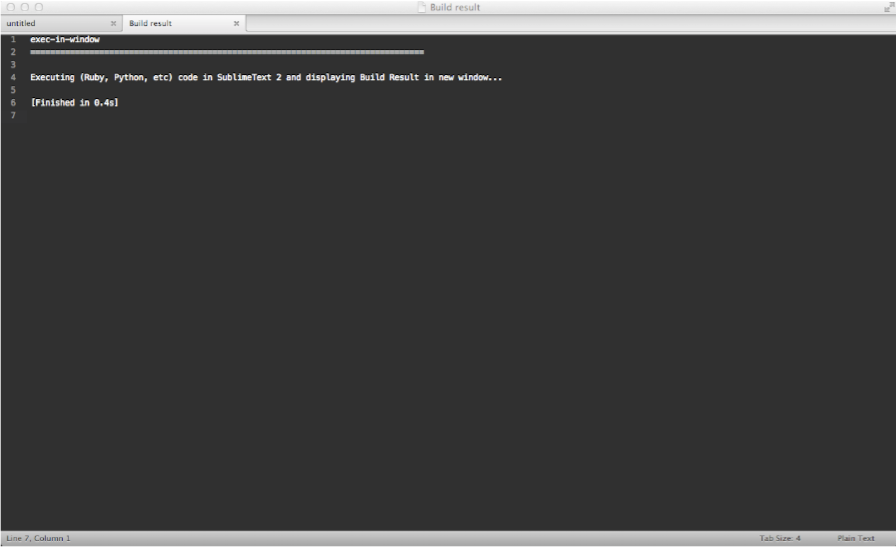
features
- display build results in new Sublime Text window instead of output panel
- execute unsaved files - based on selected syntax
installation
Using Sublime Package Control
If you are using Sublime Package Control, you can install plugin via the Package Control: Install Package menu item. Plugin is listed as Exec In Window
Using Git
go to Sublime Text Packages directory
~/Library/Application\ Support/Sublime\ Text\ 2/Packageson OS X%APPDATA%/Sublime Text 2/Packages/on Windows~/.config/sublime-text-2/Packages/on Linux
clone repository
git clone https://github.com/vhyza/exec-in-window.git
usage
modify build settings for desired language
for example for Ruby you need to modify file Packages/Ruby/Ruby.sublime-build and add line "target": "exec_in_window"
whole file should look like this
{
  "cmd": ["/Users/vhyza/.rvm/bin/rvm-auto-ruby", "$file"],
  "target": "exec_in_window",
  "selector": "source.ruby"
}
to disable output panel add "show_panel_on_build": false into your preferences (Command+,)
press Command+B to build file (unnamed files should have set proper syntax)