
Status Bar JsonPath
Sublime Text plugin to get the JSONPath under the cursor in a JSON
Details
Installs
- Total 2K
- Win 888
- Mac 1K
- Linux 289
| Oct 2 | Oct 1 | Sep 30 | Sep 29 | Sep 28 | Sep 27 | Sep 26 | Sep 25 | Sep 24 | Sep 23 | Sep 22 | Sep 21 | Sep 20 | Sep 19 | Sep 18 | Sep 17 | Sep 16 | Sep 15 | Sep 14 | Sep 13 | Sep 12 | Sep 11 | Sep 10 | Sep 9 | Sep 8 | Sep 7 | Sep 6 | Sep 5 | Sep 4 | Sep 3 | Sep 2 | Sep 1 | Aug 31 | Aug 30 | Aug 29 | Aug 28 | Aug 27 | Aug 26 | Aug 25 | Aug 24 | Aug 23 | Aug 22 | Aug 21 | Aug 20 | Aug 19 | |
|---|---|---|---|---|---|---|---|---|---|---|---|---|---|---|---|---|---|---|---|---|---|---|---|---|---|---|---|---|---|---|---|---|---|---|---|---|---|---|---|---|---|---|---|---|---|
| Windows | 0 | 1 | 1 | 0 | 1 | 0 | 0 | 0 | 0 | 0 | 1 | 1 | 0 | 1 | 1 | 0 | 0 | 0 | 0 | 0 | 1 | 0 | 1 | 0 | 0 | 0 | 1 | 0 | 2 | 0 | 0 | 0 | 3 | 0 | 1 | 2 | 1 | 1 | 1 | 0 | 0 | 0 | 0 | 1 | 1 |
| Mac | 0 | 0 | 0 | 0 | 0 | 0 | 0 | 2 | 3 | 0 | 0 | 0 | 0 | 0 | 1 | 0 | 0 | 0 | 2 | 1 | 0 | 0 | 1 | 1 | 2 | 1 | 3 | 0 | 2 | 1 | 1 | 0 | 1 | 0 | 0 | 0 | 1 | 0 | 0 | 0 | 0 | 0 | 0 | 0 | 0 |
| Linux | 0 | 0 | 1 | 0 | 0 | 1 | 1 | 0 | 0 | 0 | 0 | 0 | 1 | 3 | 0 | 2 | 0 | 0 | 0 | 0 | 0 | 0 | 0 | 0 | 0 | 0 | 0 | 0 | 0 | 0 | 1 | 1 | 1 | 1 | 0 | 0 | 0 | 0 | 2 | 0 | 1 | 1 | 0 | 0 | 0 |
Readme
- Source
- raw.githubusercontent.com
StatusBarJsonPath
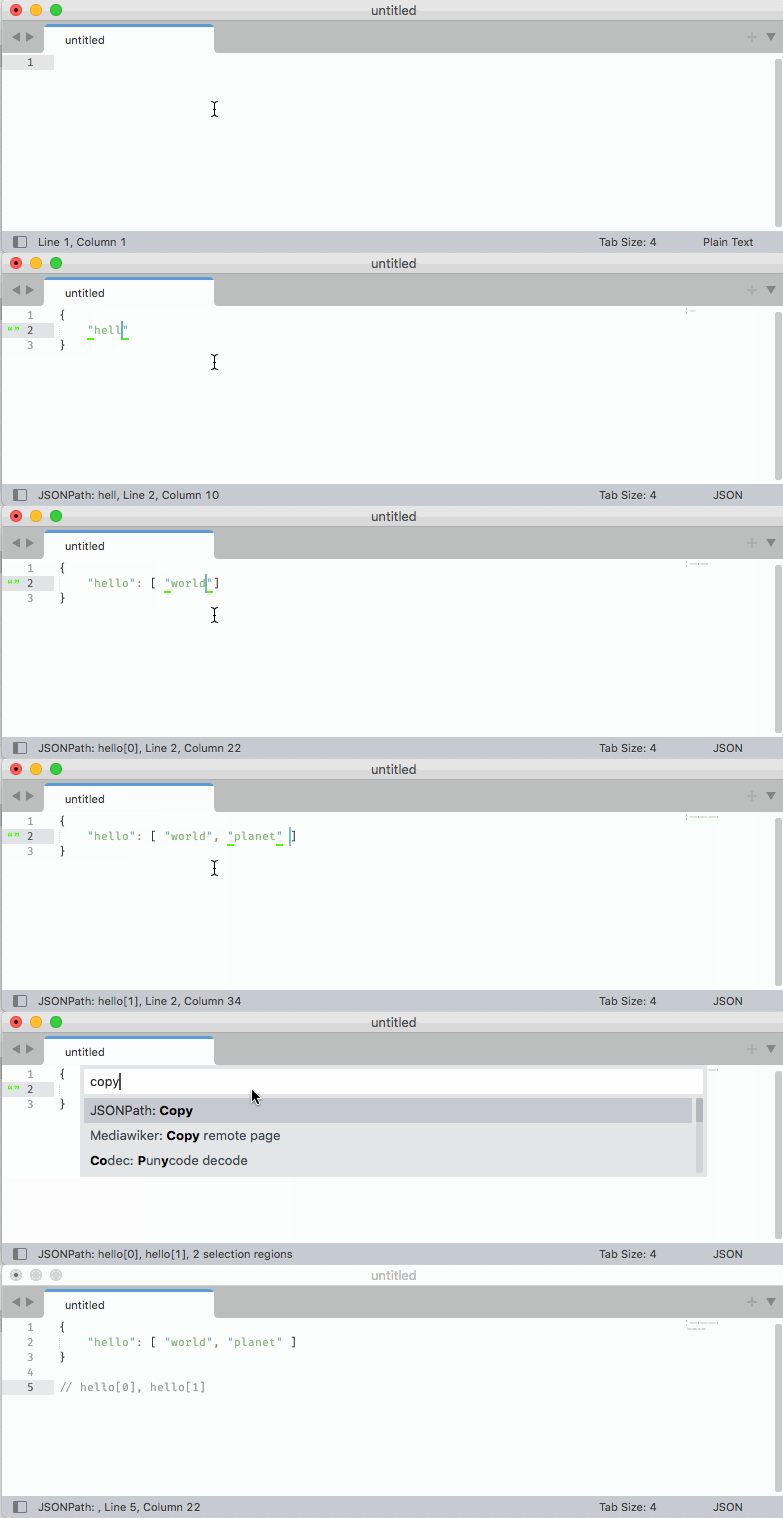
Sublime Text plugin to get the JSONPath (a notation to access the item) under the cursor in a JSON.
The plugin also includes a command JSONPath: Copy to copy the displayed path to the clipboard.
Example
Given the following JSON object:
{
    "name": "Hello World",
    "tags": [
        "example"
    ],
    "metadata": {
        "author": "Alex Kirk"
    }
}
In this scenario the plugin will display/copy the following JSONPaths (all directly queryable in jq for matching results):
- Cursor inside “name”:
.name - Cursor inside “Hello World”:
.name - Cursor inside “tags”:
.tags - Cursor inside “example”:
.tags[0] - Cursor inside “metadata”:
.metadata - Cursor inside “author”:
.metadata.author
Demo
Installation
On PackageControl it's called Status Bar JsonPath: https://packagecontrol.io/packages/Status%20Bar%20JsonPath
- Run
Package Control: Advanced Install Package - Enter
Status Bar JsonPath
You can also install the package manually like this:
- Click the Preferences >Browse Packages… menu, this should open a folder
Packages. - Download https://github.com/akirk/StatusBarJsonPath/archive/refs/heads/main.zip and extract it into that directory (it should then have a subfolder
StatusBarJsonPath-main). - Restart Sublime Text.