
Claude Code IDE
Claude Code IDE integration for Sublime Text 4 — in-editor diff review, live selection context, @-mentions. Speaks the official IDE protocol (WebSocket/MCP). Unofficial community plugin.
Details
Installs
- Total 391
- Win 153
- Mac 157
- Linux 81
| Oct 30 | Oct 29 | Oct 28 | Oct 27 | Oct 26 | Oct 25 | Oct 24 | Oct 23 | Oct 22 | Oct 21 | Oct 20 | Oct 19 | Oct 18 | Oct 17 | Oct 16 | Oct 15 | Oct 14 | Oct 13 | Oct 12 | Oct 11 | Oct 10 | Oct 9 | Oct 8 | Oct 7 | Oct 6 | Oct 5 | Oct 4 | Oct 3 | Oct 2 | Oct 1 | Sep 30 | Sep 29 | Sep 28 | Sep 27 | Sep 26 | Sep 25 | Sep 24 | Sep 23 | Sep 22 | Sep 21 | Sep 20 | Sep 19 | Sep 18 | Sep 17 | Sep 16 | Sep 15 | |
|---|---|---|---|---|---|---|---|---|---|---|---|---|---|---|---|---|---|---|---|---|---|---|---|---|---|---|---|---|---|---|---|---|---|---|---|---|---|---|---|---|---|---|---|---|---|---|
| Windows | 4 | 3 | 1 | 3 | 4 | 1 | 1 | 2 | 2 | 3 | 2 | 3 | 2 | 0 | 5 | 2 | 0 | 4 | 2 | 1 | 4 | 4 | 4 | 2 | 2 | 1 | 0 | 1 | 1 | 2 | 2 | 3 | 3 | 0 | 0 | 2 | 2 | 0 | 3 | 3 | 1 | 0 | 2 | 3 | 0 | 1 |
| Mac | 1 | 1 | 2 | 5 | 1 | 1 | 0 | 1 | 3 | 4 | 1 | 2 | 1 | 5 | 5 | 3 | 2 | 1 | 1 | 0 | 4 | 4 | 0 | 2 | 5 | 2 | 0 | 4 | 2 | 2 | 7 | 4 | 0 | 2 | 2 | 1 | 4 | 1 | 0 | 6 | 1 | 0 | 2 | 2 | 4 | 2 |
| Linux | 3 | 1 | 1 | 0 | 2 | 1 | 2 | 2 | 1 | 3 | 1 | 2 | 0 | 1 | 1 | 1 | 1 | 0 | 1 | 0 | 0 | 2 | 1 | 1 | 2 | 4 | 0 | 2 | 0 | 0 | 1 | 0 | 1 | 1 | 2 | 1 | 1 | 6 | 0 | 1 | 0 | 0 | 0 | 1 | 1 | 1 |
Readme
- Source
- raw.githubusercontent.com
Claude Code IDE for Sublime Text
English | 日本語
Run six Claude Code sessions in parallel and still know what changed where. Native Claude Code integration for Sublime Text 4: a Recent Activity pane lists every file your sessions touched — grouped project → session → file, one click to open — next to in-editor diff review (accept/reject), live selection sharing and @-mentions, over the same WebSocket/MCP protocol as the official VS Code and JetBrains extensions.
Unofficial community plugin — not affiliated with or endorsed by Anthropic. “Claude” and “Claude Code” are trademarks of Anthropic, PBC.
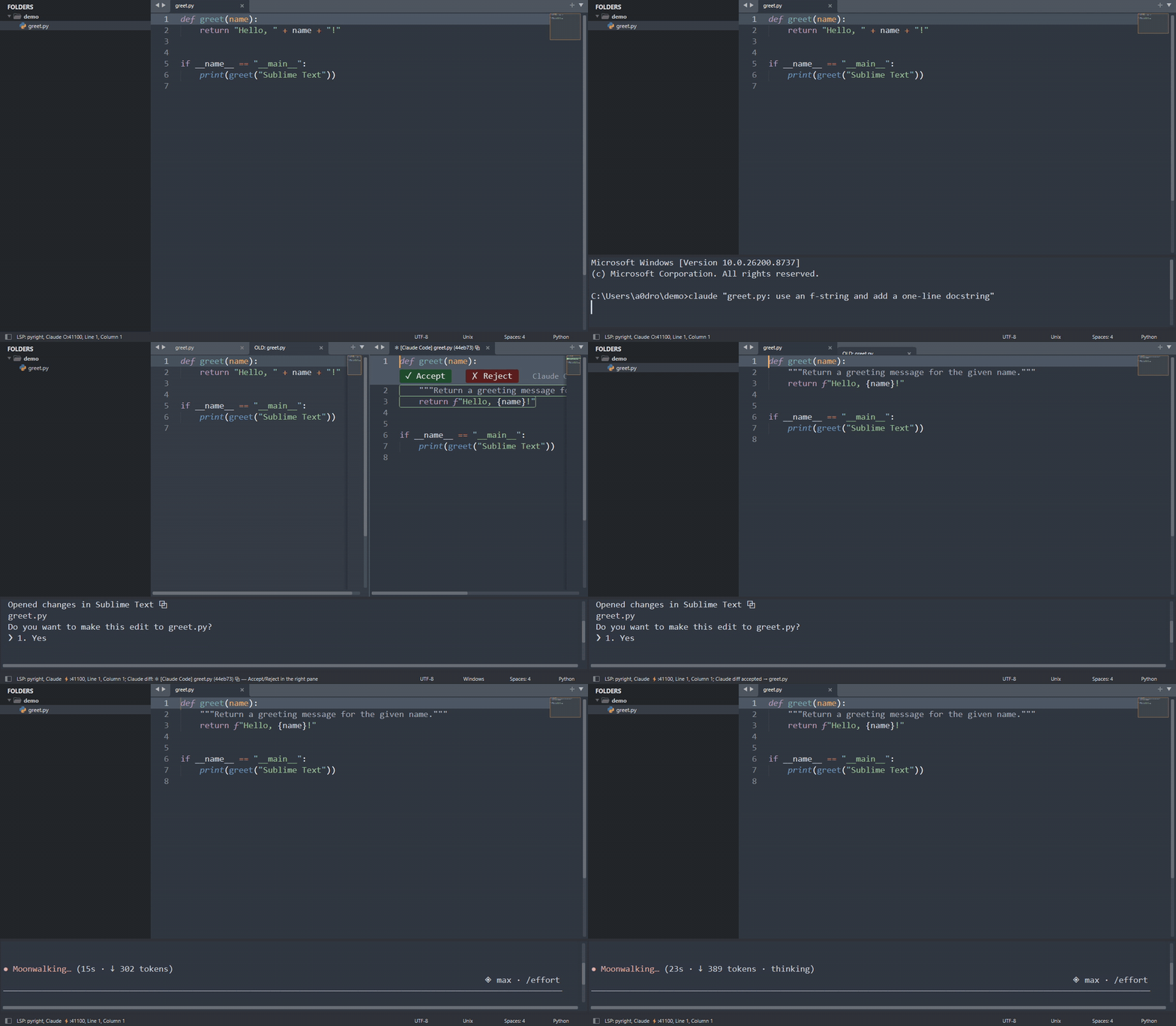
Status: 0.3.x, all features working — the IDE server with context sharing, in-editor diff review, parallel multi-session support, and the Recent Activity pane are implemented and tested end-to-end against the real Claude Code client (releases). Package Control listing is pending; the manual install below works today.
Motivation — why Sublime Text in the LLM era?
Now that an agent writes much of the code, what should an editor be? Our answer:
- Instant and lightweight. Sublime opens in a blink and stays at ~100–300 MB while agent sessions, terminals, and browsers eat the rest of your RAM. The editor is where you read and judge code; it should never be the heavy part of the stack.
- Trivially extensible by you. In an LLM-first workflow, the editor is personal infrastructure: when Claude can write a Sublime plugin in minutes, a scriptable Python API beats a marketplace of prebuilt features. You compose exactly the cockpit you want — this plugin itself is proof.
- No bundled AI, by choice. AI-native IDEs (Cursor, Windsurf, …) and VS Code couple the agent to the editor — with their own subscription, model markup, and upgrade cadence. Claude Code is editor-agnostic; the missing piece was only the thin protocol layer that lets Sublime talk to it. This plugin adds that layer, so the editor stays fast and yours, and the agent stays first-class.
The longer argument — why coupling, not the editor, is the thing to choose: Don't Switch Your Editor — Connect the Agent
What it does
When Claude Code connects (via /ide or auto-connect), the plugin provides:
- In-editor diff review — Claude's proposed edits open as a side-by-side diff; accept, reject, or hand-edit before accepting
- Context sharing — current selection, open tabs, workspace folders, dirty state
selection_changedstreaming — Claude always knows what you're looking at@-mention — send the current selection range to the prompt- Show-me CLI —
scripts/open_file.py <path>surfaces any file in the side pane, from a terminal or from the agent itself — the channel for “Claude, show me what you made” (see FAQ) - Lock-file discovery — works from Terminus inside Sublime or any external terminal
Recent Activity panel
When several Claude sessions work in parallel across projects, the hard part is knowing what just changed, where, and by which session. The panel answers that at a glance: recently changed files grouped project → session → file, newest first, in a pane next to the sidebar that opens with every window. One click opens the file — in Sublime for text and images, in the OS default app for PDF / Office / video.
By default it lists documents and media only (md, txt, html, pdf, xlsx/docx/pptx, csv, images, video, audio); code files can be toggled in per panel. Files changed since you last looked at the panel are marked *, ●/○ show which sessions are busy/idle, and ×N collapses repeated writes to the same file.
A project is the directory you opened claude in — the session's working directory. A tool call that cds into a subdirectory does not split the project, and git worktrees fold into their main repository. Don't want a project in the list? Hide it from the panel (persists until you restore hidden projects), or list directories to always hide under activity_panel.hide_projects — by basename ("demo") or full path.
- What changed comes from a filesystem watcher over the working directories of live sessions (Windows
ReadDirectoryChangesW; noisy folders such asnode_modulesare pruned), so files written by shell commands, scripts, or by hand are caught too. - Who changed it comes from a tiny Claude Code hook that logs Edit/Write paths and Bash intervals per session. Register it once in
~/.claude/settings.json(usepython3instead ofpy -3on macOS/Linux):
"hooks": {
  "PreToolUse":  [{ "matcher": "Bash",
                    "hooks": [{ "type": "command", "command": "\"<python.exe>\" \"<path-to-package>/scripts/activity_hook.py\" #claude-hook", "timeout": 30 }] }],
  "PostToolUse": [{ "matcher": "Bash|Edit|Write|MultiEdit|NotebookEdit",
                    "hooks": [{ "type": "command", "command": "\"<python.exe>\" \"<path-to-package>/scripts/activity_hook.py\" #claude-hook", "timeout": 30 }] }]
}
Controls. A single click opens the file under the pointer (a project header folds); that mouse binding ships active. Every action is in the command palette as Claude Code IDE: Recent Activity — …: Open Panel, Quick List (a fuzzy list when you would rather not spend screen space), Refresh, Toggle Code Files, Hide Project Under Caret, Show Hidden Projects, Edit Always-Hidden List, and Window 1h / 6h / 24h / 3 days / 7 days. Single-key shortcuts inside the panel — Enter open, r refresh, c code files, h hide, Shift+H restore, 1–5 time window — and Ctrl+Alt+A to open the panel from anywhere are suggested, not active: copy them from Example.sublime-keymap into your user keymap (Preferences › Package Settings › Claude Code IDE › Key Bindings). Package Control guideline: packages suggest keys, they don't claim them.
Settings live under activity_panel: auto_open, group and min_width_chars (where the pane goes and how wide), window_hours, show_code, scope ("all" = every live session's project; "window" = only files under this window's folders), hide_projects, prune (directory names never listed nor watched), keep_days, fit_to_view. With fit_to_view (default) the tree is sized to the pane: every project stays visible, each session shows its newest file before any session shows a second one, and when even the rows do not fit the oldest projects fold to a single line (▷; click one to focus it, ◆, and it expands up to max_files_per_session while the others share what is left). The two logs are ~/.claude/logs/file-activity*.jsonl; they are compacted every 30 minutes and bounded by both age (keep_days, default 7) and record count, and the watcher log keeps document/media records only. A burst of more than 100 changes in one project within 10 seconds (a git checkout or rebase rewriting a tree) is treated as a storm, not as session activity, and dropped; the panel header shows the running count (⚡). The filesystem watcher is Windows-only for now — elsewhere the panel shows hook records only.
Session tabs (0.3.8)
Every tab a Claude session opens or writes carries that session, and the tab bar treats them like a browser tab group:
- Coloured tabs: each session with open tabs gets one of eight hues (evenly spread, or your colour scheme's own palette with
session_tabs.palette: "scheme"); its tabs are painted in that hue, muted while unselected. Sublime colours a tab from the background of the tab's own colour scheme, so the plugin writes eight hidden schemes (your scheme + a hued background) toPackages/User/Claude Code IDE Sessions/and assigns one per session — the editor background of those tabs takes the same hue;session_tabs.tintsets how strong. A small theme rule shipped for Default / Default Dark / Adaptive shows the hue on unselected tabs. - Adjacent tabs: a tab opened by or for a session (Recent Activity click,
openFile,scripts/open_file.py, or any file the session wrote) is placed right after that session's other tabs. Tabs you drag by hand are never moved again; Session Tabs — Regroup All Tabs by Session re-clusters the whole pane on demand. - Panel: the session's row is underlined in its hue and shows
① ⧉3(badge, open tabs) and⊟2(folded tabs). Clicking the row focuses the session's newest tab, or reopens its folded tabs. - Session menu: right-click a tab (or a session row in the panel) → Session Tabs: focus newest, copy the paths of the session's tabs, move them to the front/back of the pane, fold them (close and remember on the window — reopen from the row) or close them (unsaved tabs are kept). The same actions are in the command palette for the active tab's session.
scripts/open_file.py tags the tab with $CLAUDE_CODE_SESSION_ID automatically (--session <id> to override). Settings: session_tabs.colors, palette, tint, badges, group.
Just the bridge (no panel, no colours)
If you only want Claude to open files and show diffs in Sublime, switch the rest off in Preferences › Package Settings › Claude Code IDE › Settings:
{
    "activity_panel": { "enabled": false },
    "session_tabs": { "colors": false }
}
Nothing is watched or polled then; a panel restored from the last session is closed on start (and the side column it lived in folds away), and session tabs lose their hue. Leave the activity hook unregistered — it only feeds the panel.
Install (manual — Package Control listing pending)
- Clone this repo anywhere.
- Link it into Sublime's
PackagesasClaude Code IDE(any folder name works — imports are relative — but this one matches Package Control installs, so the Preferences menu entries resolve):- Windows:
mklink /J "%APPDATA%\Sublime Text\Packages\Claude Code IDE" "C:\path\to\repo" - macOS:
ln -s /path/to/repo "$HOME/Library/Application Support/Sublime Text/Packages/Claude Code IDE" - Linux:
ln -s /path/to/repo "$HOME/.config/sublime-text/Packages/Claude Code IDE"
- Windows:
- Restart Sublime Text. The status bar shows
Claude ○:<port>when the server is listening, and the Recent Activity pane opens in each window. - In any terminal, run
claude, then/ideand pick Sublime Text. - Optional: register the activity hook (see Recent Activity panel) so the pane can say which session changed a file.
Development
Protocol core (claudeide/) is pure Python 3.8 with zero dependencies and never imports sublime, so it is unit-testable outside Sublime:
uv venv --python 3.8
uv pip install pytest
uv run pytest
The Sublime-facing layer lives in adapters/sublime_bridge.py + plugin_main.py.
Protocol
Implements Claude Code's IDE integration protocol (WebSocket + MCP 2025-03-26): lock file at ~/.claude/ide/<port>.lock, localhost-only WebSocket with x-claude-code-ide-authorization, and the standard tool set (openFile, openDiff, getCurrentSelection, getOpenEditors, …).
Protocol reference: coder/claudecode.nvim PROTOCOL.md — huge thanks to that project for documenting it.
FAQ
Does Claude Code work with Sublime Text?
Yes — with this plugin. Claude Code has no built-in Sublime Text support (official extensions exist for VS Code and JetBrains), but its IDE integration is a documented WebSocket/MCP protocol. This plugin implements that protocol natively in Sublime, so features like in-editor diff review, selection context, and @-mentions work the same way they do in the official extensions.
Is this an official Anthropic plugin?
No. It is an unofficial community plugin, not affiliated with or endorsed by Anthropic. It speaks the same protocol the official IDE extensions use, as documented by the claudecode.nvim project.
How do I connect Claude Code to Sublime Text?
Two ways:
- Manual: run
claudein any terminal, type/ide, and pick Sublime Text. - Auto-connect: set a fixed
"port"in the plugin settings and exportCLAUDE_CODE_SSE_PORT=<port>andENABLE_IDE_INTEGRATION=truemachine-wide. Every newclaudesession then attaches to Sublime automatically (~2 s after launch), from any terminal — including Terminus inside Sublime.
What happens when Claude edits a file?
The proposed change opens as a side-by-side diff tab in Sublime. Accept or reject it with the ✓/✗ buttons in the proposal pane (also in the command palette; ready-to-copy key bindings ship in Example.sublime-keymap), or edit the proposal by hand before accepting. Claude blocks until you decide — with default permission settings, nothing touches disk without your review. The review takes the window to two columns by default; set diff_layout to "split" to halve only the pane holding the file instead. When the last review closes, the previous layout and every tab's position come back — grids and multi-row layouts included.
Can Claude open files to show me its results?
Not via MCP — Claude Code exposes only getDiagnostics/executeCode from the ide server to the model, so the model can never call openFile itself, even while connected. The bundled CLI is the supported channel: it performs the same lock discovery + authenticated WebSocket handshake as Claude Code and calls the plugin's openFile directly — side-group placement and --preview (transient tab, no focus steal) included. It works from any terminal, even for sessions that never ran /ide:
python scripts/open_file.py path/to/report.html            # show + focus
python scripts/open_file.py path/to/notes.md --preview     # glance, no focus steal
Then teach your agent (e.g. in CLAUDE.md): “when you produce a file I should look at, run scripts/open_file.py <path>” — deliverables start appearing in Sublime as they are made.
The CLI is not part of the installed package (of scripts/, only the activity hook ships), so run it from a cloned checkout — the manual install above is one.
Does my code get sent anywhere?
The plugin itself sends nothing to the network. It runs a WebSocket server on 127.0.0.1 (localhost only, token-authenticated) that talks to the Claude Code process on your machine. What Claude Code itself sends to Anthropic is governed by Claude Code, exactly as when you use it without an IDE.
Can I run multiple Claude Code sessions at once?
Yes. The server accepts concurrent clients, so several Claude sessions (e.g. one per project or task) can attach to the same Sublime instance in parallel; diff reviews from each are tracked independently, and the Recent Activity pane shows which session changed which file.
Which platforms are supported?
The protocol core is dependency-free Python 3.8 (the Sublime Text 4 plugin host; build 4213+ runs it on Python 3.14, also tested). Developed and tested end-to-end on Windows; macOS and Linux use the same code paths and are expected to work — issues and reports welcome.
Windows + WinGet: the SublimeHQ.SublimeText.4 WinGet package is the portable zip. Started from its own folder it uses the empty Data profile next to the exe (not %APPDATA%\Sublime Text), and subl on PATH is a symlink in WinGet\Links — Sublime started through it cannot find its bundled packages (no Default theme or menus, no plugin host, so no plugins). Prefer the official installer. To keep the WinGet copy: rename its Data folder, put the package folder itself on PATH instead of the WinGet\Links symlinks, and pin the package (winget pin add --id SublimeHQ.SublimeText.4 --blocking) so an upgrade does not bring Data back.
Why keep Sublime instead of an AI-native IDE?
Because the agent doesn't need to live inside the editor. Claude Code runs in a terminal; the editor's job is reading, judging, and occasionally hand-editing what the agent proposes — a job Sublime does instantly and in ~100–300 MB of RAM. Decoupling means you upgrade the agent and the editor independently, with no bundled subscription or lock-in. See Motivation.
About
Developed and maintained by Cognisant LLC — we help teams connect AI agents to the tools they already use. More writing at Cognisant Insights, including the Japanese companion to the motivation essay: エディタを替えるな、エージェントを繋げ.
License
MIT