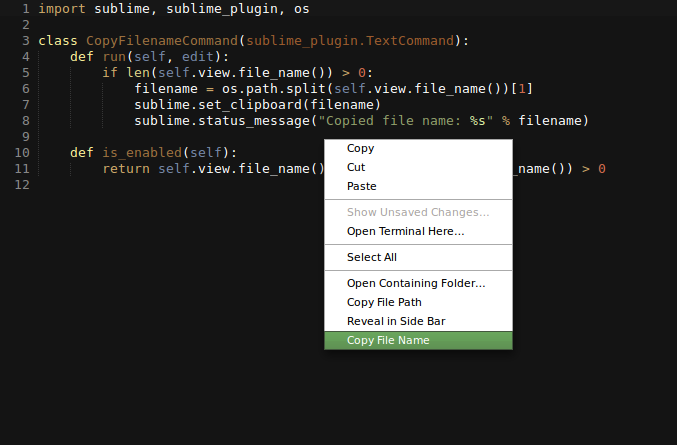
Copy File Name
Copy the file name from the right click menu in Sublime Text 2
Details
Installs
- Total 37K
- Win 34K
- Mac 2K
- Linux 716
| Aug 8 | Aug 7 | Aug 6 | Aug 5 | Aug 4 | Aug 3 | Aug 2 | Aug 1 | Jul 31 | Jul 30 | Jul 29 | Jul 28 | Jul 27 | Jul 26 | Jul 25 | Jul 24 | Jul 23 | Jul 22 | Jul 21 | Jul 20 | Jul 19 | Jul 18 | Jul 17 | Jul 16 | Jul 15 | Jul 14 | Jul 13 | Jul 12 | Jul 11 | Jul 10 | Jul 9 | Jul 8 | Jul 7 | Jul 6 | Jul 5 | Jul 4 | Jul 3 | Jul 2 | Jul 1 | Jun 30 | Jun 29 | Jun 28 | Jun 27 | Jun 26 | Jun 25 | Jun 24 | |
|---|---|---|---|---|---|---|---|---|---|---|---|---|---|---|---|---|---|---|---|---|---|---|---|---|---|---|---|---|---|---|---|---|---|---|---|---|---|---|---|---|---|---|---|---|---|---|
| Windows | 0 | 0 | 0 | 0 | 0 | 0 | 0 | 0 | 0 | 0 | 0 | 0 | 0 | 0 | 0 | 0 | 0 | 0 | 0 | 0 | 0 | 0 | 0 | 1 | 0 | 0 | 1 | 0 | 0 | 0 | 1 | 0 | 1 | 0 | 0 | 0 | 0 | 0 | 0 | 1 | 0 | 0 | 0 | 0 | 0 | 1 |
| Mac | 0 | 0 | 0 | 0 | 0 | 0 | 0 | 0 | 0 | 0 | 0 | 0 | 0 | 0 | 0 | 0 | 0 | 0 | 0 | 0 | 0 | 0 | 0 | 0 | 0 | 0 | 0 | 0 | 0 | 0 | 0 | 0 | 0 | 0 | 0 | 0 | 0 | 0 | 0 | 0 | 0 | 0 | 0 | 0 | 0 | 0 |
| Linux | 0 | 0 | 0 | 0 | 0 | 0 | 0 | 0 | 0 | 0 | 0 | 0 | 0 | 0 | 0 | 0 | 0 | 0 | 0 | 0 | 0 | 0 | 0 | 0 | 0 | 0 | 0 | 0 | 0 | 0 | 0 | 0 | 0 | 0 | 0 | 0 | 0 | 0 | 0 | 0 | 0 | 0 | 0 | 0 | 0 | 0 |
Readme
- Source
- raw.githubusercontent.com
copy-file-name
Plugin for Sublime Text 2 that adds a “Copy File Name” command to the context menu.
Install
If your using the Sublime Package Manger hold down Ctrl+shift+p and type Package Control: Install Package. Then search for copy-file-name and hit return.
If your not using the package manager then cd into your Sublime packages directory. (On Linux this is ~/Sublime Text 2/Packages) Then run this command git clone git@github.com:nwjlyons/copy-file-name.git.
Or you can download the package as zip file https://github.com/nwjlyons/copy-file-name/archive/master.zip then copy it into your Sublime packages directory.
Usage
To use the command right click on the file in the side bar or in the buffer area.