
p3n
p3n for Sublime Text: select text, see if it reads as AI-written, or rewrite it in place.
Details
Installs
- Total 1
- Win 1
- Mac 0
- Linux 0
| Nov 17 | Nov 16 | Nov 15 | Nov 14 | Nov 13 | Nov 12 | Nov 11 | Nov 10 | Nov 9 | Nov 8 | Nov 7 | Nov 6 | Nov 5 | Nov 4 | Nov 3 | Nov 2 | Nov 1 | Oct 31 | Oct 30 | Oct 29 | Oct 28 | Oct 27 | Oct 26 | Oct 25 | Oct 24 | Oct 23 | Oct 22 | Oct 21 | Oct 20 | Oct 19 | Oct 18 | Oct 17 | Oct 16 | Oct 15 | Oct 14 | Oct 13 | Oct 12 | Oct 11 | Oct 10 | Oct 9 | Oct 8 | Oct 7 | Oct 6 | Oct 5 | Oct 4 | |
|---|---|---|---|---|---|---|---|---|---|---|---|---|---|---|---|---|---|---|---|---|---|---|---|---|---|---|---|---|---|---|---|---|---|---|---|---|---|---|---|---|---|---|---|---|---|
| Windows | 0 | 0 | 0 | 0 | 0 | 0 | 0 | 0 | 0 | 0 | 0 | 0 | 0 | 0 | 0 | 0 | 0 | 0 | 0 | 0 | 0 | 0 | 0 | 0 | 0 | 0 | 4 | 0 | 0 | 0 | 0 | 0 | 0 | 0 | 0 | 0 | 0 | 0 | 0 | 0 | 0 | 0 | 0 | 0 | 0 |
| Mac | 0 | 0 | 0 | 0 | 0 | 0 | 0 | 0 | 0 | 0 | 0 | 0 | 0 | 0 | 0 | 0 | 0 | 0 | 0 | 0 | 0 | 0 | 0 | 0 | 0 | 0 | 0 | 0 | 0 | 0 | 0 | 0 | 0 | 0 | 0 | 0 | 0 | 0 | 0 | 0 | 0 | 0 | 0 | 0 | 0 |
| Linux | 0 | 0 | 0 | 0 | 0 | 0 | 0 | 0 | 0 | 0 | 0 | 0 | 0 | 0 | 0 | 0 | 0 | 0 | 0 | 0 | 0 | 0 | 0 | 0 | 0 | 0 | 0 | 0 | 0 | 0 | 0 | 0 | 0 | 0 | 0 | 0 | 0 | 0 | 0 | 0 | 0 | 0 | 0 | 0 | 0 |
Readme
- Source
- raw.githubusercontent.com

p3n for Sublime Text
Select text in Sublime Text. See if it reads as AI-written, or rewrite it in place.
Install with Package Control · p3n.si · All p3n apps


What it does
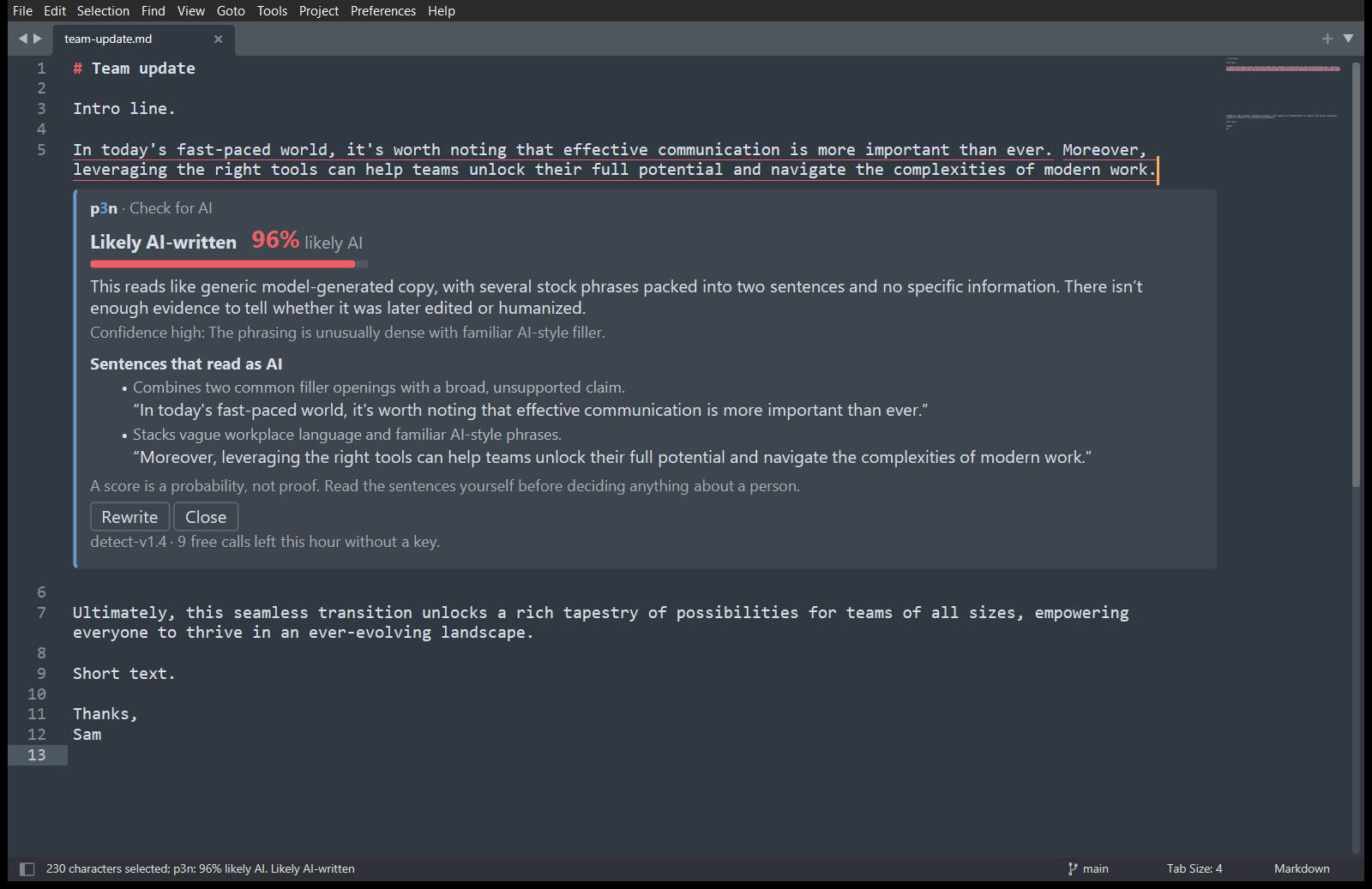
- p3n: Check for AI. A score, a one-line reason, and the sentences that give it away. Those sentences are underlined in your text, and clicking one in the card jumps to it.
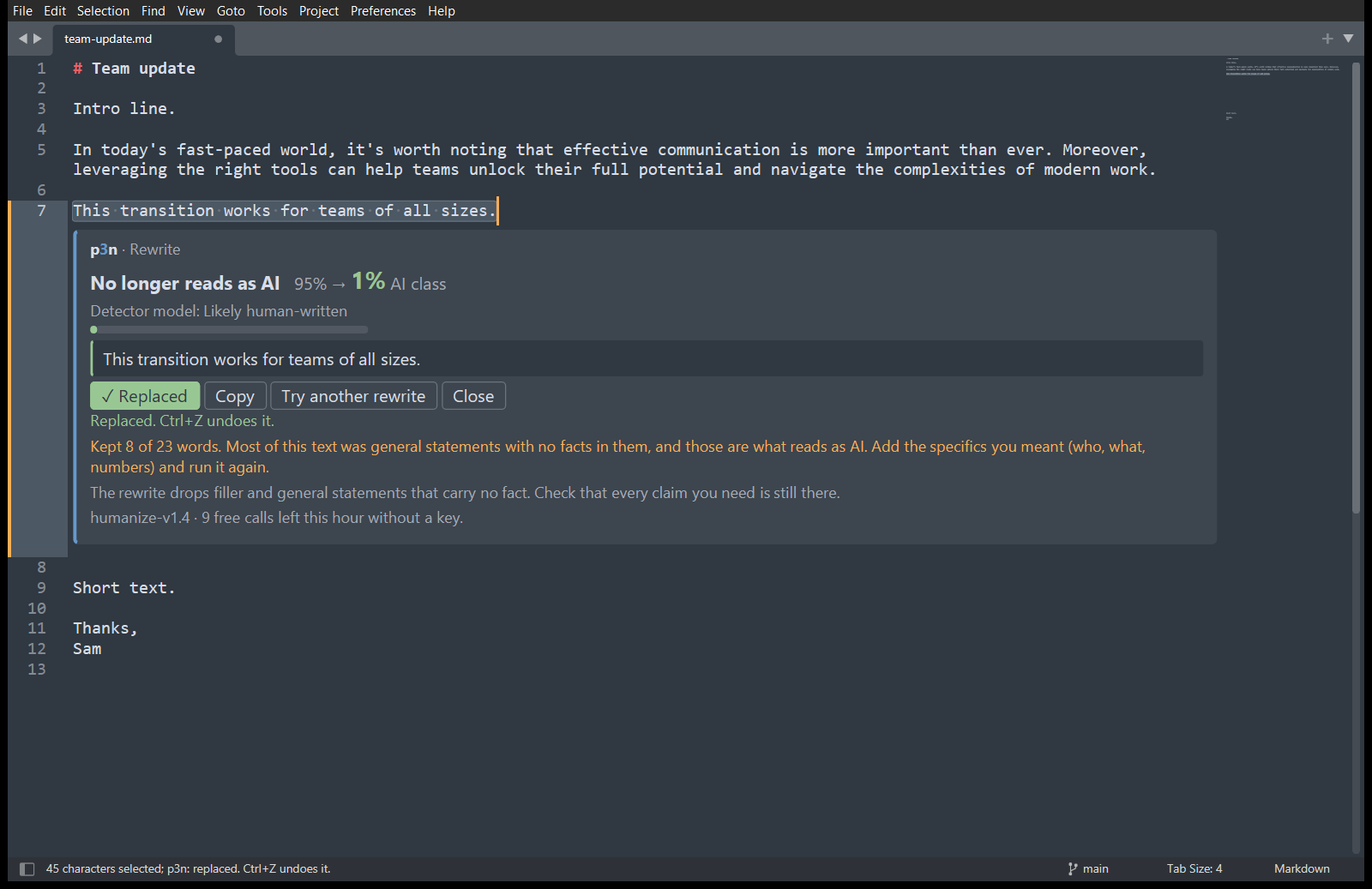
- p3n: Rewrite. A version that keeps your facts and drops the filler. Replace selection puts it where your selection was, and Ctrl+Z (Cmd+Z on a Mac) undoes it in one step.
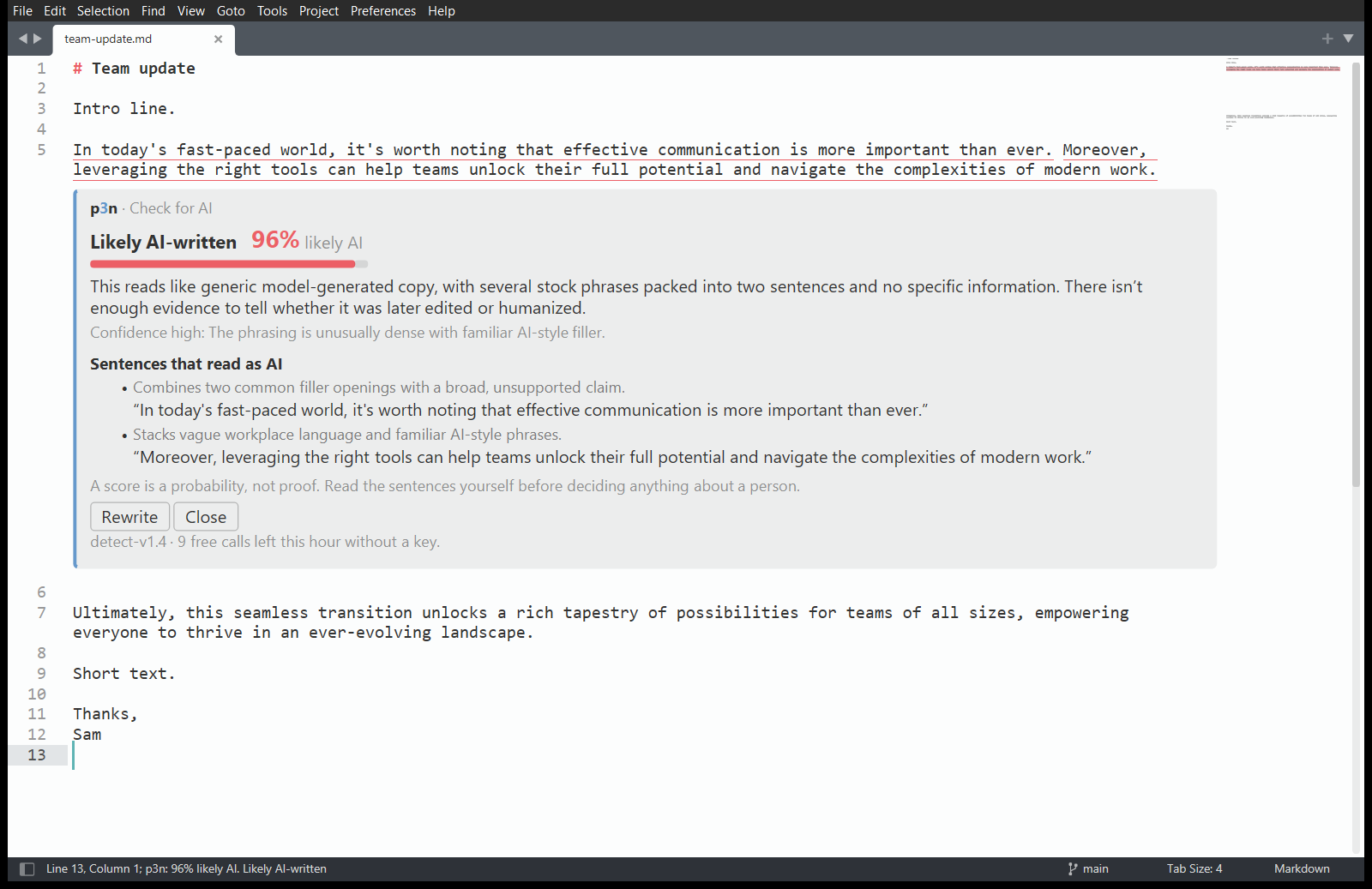
- Results open in a card under your selection. The card uses your colour scheme's colours, light or dark.
Install
It needs Sublime Text 4 (build 4107 or later).
With Package Control. p3n isn't in Package Control's own list yet, so you add its address once: 1. Open the command palette (Ctrl+Shift+P, or Cmd+Shift+P on a Mac). Run Package Control: Add Repository, paste this address and press Enter:
https://raw.githubusercontent.com/Barabosik/p3n-sublime/main/repository.json
- Run Package Control: Install Package and choose p3n.
Package Control keeps p3n up to date from then on. If the palette has no Package Control commands, run Install Package Control first.
By hand. This way it doesn't update itself.
1. In Sublime Text, choose Preferences › Browse Packages….
2. Put this repository there in a folder named exactly p3n. Either clone it with git clone https://github.com/Barabosik/p3n-sublime.git p3n, or download the ZIP and rename the folder.
3. Restart Sublime Text.
Use it
Select some text, then right-click it or open the command palette (Ctrl+Shift+P, or Cmd+Shift+P on a Mac).
| Command | What it does |
|---|---|
| p3n: Check for AI | Checks the selection. With several selections, it checks them together. |
| p3n: Rewrite | Rewrites the selection. One selection at a time. |
| p3n: Cancel | Stops waiting for a result. Shown while p3n is working. |
| p3n: Clear Results | Closes the card and removes the underlines. |
| p3n: Set API Key | Checks a key with p3n, then saves it. |
| p3n: Remove API Key | Removes the saved key. |
| p3n: Open p3n.si | Opens p3n.si in your browser. |
| Preferences: p3n Settings | Opens the settings. |
Check needs at least 40 characters, a sentence or two, and Rewrite at least eight words. p3n says so before sending anything.
The right-click menu shows the first two only when text is selected. Don't want them there? Set "context_menu": false in the settings (Preferences › Package Settings › p3n › Settings); they stay in the command palette. p3n adds no key bindings. To add your own, open Preferences › Key Bindings and add, for example:
{ "keys": ["ctrl+alt+shift+c"], "command": "p3n_check" },
{ "keys": ["ctrl+alt+shift+r"], "command": "p3n_rewrite" }
Free, or with a key
You get 10 checks or rewrites an hour without an account, up to 5,000 characters each. For more, sign up at p3n.si (you get free credit), make a key on the API keys page, and run p3n: Set API Key. With a key, a call takes up to 200,000 characters and is billed to your p3n balance.
When your text leaves your computer
p3n sends the text you selected to api.p3n.si over HTTPS. That happens only when you run p3n: Check for AI or p3n: Rewrite, or click Rewrite or Try another rewrite on a card. Nothing is sent when you open, edit or save a file. It sends no other text, keeps no history and has no analytics or telemetry. p3n: Set API Key sends the key alone, to check it.
Your API key is saved in Packages/User/p3n.sublime-settings, in plain text. If you sync or publish your Sublime settings, keep that file out, or set the P3N_API_KEY environment variable instead. The details, and what p3n does with the text, are in PRIVACY.md.
Settings
| Setting | Default | What it does |
|---|---|---|
api_key |
"" |
Your p3n API key. Empty means keyless use, with the free hourly limit. |
highlight_sentences |
true |
Underline the sentences that read as AI, and dot-underline the pattern hits. |
show_reasons |
false |
Also show each sentence's reason at the right edge of the view. |
context_menu |
true |
Show Check for AI and Rewrite in the right-click menu when text is selected. false hides them. |
Other p3n apps
p3n also works in Chrome and Firefox, Word and Excel, Google Docs, VS Code and Obsidian. Install steps for each are on nikita-andreiev.com/p3n.
Develop
Tests, the in-editor checks and the release steps are in CONTRIBUTING.md.
Licence
MIT