
Borliana Color Scheme
A dark Sublime Text theme: the lovechild of the bold Borland aesthetic and the gentle Mariana palette.
Details
Installs
- Total 51
- Win 18
- Mac 16
- Linux 17
| Oct 11 | Oct 10 | Oct 9 | Oct 8 | Oct 7 | Oct 6 | Oct 5 | Oct 4 | Oct 3 | Oct 2 | Oct 1 | Sep 30 | Sep 29 | Sep 28 | Sep 27 | Sep 26 | Sep 25 | Sep 24 | Sep 23 | Sep 22 | Sep 21 | Sep 20 | Sep 19 | Sep 18 | Sep 17 | Sep 16 | Sep 15 | Sep 14 | Sep 13 | Sep 12 | Sep 11 | Sep 10 | Sep 9 | Sep 8 | Sep 7 | Sep 6 | Sep 5 | Sep 4 | Sep 3 | Sep 2 | Sep 1 | Aug 31 | Aug 30 | Aug 29 | Aug 28 | |
|---|---|---|---|---|---|---|---|---|---|---|---|---|---|---|---|---|---|---|---|---|---|---|---|---|---|---|---|---|---|---|---|---|---|---|---|---|---|---|---|---|---|---|---|---|---|
| Windows | 0 | 0 | 1 | 0 | 0 | 0 | 0 | 0 | 0 | 0 | 0 | 0 | 0 | 0 | 0 | 0 | 0 | 0 | 1 | 0 | 0 | 0 | 0 | 0 | 0 | 0 | 0 | 0 | 0 | 0 | 0 | 0 | 0 | 0 | 0 | 1 | 0 | 0 | 0 | 0 | 0 | 0 | 0 | 0 | 0 |
| Mac | 0 | 0 | 0 | 0 | 1 | 0 | 0 | 0 | 0 | 1 | 1 | 0 | 0 | 1 | 0 | 0 | 0 | 1 | 0 | 0 | 0 | 0 | 0 | 0 | 0 | 0 | 0 | 0 | 0 | 1 | 0 | 0 | 0 | 0 | 0 | 0 | 0 | 0 | 0 | 0 | 0 | 0 | 1 | 0 | 2 |
| Linux | 0 | 0 | 0 | 0 | 0 | 0 | 0 | 0 | 0 | 1 | 0 | 0 | 0 | 0 | 0 | 0 | 0 | 0 | 0 | 0 | 0 | 0 | 0 | 0 | 0 | 0 | 0 | 0 | 0 | 0 | 0 | 0 | 0 | 1 | 0 | 0 | 0 | 0 | 2 | 0 | 0 | 0 | 0 | 0 | 0 |
Readme
- Source
- raw.githubusercontent.com


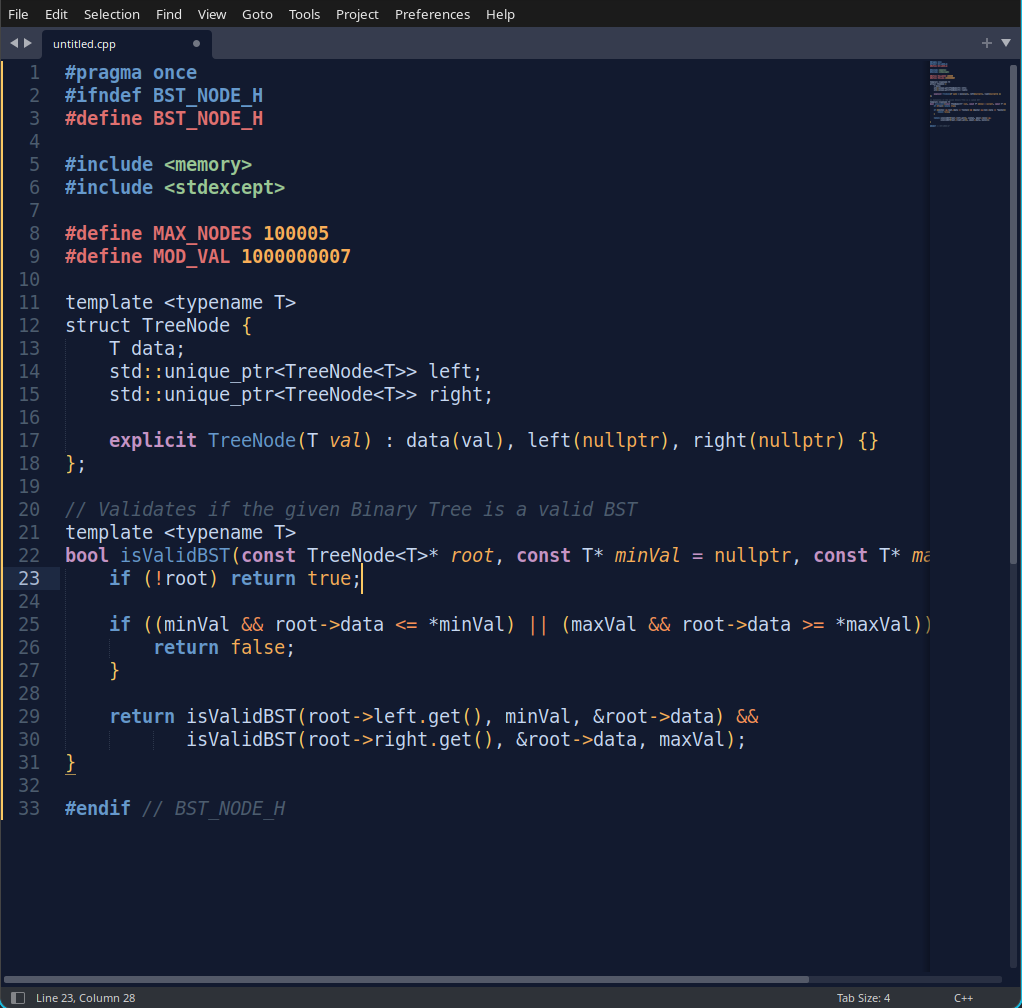
Borliana is a lightweight, minimalist color scheme forged specifically for solitary scrolls and algorithmic ruminations. It marries the heavy, bold visual weight of the classic Borland identity with the soft, eye-soothing pastel color science of Mariana.
The result is a highly readable, high-contrast environment designed to keep you focused on logic and data structures, entirely without the retina burn.
📸 Preview
🚀 Installation
Via Package Control (Coming Soon)
Note: Borliana is currently pending approval on Package Control.
1. Open the Command Palette (Ctrl+Shift+P on Windows/Linux, Cmd+Shift+P on Mac).
2. Type Package Control: Install Package.
3. Search for Borliana Color Scheme and hit Enter.
Manual Installation
If you want to use it right now or test it:
1. Download the Borliana.sublime-color-scheme file from this repository.
2. Open Sublime Text and navigate to Preferences > Browse Packages...
3. Open the User folder (or create a Borliana folder inside Packages).
4. Drop the Borliana.sublime-color-scheme file into that folder.
⚙️ Activation
Once installed, you can activate the color scheme by navigating to:
Preferences > Select Color Scheme... and choosing Borliana.