
Cisco
A fresh take on Cisco device configuration Syntax Highlighting for Sublime Text.
Details
Installs
- Total 19K
- Win 11K
- Mac 5K
- Linux 2K
| Oct 27 | Oct 26 | Oct 25 | Oct 24 | Oct 23 | Oct 22 | Oct 21 | Oct 20 | Oct 19 | Oct 18 | Oct 17 | Oct 16 | Oct 15 | Oct 14 | Oct 13 | Oct 12 | Oct 11 | Oct 10 | Oct 9 | Oct 8 | Oct 7 | Oct 6 | Oct 5 | Oct 4 | Oct 3 | Oct 2 | Oct 1 | Sep 30 | Sep 29 | Sep 28 | Sep 27 | Sep 26 | Sep 25 | Sep 24 | Sep 23 | Sep 22 | Sep 21 | Sep 20 | Sep 19 | Sep 18 | Sep 17 | Sep 16 | Sep 15 | Sep 14 | Sep 13 | Sep 12 | |
|---|---|---|---|---|---|---|---|---|---|---|---|---|---|---|---|---|---|---|---|---|---|---|---|---|---|---|---|---|---|---|---|---|---|---|---|---|---|---|---|---|---|---|---|---|---|---|
| Windows | 2 | 3 | 1 | 1 | 1 | 3 | 1 | 2 | 2 | 0 | 2 | 0 | 0 | 0 | 1 | 0 | 2 | 1 | 1 | 1 | 3 | 0 | 0 | 0 | 0 | 2 | 3 | 2 | 0 | 1 | 0 | 0 | 0 | 3 | 7 | 0 | 2 | 0 | 0 | 1 | 4 | 5 | 0 | 1 | 0 | 1 |
| Mac | 0 | 1 | 0 | 0 | 0 | 2 | 0 | 1 | 1 | 0 | 0 | 1 | 1 | 0 | 1 | 0 | 0 | 0 | 1 | 1 | 0 | 0 | 2 | 0 | 0 | 1 | 1 | 1 | 0 | 0 | 0 | 0 | 0 | 1 | 1 | 0 | 0 | 1 | 0 | 0 | 0 | 4 | 3 | 2 | 0 | 0 |
| Linux | 1 | 0 | 0 | 0 | 0 | 0 | 0 | 0 | 1 | 0 | 0 | 0 | 0 | 2 | 0 | 2 | 0 | 0 | 1 | 0 | 0 | 1 | 1 | 0 | 0 | 0 | 0 | 1 | 1 | 0 | 1 | 1 | 0 | 0 | 0 | 0 | 1 | 0 | 1 | 0 | 0 | 0 | 0 | 0 | 1 | 0 |
Readme
- Source
- raw.githubusercontent.com
🌐 Cisco Configuration Syntax Highlighting for Sublime Text
A fresh take on a comprehensive syntax highlighter for Cisco IOS, NX-OS, and IOS-XE configurations


✨ Features
CiscoSyntax by BadWifi brings intelligent syntax highlighting to your Cisco configuration files, making them easier to read, understand, and troubleshoot.
🎯 Highlights Include:
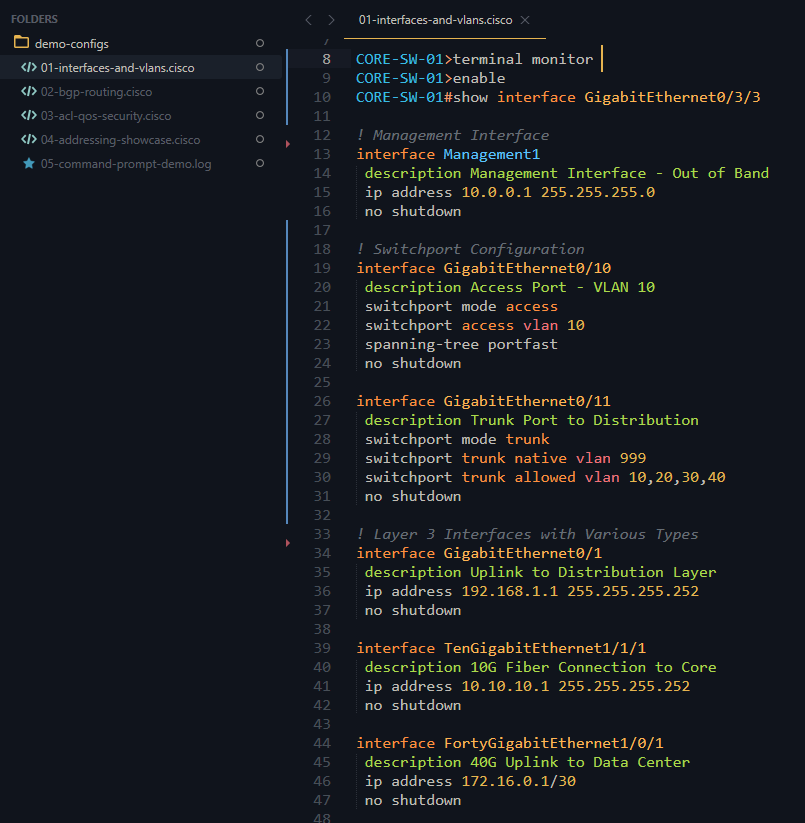
- 📡 Interface Recognition - All interface types (Ethernet, GigabitEthernet, TenGigabitEthernet, Port-Channel, Loopback, VLAN, Tunnel, Serial, Cellular, and more)
- 🌍 IP Addressing - IPv4, IPv6 (full and condensed), CIDR notation, and MAC addresses
- 🔐 Security & Crypto - ACLs (access-lists, access-groups), crypto maps, transform-sets, and object-groups
- 🔀 Routing Protocols - BGP configurations (peer-groups, peer-policies, peer-sessions, neighbors)
- 🏷️ VRF Support - VRF definitions and forwarding instances
- 📊 QoS Policies - Class-maps, policy-maps, and service-policies
- 💬 Comments & Descriptions - Clearly distinguished configuration comments and interface descriptions
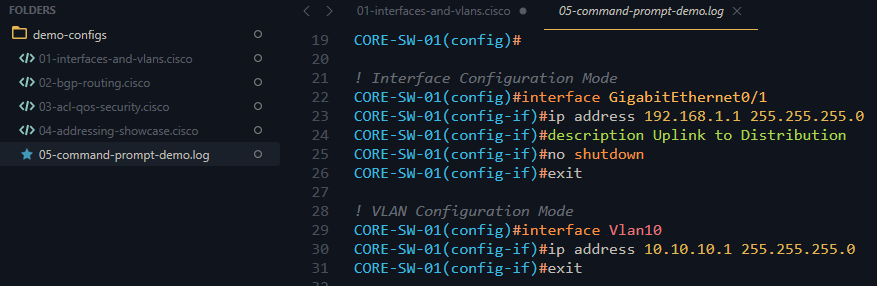
- 🎨 Command Modes - Visual distinction between user mode (#) and privileged mode (>)
- 🚫 Disabled Commands - Special highlighting for
noanddefaultcommands
📁 Supported File Extensions:
.ios.cisco.config.log- note that .txt can be defaulted to this by selecting
View->Syntax->Open all with current extension as...
📸 Screenshots
All Screenshots taken using Ayu-dark sublime theme.
Screenshot Commands Prompt
Screenshot Interface and VLANs
📦 Installation
🚀 Via Package Control (Coming Soon)
Once published to Package Control:
- Open Sublime Text
- Press
Ctrl+Shift+P(Windows/Linux) orCmd+Shift+P(Mac) - Type “Package Control: Install Package”
- Search for “CiscoSyntax BadWifi”
- Press Enter to install
📥 Manual Installation
Option 1: Using Git (Recommended)
Navigate to your Sublime Text
Packagesfolder:- Windows:
%AppData%\Sublime Text\Packages\ - Mac:
~/Library/Application Support/Sublime Text/Packages/ - Linux:
~/.config/sublime-text/Packages/
- Windows:
Clone this repository:
git clone https://github.com/badwifi/CiscoSyntax-Badwifi-Sublime-syntax.git "CiscoSyntax BadWifi"
- Restart Sublime Text
Option 2: Direct Download
- Download the latest release
- Extract the contents to your Sublime Text
Packagesfolder (see paths above) - Ensure the folder is named
CiscoSyntax BadWifi - Restart Sublime Text
🎯 Usage
Automatic Detection
The syntax highlighter will automatically activate for files with these extensions:
- .ios
- .cisco
- .config
- .log
Manual Selection
For other file types:
1. Open your Cisco configuration file
2. Click on the syntax name in the bottom-right corner (or press Ctrl+Shift+P / Cmd+Shift+P)
3. Select “Set Syntax: CiscoSyntax BadWifi”
🤝 Contributing
Contributions are welcome! If you find a bug or want to add support for additional Cisco commands:
- Fork the repository
- Create a feature branch (
git checkout -b feature/your-feature) - Commit your changes (
git commit -m 'Add some feature') - Push to the branch (
git push origin feature/your-feature) - Open a Pull Request
🐛 Reporting Issues
Found a bug or missing syntax highlighting? Open an issue with: - A description of the problem - Sample configuration snippet - Expected vs actual highlighting behavior
📄 License
This project is licensed under the MIT License - see the LICENSE file for details.
💙 Support
If you find this syntax highlighter useful, please: - ⭐ Star this repository - 🐛 Report bugs or request features via Issues - 🔀 Submit pull requests to improve the highlighting
Created and maintained by Michael Burk, CCIE #50207 Badwifi.dev </p