
EasyDiff
An intuitive context menu based diff plugin for Sublime Text
Details
Installs
- Total 54K
- Win 25K
- Mac 19K
- Linux 10K
| Oct 13 | Oct 12 | Oct 11 | Oct 10 | Oct 9 | Oct 8 | Oct 7 | Oct 6 | Oct 5 | Oct 4 | Oct 3 | Oct 2 | Oct 1 | Sep 30 | Sep 29 | Sep 28 | Sep 27 | Sep 26 | Sep 25 | Sep 24 | Sep 23 | Sep 22 | Sep 21 | Sep 20 | Sep 19 | Sep 18 | Sep 17 | Sep 16 | Sep 15 | Sep 14 | Sep 13 | Sep 12 | Sep 11 | Sep 10 | Sep 9 | Sep 8 | Sep 7 | Sep 6 | Sep 5 | Sep 4 | Sep 3 | Sep 2 | Sep 1 | Aug 31 | Aug 30 | Aug 29 | |
|---|---|---|---|---|---|---|---|---|---|---|---|---|---|---|---|---|---|---|---|---|---|---|---|---|---|---|---|---|---|---|---|---|---|---|---|---|---|---|---|---|---|---|---|---|---|---|
| Windows | 0 | 1 | 1 | 0 | 0 | 1 | 2 | 0 | 6 | 1 | 0 | 4 | 1 | 2 | 3 | 1 | 0 | 0 | 4 | 4 | 2 | 4 | 1 | 1 | 0 | 1 | 2 | 0 | 0 | 2 | 1 | 0 | 1 | 0 | 1 | 1 | 2 | 2 | 1 | 1 | 2 | 2 | 3 | 1 | 0 | 2 |
| Mac | 0 | 0 | 1 | 0 | 3 | 0 | 0 | 1 | 3 | 1 | 0 | 2 | 0 | 2 | 3 | 0 | 0 | 0 | 1 | 2 | 1 | 3 | 1 | 0 | 1 | 2 | 1 | 0 | 1 | 1 | 0 | 0 | 3 | 0 | 1 | 3 | 2 | 0 | 0 | 1 | 3 | 2 | 2 | 1 | 1 | 0 |
| Linux | 0 | 1 | 0 | 1 | 1 | 1 | 0 | 0 | 0 | 0 | 0 | 0 | 0 | 0 | 1 | 1 | 1 | 1 | 1 | 0 | 0 | 0 | 1 | 0 | 1 | 1 | 0 | 2 | 0 | 0 | 0 | 0 | 0 | 0 | 2 | 0 | 0 | 0 | 0 | 0 | 0 | 1 | 2 | 1 | 0 | 0 |
Readme
- Source
- raw.githubusercontent.com



EasyDiff
EasyDiff is a diff tool for comparing files in Sublime Text in special diff tabs or in your preferred external diff viewer.
Features
- Allows comparing views, selections, multi-selections, and clipboard combinations.
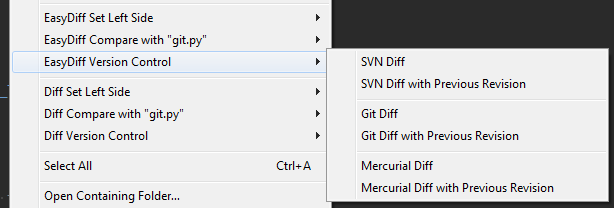
- Can compare working copy against the base or previous revision of a file in SVN, Git, and Mercurial (requires some setup and configuration).
- Dynamic context menus for selecting left side and right side compare. Dynamic menus show what file is on left side (think Beyond Compare context menus).
- View diffs in a view buffer or output panel.
- You can selectively hide version control menus or disable the command completely via the settings file.
- Can open diffs in external diff programs if desired (requires some setup and configuration).
- Show only internal diff options, only external options, or show both depending on your needs and preferences.
Documentation
http://facelessuser.github.io/EasyDiff/
License
EasyDiff is released under the MIT license.