
GitHubPullRequest
Sublime plugin to review GitHub pull-request from the comfort of your editor
Details
Installs
- Total 12
- Win 4
- Mac 8
- Linux 0
| Oct 21 | Oct 20 | Oct 19 | Oct 18 | Oct 17 | Oct 16 | Oct 15 | Oct 14 | Oct 13 | Oct 12 | Oct 11 | Oct 10 | Oct 9 | Oct 8 | Oct 7 | Oct 6 | Oct 5 | Oct 4 | Oct 3 | Oct 2 | Oct 1 | Sep 30 | Sep 29 | Sep 28 | Sep 27 | Sep 26 | Sep 25 | Sep 24 | Sep 23 | Sep 22 | Sep 21 | Sep 20 | Sep 19 | Sep 18 | Sep 17 | Sep 16 | Sep 15 | Sep 14 | Sep 13 | Sep 12 | Sep 11 | Sep 10 | Sep 9 | Sep 8 | Sep 7 | |
|---|---|---|---|---|---|---|---|---|---|---|---|---|---|---|---|---|---|---|---|---|---|---|---|---|---|---|---|---|---|---|---|---|---|---|---|---|---|---|---|---|---|---|---|---|---|
| Windows | 0 | 0 | 0 | 0 | 0 | 0 | 0 | 0 | 0 | 0 | 0 | 0 | 0 | 0 | 0 | 0 | 0 | 0 | 0 | 0 | 0 | 0 | 0 | 0 | 0 | 0 | 0 | 2 | 0 | 0 | 0 | 1 | 0 | 0 | 0 | 0 | 0 | 0 | 0 | 0 | 1 | 0 | 0 | 0 | 0 |
| Mac | 0 | 0 | 1 | 0 | 1 | 0 | 0 | 0 | 0 | 0 | 0 | 0 | 1 | 0 | 0 | 0 | 0 | 0 | 0 | 0 | 0 | 1 | 0 | 0 | 0 | 0 | 0 | 1 | 0 | 2 | 1 | 0 | 1 | 0 | 0 | 0 | 0 | 0 | 0 | 0 | 0 | 0 | 0 | 0 | 0 |
| Linux | 0 | 0 | 0 | 0 | 0 | 0 | 0 | 0 | 0 | 0 | 0 | 0 | 0 | 0 | 0 | 0 | 0 | 0 | 0 | 0 | 0 | 0 | 0 | 0 | 0 | 0 | 0 | 0 | 0 | 0 | 0 | 0 | 0 | 0 | 0 | 0 | 0 | 0 | 0 | 0 | 0 | 0 | 0 | 0 | 0 |
Readme
- Source
- raw.githubusercontent.com
GitHubPullRequest
Review GitHub pull requests without leaving Sublime Text. 🔍
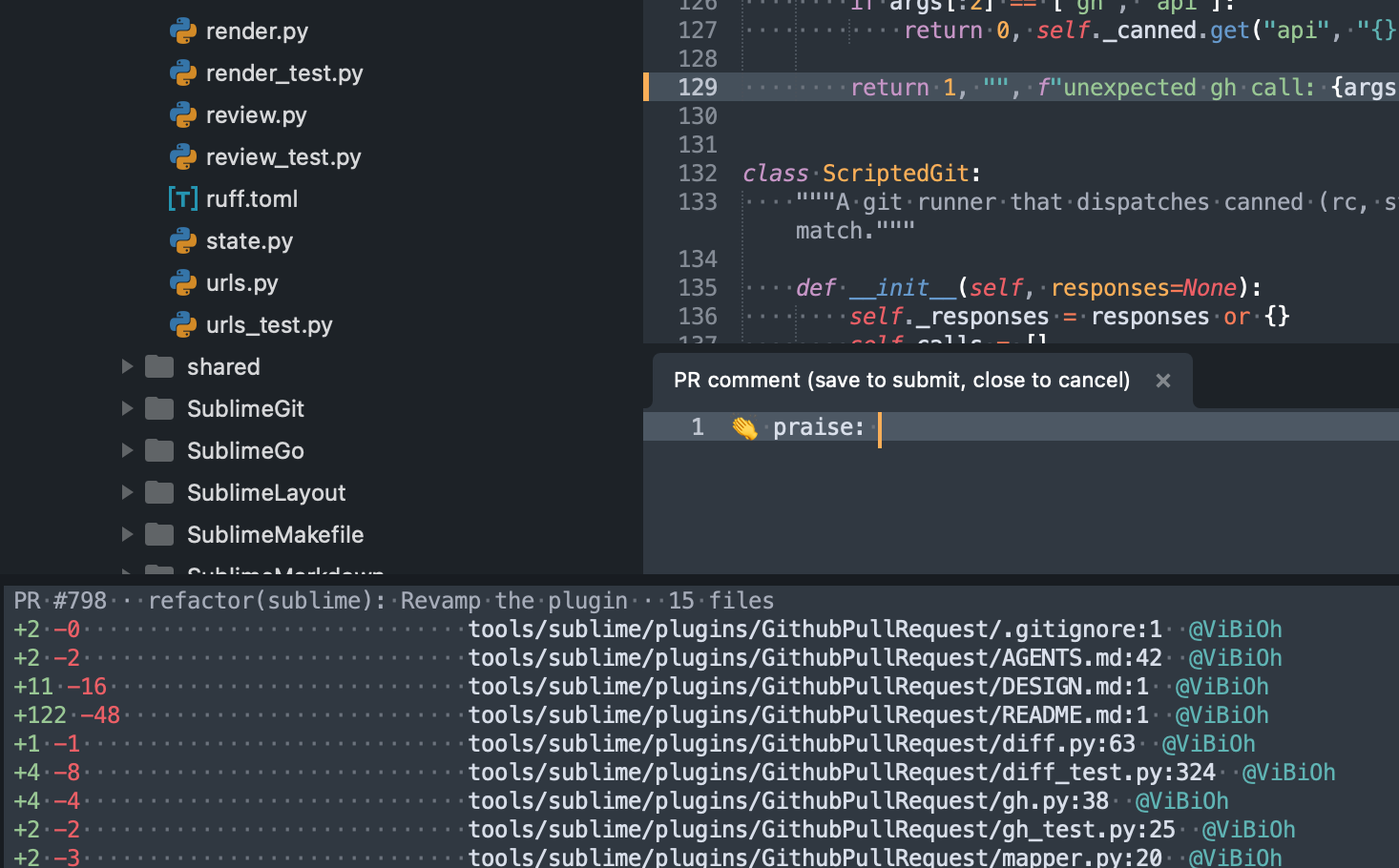
Threads render on the lines they belong to, the gutter shows the PR diff, and you can write, batch, and submit review comments from the editor. All of it on demand, and none of it touches your git state.
Command Palette → GitHubPullRequest: Load pull-request
That is the whole ceremony. The PR is inferred from the branch you are on.
✨ Why
The github.com review UI is fine until you want to actually read the code. Then you lose your editor: LSP, go-to-definition, syntax highlighting, your keybindings, your muscle memory. This keeps the review where the code already lives.
And it stays out of your way: the plugin is completely inert until you load a PR, and it never runs a mutating git command.
🚀 Features
🧵 Threads on the code
Unresolved review threads get a blue gutter icon on the line they were written against. Hover one and the whole conversation opens in a popup, rendered from GitHub's own HTML: formatting, links, code blocks, task lists.
From the popup you can Reply, Resolve / Unresolve, Open on github.com, or Apply a suggestion block straight into your buffer.
🎨 Real diff in the gutter
Sublime's native diff gutter is repointed at the PR merge base, so you see exactly what the PR changed, per file, with zero checkout dance. Files added by the PR light up entirely green.
💬 Comments written like code
Select a line or a range, hit Comment on line or selection, and a compose buffer opens in a split below the file, so the code stays on screen. Markdown syntax, full editor power.
Save submits. Close cancels. Just like a git commit editor.
- 🏷️ Conventional Comments built in. A fuzzy label picker (
💡 suggestion,⚠️ issue,💅 nitpick,❓ question, …) prefills the body. Fully configurable, or skippable, or off. - ✍️ Automatic suggestions. If the lines you are commenting on carry your own uncommitted edits, the compose buffer is prefilled with a ready-to-post
suggestionblock containing your version. Fix it, then propose the fix, in one gesture. Removing lines works too. (If your selection reached outside the PR diff and had to be narrowed, the block holds your version of the lines the comment actually covers, never a replacement wider than that.) - 📍 Edit-proof anchoring. Your local edits shift buffer rows; the plugin maps them back to the PR's head lines, so comments, icons, and suggestions all land on the right code even after you have been typing.
📦 Batched reviews, stored on GitHub
Queued comments become a real GitHub pending review, exactly like the web UI's “Start a review”.
- 💜 Drafts get a purple gutter icon and an Edit / Discard popup.
- 🔄 They survive a crash, a restart, or a reboot: reload the PR and they come back.
- 👀 They are visible on github.com as pending until you submit.
- 🛟 If GitHub is unreachable when you queue one, it is kept locally instead of lost, and sent along when you submit.
Then submit everything in one shot with a verdict: Comment, Approve, or Request changes.
📋 Changed-files panel
A bottom panel lists every changed file with aligned, colorized stats:
+42 -7                            src/server/handler.go:118  @backend-team
    (2 unresolved) (1 pending)    src/server/handler.go:145
Double-click, Enter, or F4 jumps to the file at the right line. If the codeowners binary is on your PATH, each file also shows who owns it.
🧭 Navigation
- Next / Previous comment to walk the threads in a file.
- List all comments for a cross-file quick-panel of every thread, jumping straight to file and line.
🤖 Review with an agent
Review with agent (tmux) splits your tmux session and launches your coding agent (claude by default, configurable) with a review prompt for this branch against its base. Read its findings, then write the ones you agree with as real review comments.
🔒 It never touches git
No gh pr checkout. No branch, no reset, no stash, no writes of any kind. Only read-only git (show, merge-base, rev-parse). Your working tree, index, and stash are exactly where you left them.
Everything that talks to GitHub goes through the gh CLI, so the plugin never reads or stores your token, and multi-org SAML SSO just works.
📥 Requirements
- Sublime Text 4 (uses
minihtml,set_reference_document). gh, installed and authenticated (gh auth login).- You are on the PR branch. That is how the PR is inferred, and what makes the non-mutating diff possible.
- Optional:
codeownersonPATHfor owner annotations, andtmuxfor the agent command.
⚙️ Install
Clone into your Sublime Packages/ folder:
git clone https://github.com/ViBiOh/Sublime-GitHubPullRequest.git \
  "$HOME/Library/Application Support/Sublime Text/Packages/GitHubPullRequest"
On Linux the target is ~/.config/sublime-text/Packages/, on Windows %APPDATA%\Sublime Text\Packages\.
Sublime picks the package up immediately; no restart needed.
🎮 Commands
Every command is under Tools → GitHubPullRequest, and in the command palette prefixed GitHubPullRequest:. Settings and key bindings are under Preferences → Package Settings → GitHubPullRequest. Comment on line or selection is also on the right-click menu, where it shows up only while a review is loaded and the file is one the pull-request changes.
| Command | What it does |
|---|---|
| Load pull-request | Infer the PR from the current branch, fetch files and threads, open the changed-files panel. Only open/draft PRs load. |
| Open pull-request in browser | Open this branch's PR on GitHub. Works with or without a loaded review. |
| Show changed files | The bottom panel of changed files, stats, comment counts, and owners, with the PR description underneath. |
| List all comments | Quick-panel of every thread across the PR; jumps to file and line. |
| Comment on line or selection | Queue a review comment on the cursor line or the selected range. |
| Next comment / Previous comment | Walk the commented lines in the current file. |
| Review with agent (tmux) | Run your configured agent on this branch versus its base, in a tmux split. |
| Submit review | Pick a verdict and post every queued comment as one review. |
| Discard queued comments | Drop the whole draft queue, on GitHub too. |
| End review | Clear all decorations and state. Asks what to do with anything still queued. |
In a comment compose buffer, Save (Cmd+S / Ctrl+S) submits the comment; closing without saving cancels.
🔧 Settings
Override any of these in Packages/User/GitHubPullRequest.sublime-settings (Preferences → Package Settings → GitHubPullRequest → Settings).
| Key | Default | Meaning |
|---|---|---|
auto_show_popup |
true |
Show the thread/draft popup on hover. |
show_gutter_icon |
true |
Draw gutter icons for threads and drafts. |
hide_outdated |
true |
Hide outdated threads (their code changed, so they are usually mis-anchored). |
hide_resolved |
true |
Hide resolved threads. Set to false to keep reading them and to get the popup's Unresolve link back. |
gutter_icon |
"bookmark" |
bookmark, dot, circle, or a Packages/... png. |
conventional_comments |
true |
Offer the Conventional Comments label picker before composing. |
comment_labels |
standard set | The labels the picker offers ({emoji, label, description}). emoji is optional and, when set, prefixes the posted comment. |
agent_command |
["claude"] |
Agent to launch for Review with agent, e.g. ["claude", "--model", "opus"] or ["aider", "--yes"]. |
agent_review_prompt |
a review prompt | Appended to agent_command; {base} is replaced with the base branch. |
🧱 Known limitations
- One PR at a time, and you must be on its head branch.
- GitHub API caps apply on huge PRs (
/pulls/{n}/filesstops at 3000 files; very large and binary files ship no patch). - No sidebar badges: Sublime exposes no API for it, hence the bottom panel.
- Not implemented: re-anchoring outdated comments, reactions, viewed-file state, CI checks.
🛠️ Hacking
Only plugin.py and githubpullrequest/anchors.py import sublime. Everything else (urls, diff, mapper, render, gh, review, state, repo, owners, layout, labels, panel, jsonc) stays free of it, so it is unit-tested headlessly; those two get a syntax check instead.
plugin.py is the only root-level module, because Sublime loads each root-level .py as a separate plugin; all shared code lives in the githubpullrequest/ subpackage.
python3 -m unittest discover -p '*_test.py'
ruff check . && ruff format .
python3 -m py_compile plugin.py githubpullrequest/anchors.py
See AGENTS.md for the architecture tour and DESIGN.md for the interface contracts.