
Icons - Catppuccin
Pastel icons for Sublime Text
Details
Installs
- Total 229
- Win 90
- Mac 72
- Linux 67
| Nov 5 | Nov 4 | Nov 3 | Nov 2 | Nov 1 | Oct 31 | Oct 30 | Oct 29 | Oct 28 | Oct 27 | Oct 26 | Oct 25 | Oct 24 | Oct 23 | Oct 22 | Oct 21 | Oct 20 | Oct 19 | Oct 18 | Oct 17 | Oct 16 | Oct 15 | Oct 14 | Oct 13 | Oct 12 | Oct 11 | Oct 10 | Oct 9 | Oct 8 | Oct 7 | Oct 6 | Oct 5 | Oct 4 | Oct 3 | Oct 2 | Oct 1 | Sep 30 | Sep 29 | Sep 28 | Sep 27 | Sep 26 | Sep 25 | Sep 24 | Sep 23 | Sep 22 | |
|---|---|---|---|---|---|---|---|---|---|---|---|---|---|---|---|---|---|---|---|---|---|---|---|---|---|---|---|---|---|---|---|---|---|---|---|---|---|---|---|---|---|---|---|---|---|
| Windows | 5 | 8 | 2 | 3 | 3 | 4 | 7 | 4 | 9 | 5 | 5 | 3 | 5 | 1 | 6 | 7 | 4 | 6 | 1 | 4 | 2 | 2 | 0 | 0 | 0 | 0 | 0 | 0 | 0 | 0 | 0 | 0 | 0 | 0 | 0 | 0 | 0 | 0 | 0 | 0 | 0 | 0 | 0 | 0 | 0 |
| Mac | 6 | 4 | 3 | 2 | 2 | 3 | 1 | 4 | 2 | 5 | 5 | 5 | 5 | 6 | 4 | 3 | 3 | 2 | 2 | 2 | 2 | 1 | 0 | 0 | 0 | 0 | 0 | 0 | 0 | 0 | 0 | 0 | 0 | 0 | 0 | 0 | 0 | 0 | 0 | 0 | 0 | 0 | 0 | 0 | 0 |
| Linux | 6 | 3 | 2 | 3 | 7 | 1 | 0 | 6 | 1 | 6 | 3 | 1 | 0 | 4 | 1 | 8 | 5 | 4 | 4 | 4 | 5 | 0 | 0 | 0 | 0 | 0 | 0 | 0 | 0 | 0 | 0 | 0 | 0 | 0 | 0 | 0 | 0 | 0 | 0 | 0 | 0 | 0 | 0 | 0 | 0 |
Readme
- Source
- raw.githubusercontent.com
Icons - Catppuccin
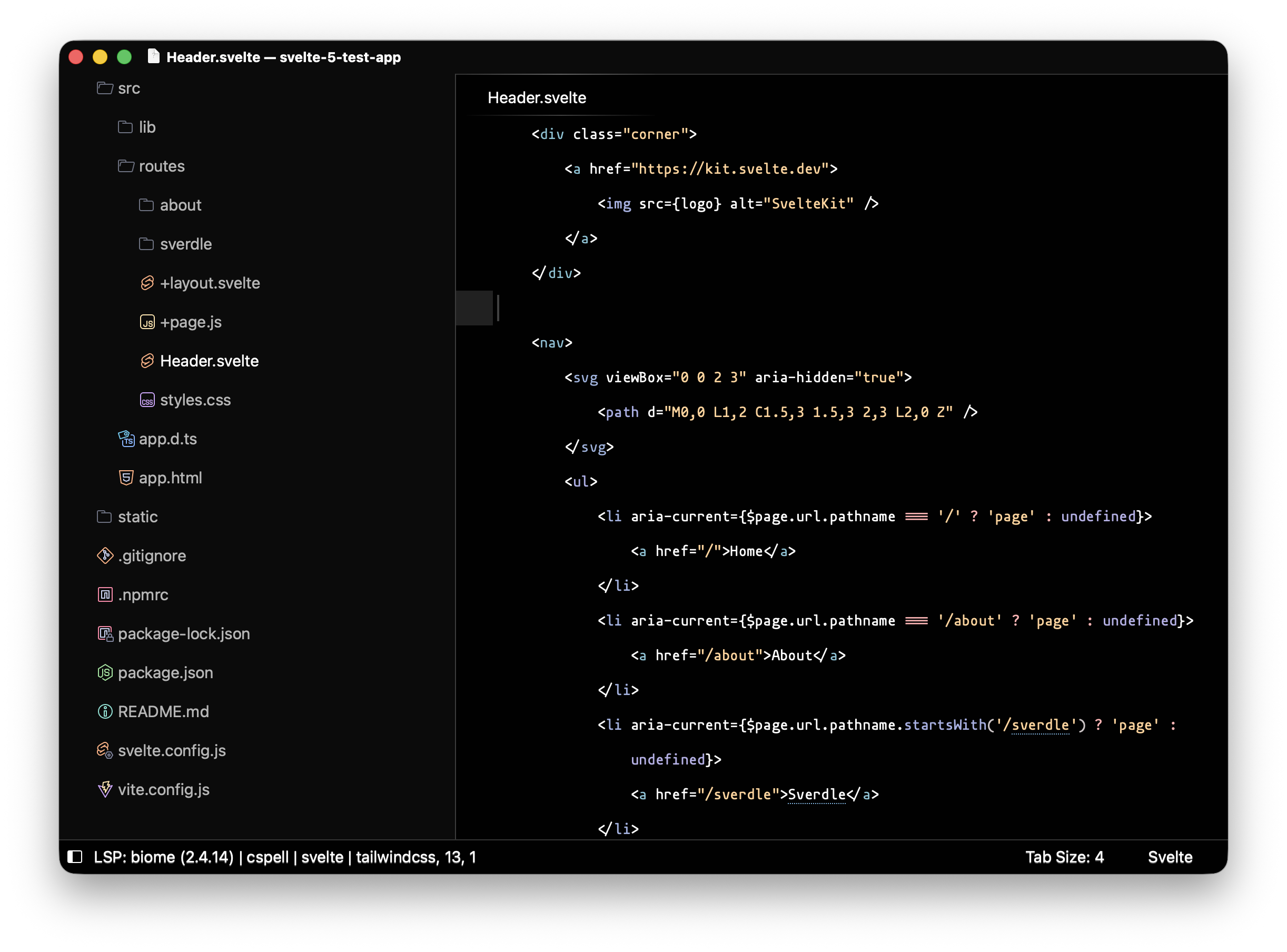
Getting started
Install Icons - Catppuccin from https://packages.sublimetext.io/
Or clone the repo in Sublime Text “Packages” folders:
git clone https://github.com/predragnikolic/catppuccin-sublime-icons.git "Icons - Catppuccin"
Select Preferences: Settings in the command palette and set:
Error: language “jsonc” is not supported
// Preferences.sublime-settings
{
    "file_icon_theme": "Catppuccin Mocha.sublime-file-icons"
}
Tweak your current theme, so the icons look nice.
Open the command palette and select UI: Customize Theme:
Error: language “jsonc” is not supported
{
    "rules": [
        // Fix stretched file icons
        {
            "settings": {"file_icon_theme": "Catppuccin Mocha.sublime-file-icons"}, // only apply rule overrides if file_icon_theme is "Catppuccin Mocha.sublime-file-icons"
            "class": "icon_file_type",
            "content_margin": 8,
            "layer0.opacity": 1.0, // tweak opacity to your liking
            "layer0.texture": "Icons - Catppuccin/icons/file_type_text.png",
            // "layer0.tint": [0, 0, 0, 150], // enable monochrome icons (good for light themes)
        },

        // Change open/close folder icons
        {
            "settings": {"file_icon_theme": "Catppuccin Mocha.sublime-file-icons"},
            "class": "icon_folder",
            "layer0.texture": "Icons - Catppuccin/icons/file_type_folder.png",
            "content_margin": 8,
            "layer0.opacity": 1.0, // tweak opacity to your liking
            // "layer0.tint": [0, 0, 0, 150], // enable monochrome icons (good for light themes)
        },
        {
            "settings": {"file_icon_theme": "Catppuccin Mocha.sublime-file-icons"},
            "class": "icon_folder",
            "parents": [{"class": "tree_row", "attributes": ["expanded"]}],
            "layer0.texture": "Icons - Catppuccin/icons/file_type_folder_open.png",
        },

        // Hides Folder Arrows
        {
            "settings": {"file_icon_theme": "Catppuccin Mocha.sublime-file-icons"},
            "class": "disclosure_button_control",
            "content_margin": 0,
        },
    ]
}