
LLM
Chat with LLMs (Ollama, Claude, OpenAI, OpenRouter, DeepSeek, plus any OpenAI-compatible endpoint) inside Sublime Text 4. Secure external secrets storage for hosted providers.
Details
Installs
- Total 458
- Win 218
- Mac 131
- Linux 109
| Oct 13 | Oct 12 | Oct 11 | Oct 10 | Oct 9 | Oct 8 | Oct 7 | Oct 6 | Oct 5 | Oct 4 | Oct 3 | Oct 2 | Oct 1 | Sep 30 | Sep 29 | Sep 28 | Sep 27 | Sep 26 | Sep 25 | Sep 24 | Sep 23 | Sep 22 | Sep 21 | Sep 20 | Sep 19 | Sep 18 | Sep 17 | Sep 16 | Sep 15 | Sep 14 | Sep 13 | Sep 12 | Sep 11 | Sep 10 | Sep 9 | Sep 8 | Sep 7 | Sep 6 | Sep 5 | Sep 4 | Sep 3 | Sep 2 | Sep 1 | Aug 31 | Aug 30 | Aug 29 | |
|---|---|---|---|---|---|---|---|---|---|---|---|---|---|---|---|---|---|---|---|---|---|---|---|---|---|---|---|---|---|---|---|---|---|---|---|---|---|---|---|---|---|---|---|---|---|---|
| Windows | 0 | 2 | 3 | 1 | 0 | 2 | 2 | 0 | 1 | 0 | 0 | 3 | 0 | 1 | 2 | 0 | 2 | 3 | 0 | 3 | 3 | 4 | 1 | 0 | 4 | 3 | 1 | 1 | 3 | 1 | 0 | 2 | 3 | 4 | 4 | 3 | 0 | 4 | 1 | 1 | 2 | 5 | 2 | 2 | 0 | 0 |
| Mac | 0 | 2 | 0 | 1 | 1 | 0 | 3 | 5 | 2 | 2 | 0 | 0 | 2 | 4 | 0 | 2 | 1 | 0 | 1 | 5 | 2 | 1 | 2 | 1 | 0 | 0 | 1 | 0 | 0 | 1 | 1 | 2 | 1 | 0 | 2 | 0 | 0 | 1 | 1 | 3 | 1 | 1 | 1 | 0 | 3 | 3 |
| Linux | 0 | 0 | 0 | 3 | 0 | 1 | 2 | 3 | 1 | 0 | 0 | 2 | 1 | 0 | 1 | 0 | 0 | 0 | 1 | 3 | 2 | 0 | 1 | 1 | 1 | 4 | 2 | 1 | 1 | 0 | 1 | 1 | 0 | 1 | 2 | 1 | 1 | 1 | 0 | 0 | 3 | 0 | 1 | 1 | 1 | 0 |
Readme
- Source
- raw.githubusercontent.com
LLM for Sublime Text
A chat interface for LLMs (Ollama, OpenAI, Anthropic, OpenRouter, DeepSeek, plus any OpenAI-compatible endpoint) inside Sublime Text 4.
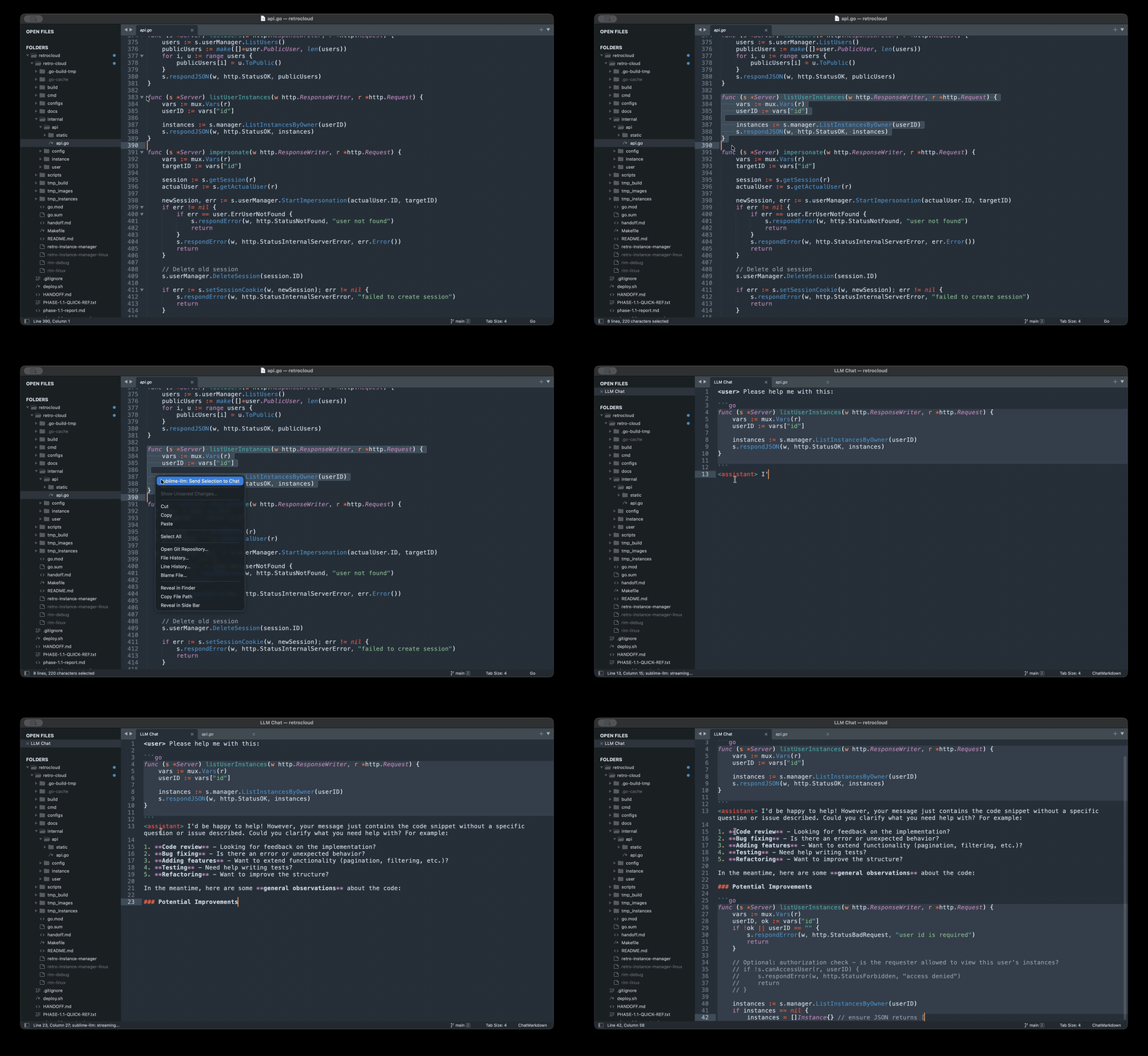
Use it for:
- Conversational coding help without leaving the editor.
- Sending a code selection into the chat with one keystroke.
- Local, private inference via Ollama (default).
- Hosted models when you want them, with provider config and API keys stored outside the dotfiles-symlink scope.
Install
Manual install (development / pre-publish)
- Locate your Packages directory:
- macOS:
~/Library/Application Support/Sublime Text/Packages/ - Linux:
~/.config/sublime-text/Packages/ - Windows:
%APPDATA%\Sublime Text\Packages\
- macOS:
- Clone or symlink this repository into that directory as
LLM:
ln -s <path-to-clone> '<packages-dir>/LLM'
- Restart Sublime Text.
The plugin requires Sublime Text build 4050 or newer (Python 3.8+ plugin host).
Quickstart: Ollama (works by default)
Ollama runs models locally — no API key, no network egress, and no LLM-specific configuration if you use the default llama3.2 model.
- Install Ollama: https://ollama.com
- Start the server:
ollama serve(or use the desktop app). - Pull a model:
ollama pull llama3.2 - In Sublime: use command palette:
LLM: Choose Model - In Sublime:
Tools -> LLM: Open Chat(or use the command palette:LLM: Open Chat). - Type a message after the
<user>prompt. - Press
Ctrl+Enter(macOS:Cmd+Enter) to send.
Default settings already point at local Ollama:
provider:"ollama"base_url:"http://localhost:11434"(also honors theOLLAMA_HOSTenvironment variable whenbase_urlis unset)model:"llama3.2"
That means a fresh install should work after ollama serve and ollama pull llama3.2. Use LLM: Choose Model or set providers.ollama.model in config.json only if you want a different local model.
If Ollama isn't running, errors surface as Ollama is not running. Start it with ollama serve.
Hosted providers
To use OpenAI, Anthropic, OpenRouter, or DeepSeek, update api_key in config.json with a key from the provider in question:
"openai": {
      "api_key": "REPLACE_ME_with_sk-...",
      "base_url": "https://api.openai.com/v1",
      "model": "gpt-4o"
    },
    "anthropic": {
      "api_key": "REPLACE_ME_with_sk-ant-...",
      "model": "claude-sonnet-4-6"
    },
    "openrouter": {
      "api_key": "REPLACE_ME_with_sk-or-...",
      "base_url": "https://openrouter.ai/api/v1",
      "model": "anthropic/claude-sonnet-4.5",
      "referer": "",
      "title": "LLM"
    },
    "deepseek": {
      "api_key": "REPLACE_ME_with_sk-...",
      "base_url": "https://api.deepseek.com",
      "model": "deepseek-v4-flash"
    },
Update model to change the default model or select “LLM: Choose Model” from the command palette to pick a specific model from the chosen provider.
External provider config and API keys
LLM keeps provider-level settings outside Sublime's settings file. The default external config path is ~/.config/sublime-llm/config.json on macOS / Linux, or %APPDATA%\sublime-llm\config.json on Windows. A template is shipped as config.example.json.
Example:
{
  "active_provider": "ollama",
  "providers": {
    "ollama": {
      "base_url": "http://localhost:11434",
      "model": "llama3.2"
    },
    "openai": {
      "api_key": "sk-...",
      "base_url": "https://api.openai.com/v1",
      "model": "gpt-4o"
    },
    "custom": {
      "api_key": "...",
      "base_url": "http://localhost:1234/v1",
      "model": "local-model",
      "label": "LM Studio"
    }
  }
}
Provider settings are read from providers.<name> and can include base_url, model, api_key, referer, title, models, or label depending on the provider. active_provider selects the provider when provider is not set elsewhere.
API keys are resolved in this order and the first match wins:
- Environment variable —
OPENAI_API_KEY,ANTHROPIC_API_KEY,OPENROUTER_API_KEY,DEEPSEEK_API_KEY, orCUSTOM_API_KEY.
On macOS, GUI apps launched from the Dock or Spotlight do not inherit environment variables from your shell rc — they're children of launchd, not of your shell. Either launch Sublime from a terminal (subl), or use the external config file instead. The same caveat applies on Linux for apps launched via desktop entry files that don't source a shell.
External config file —
config.jsonat the path above, withapi_keyunderproviders.<name>.api_key.Legacy key-only file — existing
secrets.jsoninstalls are still read for backward compatibility. New installs should useconfig.json; new writes go toconfig.json. The old key-only shape is:
{
     "openai": "sk-...",
     "anthropic": "sk-ant-...",
     "openrouter": "sk-or-...",
     "deepseek": "sk-...",
     "custom": "..."
   }
- Settings file —
<Packages>/User/LLM.sublime-settings. Disabled by default. Set"allow_secrets_in_settings_file": trueto opt in. Not recommended: this file is commonly committed to dotfiles repos and synced via cloud services. If a key is present in the settings file while the opt-in is off, the plugin logs a warning and ignores it.
On POSIX systems, the plugin checks external config and legacy key-only file permissions and warns if they're looser than 0600. When the plugin itself writes the external config file, it enforces 0600 on the file and 0700 on the parent directory. This path is outside the usual dotfiles-symlink scope and is the recommended default for most users.
Whenever a key is resolved, it is registered with the logger's redacting filter so it cannot accidentally appear in log output, even from third-party libraries.
You can verify which source a key came from with LLM: Show External Config Status. The display masks all but the last four characters of every key.
Recommended .gitignore
If you sync your Sublime user directory to git or a cloud drive, add:
# LLM local/private config
config.json
secrets.json
LLM.sublime-settings
If you absolutely must check in LLM.sublime-settings, leave allow_secrets_in_settings_file at its default (false) so that any stray key in that file is ignored at runtime.
Keybindings
Default bindings:
| Key (Linux / Windows) | Key (macOS) | Context | Effect |
|---|---|---|---|
Ctrl+Enter |
Cmd+Enter |
inside the chat view | Submit the current input region. |
Ctrl+Shift+L |
Cmd+Shift+L |
any view, with a non-empty selection | Send the selection to the chat view as a fenced code block. |
Esc |
Esc |
chat view, while streaming | Cancel the in-flight response. |
All commands are also reachable via the command palette under the LLM: prefix:
| Command | Effect |
|---|---|
LLM: Open Chat |
Open or focus the chat view (creates a side group if needed). |
LLM: Submit Message |
Send the current input region. |
LLM: Send Selection to Chat |
Pre-fill chat input with the current selection wrapped in a fenced code block. |
LLM: Cancel |
Cancel an in-flight stream. |
LLM: Choose Model |
Quick-panel model picker. |
LLM: Choose Provider |
Quick-panel provider picker with health badges. |
LLM: Show Status |
Diagnostic display: provider, model, health, model count. |
LLM: Show External Config Status |
Per-provider key source, last-four-character masked. |
LLM: Clear Chat History |
Empty the chat for the current project and remove its on-disk transcript. |
LLM: Open Chat is also wired into Tools -> LLM: Open Chat. LLM: Send Selection to Chat is wired into the editor's right-click context menu when a selection is non-empty.
Settings reference
General chat settings live in LLM.sublime-settings (defaults shipped with the plugin) and can be overridden in <Packages>/User/LLM.sublime-settings or per-project in your .sublime-project file under "settings". Provider-level settings can also live in the external config file under providers.<name>.
| Key | Default | Purpose |
|---|---|---|
provider |
"ollama" |
Active provider. One of ollama, openai, anthropic, openrouter, deepseek, custom. |
model |
"llama3.2" |
Model identifier for the active provider. The default matches the Ollama quickstart; set another model via config.json, user settings, or LLM: Choose Model. |
base_url |
"http://localhost:11434" |
Used by the Ollama provider. Other providers have their own defaults (see provider matrix). |
temperature |
0.7 |
Sampling temperature. |
max_tokens |
4096 |
Max completion tokens. Required for Anthropic; recommended for OpenAI. |
system_prompt |
"" |
Optional system message prepended to each conversation. |
allow_secrets_in_settings_file |
false |
If true, allows hosted-provider keys (*_api_key settings) to be read from this settings file. Not recommended. |
openrouter_referer |
"" |
Optional HTTP-Referer header for OpenRouter analytics. |
openrouter_title |
"" |
Optional X-Title header for OpenRouter analytics. |
anthropic_version |
"2023-06-01" |
Value of the anthropic-version request header. |
anthropic_models |
[] |
Override the model list shown by the Anthropic provider. Empty means use the plugin's built-in default list. |
deepseek_models |
["deepseek-v4-flash", "deepseek-v4-pro"] |
Fallback model list for DeepSeek when /models isn't reachable. |
custom_base_url |
"" |
Required when provider is "custom". Example: http://localhost:1234/v1 for LM Studio. |
custom_api_key |
"" |
Optional API key for the custom endpoint (the env var CUSTOM_API_KEY and the external config file are preferred). |
custom_models |
[] |
Fallback list if the custom server doesn't expose /v1/models. |
custom_label |
"Custom" |
Display label for the custom provider in error messages (e.g. "LM Studio"). |
Per-project overrides go in your .sublime-project:
{
  "folders": [],
  "settings": {
    "provider": "anthropic",
    "model": "claude-opus-4-7"
  }
}
Never put API keys in .sublime-project files. They're commonly committed to source control.
Chat view conventions
- The conversation is plain Markdown. Each turn starts with a prompt:
<user>or<assistant>(an optional is also recognized by the syntax). - The input region is the text after the last
<user>prompt — type freely there. - The chat view is a Sublime scratch buffer; it will not prompt to save on close. Per-project on-disk persistence keeps the conversation across restarts under
Packages/User/sublime-llm/chats/<slug>.md. - Fenced code blocks (e.g.
```python) get language-specific syntax highlighting via the standard Markdown embedding mechanism. The chat syntax isChatMarkdown.sublime-syntax, shipped with the plugin. - One active chat per window. Reopening it via
LLM: Open Chatfocuses the existing view instead of creating a new one.
Sending a selection to chat
With a non-empty selection in any view:
- Right-click and pick
LLM: Send Selection to Chat, or - Run
LLM: Send Selection to Chatfrom the command palette.
This command ships without a default key binding to avoid clashing with Sublime's built-in Ctrl+Shift+L / Cmd+Shift+L (“Split selection into lines”). To bind it yourself, add to Packages/User/Default.sublime-keymap (commented examples are in the plugin's Default.sublime-keymap):
{
    "keys": ["primary+shift+l"],
    "command": "sublime_llm_send_selection",
    "context": [
        {"key": "selection_empty", "operator": "equal", "operand": false}
    ]
}
(primary resolves to ctrl on Linux/Windows and cmd on macOS.)
The chat view opens (or focuses) and the selection is appended to the input region as a fenced code block. The fence language tag is inferred from the source view's syntax — Python, JavaScript, TypeScript, TSX, JSON, YAML, HTML, CSS, Markdown, Rust, Go, Ruby, Java, C++, C, shell, and SQL are recognized; other syntaxes get an empty language tag.
If the chat input already contains text, the selection is appended below a blank line rather than replacing it.
Troubleshooting
Ollama not running. Start it with ollama serve or the desktop app. The plugin reports Ollama is not running. Start it with ollama serve. in the status bar.
**405 Method Not Allowed or similar from Ollama.** Make sure your base_url is a host plus optional port — no trailing path component. Default is http://localhost:11434; the plugin appends /api/chat and /api/tags internally. The setting also honors http://host:port without a scheme (the plugin prepends http://).
**UNREACHABLE for a hosted provider.** Check your network and corporate proxy. The plugin issues plain urllib requests; it doesn't read http_proxy/https_proxy env vars automatically (Sublime's bundled Python doesn't include urllib3 request-level proxy detection).
**MISSING_CREDENTIAL / BAD_CREDENTIAL for OpenAI, Anthropic, OpenRouter, DeepSeek.** Verify the key resolution source with LLM: Show External Config Status — it shows whether each key was resolved from env, external config, legacy file, settings, or is missing, with the last four characters masked. If env vars aren't picked up on macOS, see the launchd caveat above.
Streaming feels slow. Token batching is set to flush every 50 ms server-side; the actual cadence is dominated by the upstream model. A typing indicator is planned in the post-MVP backlog (ticket H5).
Chat view is gone. LLM: Open Chat reopens or focuses it. Chat content lives in a scratch buffer; per-project on-disk persistence keeps the conversation across restarts.
Stream looks corrupted. A STREAM_CORRUPTED message means the plugin received bytes it couldn't parse as the provider's expected wire format. Cancel and retry. If it reproduces, file an issue with the provider name and (sanitized) sample.
Security
- No API keys are logged. The plugin's logger has a redacting filter applied to every handler. The filter masks every key the plugin has resolved this session and also catches common API-key shapes (
sk-...,sk-ant-...,Bearer ...) regardless of whether they were registered explicitly. - No telemetry. The plugin makes HTTP requests only to the configured provider's base URL.
- Keys are resolved per-request. Changing env vars,
config.json, or a legacy key-only file takes effect on the next request without restarting Sublime. - The external config file gets restrictive permissions (
0600on the file,0700on its directory) when the plugin writes it. The plugin warns if it reads external config or a legacy key-only file with looser permissions but does not refuse to read it. - Settings-file storage is opt-in. Keys placed in
LLM.sublime-settingsare ignored unless you set"allow_secrets_in_settings_file": true. When that opt-in is on, the plugin emits a one-time warning that storing keys there is insecure. - See External provider config and API keys for the recommended storage approach.
If you find a security issue, please email tony@1x0.net rather than opening a public issue. See SECURITY.md for details.
Development
Tests run inside a real (headless) Sublime Text via UnitTesting's Docker runner, so test code can use the full sublime / sublime_plugin API. Requirements: Docker, plus a clone of UnitTesting.
Run tests:
UT=/path/to/UnitTesting   # git clone https://github.com/SublimeText/UnitTesting
"$UT/docker/ut-run-tests" . --package-name LLM
Run a single test file:
"$UT/docker/ut-run-tests" . --package-name LLM --file tests/test_chat_parser.py
Use --dry-run to verify the Docker/Sublime test environment without running tests. The first run builds the image and installs Sublime Text into a cache volume; later runs are fast.
Notes:
--package-name LLMis required: the package is mounted asPackages/LLM, and tests import the plugin asfrom LLM.sublime_llm import ....- Test classes subclass
unittesting.DeferrableTestCase, which also lets a test yield to the Sublime event loop (yield a callable to poll a condition, or an int for a delay in ms) when exercising async editor behavior.
Local install loop:
- Symlink the repo into your Packages directory.
- Install Package Reloader for automatic submodule reload on save.
- Use the Sublime console (
Ctrl+`) forview.run_command(...)andprintdebugging.
Architecture overview: provider abstraction lives in sublime_llm/providers/base.py; secret resolution in sublime_llm/secrets.py; chat surface in sublime_llm/chat_view.py and sublime_llm/commands.py.
Contributing
PRs welcome. Please:
- Add unit tests for new logic in
tests/. Avoid Sublime-dependent imports at module top level so the suite runs without Sublime. - Keep API-key handling routed through
sublime_llm.secrets.resolve_key. Never log keys; callregister_secret(fromsublime_llm.logging_setup) on any new key material so the redaction filter catches it. - Match the existing code style: stdlib only, Python 3.8 target, short one-line docstrings at most, no multi-line comment blocks.
Open work and post-1.0 ideas are tracked in the GitHub issue list.
License
MIT. See LICENSE.