
Notr
Note taking plugin for Sublime Text: markup syntax for coloring plain text files, links and references, search.
Details
Installs
- Total 66
- Win 34
- Mac 22
- Linux 10
| Oct 11 | Oct 10 | Oct 9 | Oct 8 | Oct 7 | Oct 6 | Oct 5 | Oct 4 | Oct 3 | Oct 2 | Oct 1 | Sep 30 | Sep 29 | Sep 28 | Sep 27 | Sep 26 | Sep 25 | Sep 24 | Sep 23 | Sep 22 | Sep 21 | Sep 20 | Sep 19 | Sep 18 | Sep 17 | Sep 16 | Sep 15 | Sep 14 | Sep 13 | Sep 12 | Sep 11 | Sep 10 | Sep 9 | Sep 8 | Sep 7 | Sep 6 | Sep 5 | Sep 4 | Sep 3 | Sep 2 | Sep 1 | Aug 31 | Aug 30 | Aug 29 | Aug 28 | |
|---|---|---|---|---|---|---|---|---|---|---|---|---|---|---|---|---|---|---|---|---|---|---|---|---|---|---|---|---|---|---|---|---|---|---|---|---|---|---|---|---|---|---|---|---|---|
| Windows | 0 | 0 | 0 | 0 | 0 | 0 | 0 | 0 | 0 | 0 | 0 | 0 | 0 | 0 | 0 | 0 | 0 | 0 | 0 | 0 | 0 | 0 | 0 | 0 | 0 | 0 | 0 | 0 | 0 | 0 | 0 | 0 | 1 | 0 | 0 | 1 | 0 | 0 | 0 | 0 | 0 | 0 | 0 | 0 | 0 |
| Mac | 0 | 0 | 0 | 0 | 0 | 0 | 0 | 0 | 0 | 0 | 0 | 0 | 0 | 0 | 0 | 0 | 0 | 1 | 0 | 0 | 0 | 0 | 0 | 0 | 0 | 0 | 0 | 0 | 0 | 0 | 0 | 0 | 0 | 0 | 0 | 0 | 0 | 0 | 0 | 0 | 0 | 0 | 1 | 0 | 0 |
| Linux | 0 | 0 | 0 | 0 | 0 | 0 | 0 | 0 | 0 | 0 | 0 | 0 | 0 | 0 | 0 | 0 | 0 | 0 | 0 | 0 | 0 | 0 | 0 | 0 | 0 | 0 | 0 | 0 | 0 | 0 | 0 | 0 | 0 | 0 | 0 | 0 | 0 | 0 | 0 | 0 | 0 | 0 | 0 | 1 | 0 |
Readme
- Source
- raw.githubusercontent.com
Notr
Notr is a Sublime Text application plugin for managing and displaying collections of text notes. It is a plain text format with some similarity to markdown. However there is no rendering-for-publication step: the text itself is the whole point.
The markup syntax provides file and section navigation and colorizing to provide visual clues for things like sections, links, tables, lists, etc.
Built for ST4 on Windows. Linux and OSX should be ok but are minimally tested - PRs welcome.
Features
- Notr files have the extension
.ntr - Multiple notr projects.
- Sections are identified like markdown
# ## ### etc. - Sections with tags and simple (non-hierarchal) folding.
- Lists with several bullet types.
- Markdown-like quotes and raw text, toggle like comments.
- Tables with insert/delete column, fit, sort. This can be taken verbatim for general purpose plugin use.
- Targets and references - targets can be section, file (image or other), url.
- Navigation to targets via quick panel. Has MRU and sticky entries.
- Navigation to notr file errors.
- Search in all project notr files.
- Auto highlight - supplements Highlight Token.
- Render to html with Render View.
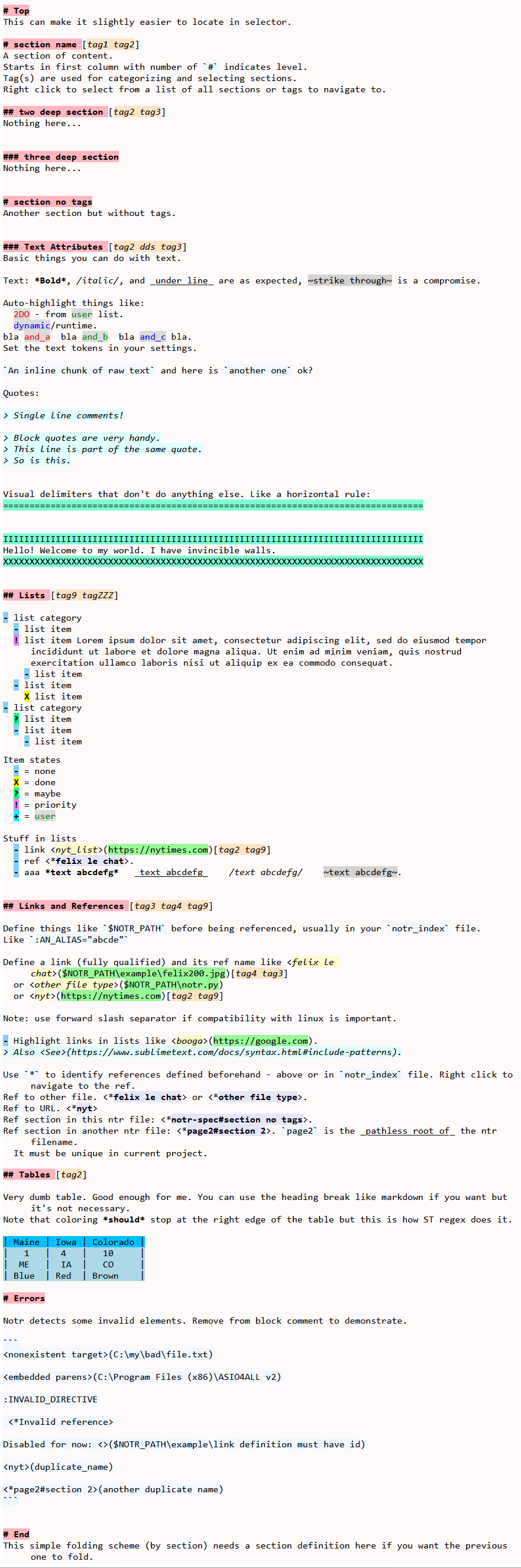
The spec describes all
the features (using Windows filenames). That file will look something like this:
Example
To run the example:
- Install the plugin via PackageControl.
- Download the example files.
- Select Preferences => Package Settings => Notr.
- Add this project name to your settings:
"project_files":
[
    // windows:
    "<DOWNLOAD_DIR>\\notr-demo.nproj",
    // linux:
    "<DOWNLOAD_DIR>/notr-demo-nx.nproj",
]
- Implement your style per Color Scheme
- Now open
notr-spec.ntr. Test drive the various context menu selections.
Commands and Menus
| Command | Description | Args |
|---|---|---|
| notr_open_project | Open a project from settings using selector | |
| notr_edit_project | Edit the current project | |
| notr_insert_target_from_clip | Insert a target from clipboard | |
| notr_insert_ref | Insert a ref from selector | |
| notr_goto_target | Go to a target via selector or ref or link | filter_by_tag=T OR F |
| notr_goto_section | Go to next/previous section in file | where: next OR prev |
| notr_insert_hrule | Make a line | fill_str=“=”, reps=20 |
| notr_find_in_files | Search within the notr_paths in current project | |
| table_fit | Fit table contents to columns | |
| table_insert_col | Insert column at caret | |
| table_delete_col | Remove column at caret | |
| table_sort_col | Sort column at caret - direction toggles | asc=true OR false |
| notr_dump | Diagnostic to show the internal info | verbose=T is everything else just les |
| notr_help | Show a help page | |
| notr_reload | Force reload after editing colors etc |
There is no default Context.sublime-menu file in this plugin.
Add the commands you like to your own User\Context.sublime-menu file. Typical entries are:
{ "caption": "Notr",
    "children":
    [
        { "caption": "Open Project", "command": "notr_open_project" },
        { "caption": "Edit Project", "command": "notr_edit_project" },
        { "caption": "-" },
        { "caption": "Find in Notr Files", "command": "notr_find_in_files" },
        { "caption": "Goto Target", "command": "notr_goto_target", "args" : {"filter_by_tag" : false} },
        { "caption": "Goto Target by Tag", "command": "notr_goto_target", "args" : {"filter_by_tag" : true} },
        { "caption": "Insert Target From Clipboard", "command": "notr_insert_target_from_clip" },
        { "caption": "Insert Ref", "command": "notr_insert_ref" },
        { "caption": "Insert HRule", "command": "notr_insert_hrule", "args" : {"fill_str" : "=", "reps": 60} },
        { "caption": "-" },
        { "caption": "Fit Table", "command": "table_fit" },
        { "caption": "Insert Column", "command": "table_insert_col" },
        { "caption": "Delete Column", "command": "table_delete_col" },
        { "caption": "Sort Asc", "command": "table_sort_col", "args" : {"asc" : true} },
        { "caption": "Sort Desc", "command": "table_sort_col", "args" : {"asc" : false} },
    ]
}
Settings
| Setting | Description | Options |
|---|---|---|
| project_files | List of project filenames | |
| sort_tags_alpha | Sort tags alphabetically else by frequency | default=true |
| mru_size | How many mru entries in selector | default=5 |
| fixed_hl_whole_word | Select fixed_hl by whole word | default=true |
| show_panel | Output to panel or view | default=false |
| qualify_with_dir | Prepend “dir:” to section and ref names | default=false |
Project File
A notr project file (e.g. demo project) contains the following elements. Note: currently this file is pure json and doesn't support comments or trailing commas.
| Key | Description |
|---|---|
| notr_paths | List of where notr files live |
| notr_index | Main notr file |
| sticky | list of section names that always appear at the top of selector |
| fixed_hl | Three sets of user keywords |
| section_sel_depth | Section selector hierarchy depth (default=1) |
Color Scheme
New scopes have been added to support this application. Adjust the values in
notr-scopes.sublime-color-scheme to taste
and add them to your Packages\User\your.sublime-color-scheme file.
Note that these are shared with the Render View and Highlight Token packages.
After editing your color-scheme, you need to close and reopen affected views.
Caveats
- ST uses a custom line-oriented regex engine. Some things pertaining to normal line endings don't quite work as expected.
- Note that coloring should stop at the right edge of a table. This is also how ST renders MD tables. Something to do with meta-scope.
- Coloring for
markup.user_hlsandmarkup.fixed_hlsonly supports fore and back colors, not font_style. view.add_regions()apparently only supports colors, annotations, and icon. It does not support font style and region flags. Also they are not available viaextract_scope().- Doesn't handle targets with embedded parentheses (e.g.
Program Files (x86)). It exceeds my meager regex skills. - If you move or rename a
.ntrfile you need to restart Notr.
Notes
sbot_common.pycontains miscellaneous common components primarily for internal use by the sbot family. This includes a very simple logger primarily for user-facing information, syntax errors and the like. Log file is in<ST_PACKAGES_DIR>\User\Notr\Notr.log.
Future
- Publish somewhere for web access, probably rendered html.
- Fancy stuff like image thumbnail phantom/hover, annotations, hover/popups, etc.
- Unicode picker/inserter for symbols.
- Configure fixed_hl in ntr file using #directive.
- Heading formatting per level.
- Hierarchal folding.
- Table delimiter
|fights with things like directory trees. Block comments around the tree works but could be more elegant.