
VisuBezier
Provides a preview when hovering CSS easing functions.
Details
Installs
- Total 6
- Win 2
- Mac 4
- Linux 0
| Nov 4 | Nov 3 | Nov 2 | Nov 1 | Oct 31 | Oct 30 | Oct 29 | Oct 28 | Oct 27 | Oct 26 | Oct 25 | Oct 24 | Oct 23 | Oct 22 | Oct 21 | Oct 20 | Oct 19 | Oct 18 | Oct 17 | Oct 16 | Oct 15 | Oct 14 | Oct 13 | Oct 12 | Oct 11 | Oct 10 | Oct 9 | Oct 8 | Oct 7 | Oct 6 | Oct 5 | Oct 4 | Oct 3 | Oct 2 | Oct 1 | Sep 30 | Sep 29 | Sep 28 | Sep 27 | Sep 26 | Sep 25 | Sep 24 | Sep 23 | Sep 22 | Sep 21 | |
|---|---|---|---|---|---|---|---|---|---|---|---|---|---|---|---|---|---|---|---|---|---|---|---|---|---|---|---|---|---|---|---|---|---|---|---|---|---|---|---|---|---|---|---|---|---|
| Windows | 0 | 0 | 0 | 0 | 0 | 0 | 0 | 0 | 0 | 0 | 0 | 0 | 0 | 0 | 0 | 0 | 0 | 0 | 0 | 0 | 0 | 0 | 0 | 0 | 0 | 0 | 0 | 0 | 1 | 0 | 0 | 0 | 0 | 0 | 0 | 0 | 0 | 0 | 0 | 0 | 0 | 0 | 0 | 0 | 0 |
| Mac | 0 | 0 | 0 | 0 | 0 | 0 | 0 | 0 | 0 | 0 | 0 | 0 | 0 | 0 | 0 | 0 | 0 | 0 | 1 | 0 | 0 | 0 | 0 | 0 | 0 | 0 | 0 | 0 | 0 | 0 | 0 | 0 | 0 | 0 | 0 | 0 | 0 | 0 | 0 | 0 | 0 | 1 | 1 | 0 | 1 |
| Linux | 0 | 0 | 0 | 0 | 0 | 0 | 0 | 0 | 0 | 0 | 0 | 0 | 0 | 0 | 0 | 0 | 0 | 0 | 0 | 0 | 0 | 0 | 0 | 0 | 0 | 0 | 0 | 0 | 0 | 0 | 0 | 0 | 0 | 0 | 0 | 0 | 0 | 0 | 0 | 0 | 0 | 0 | 0 | 0 | 0 |
Readme
- Source
- raw.githubusercontent.com
VisuBezier
Provides a preview when hovering CSS easing functions in Sublime Text.
A Sublime Text port of the VisuBezier VS Code extension by Chris Kirk-Nielsen.
Features
Easing functions are underlined in the buffer. Hover one to see a plot of the curve alongside an animation comparing it against a reference easing (linear by default).
Prefer just the graph? Set "show_track": false for a preview of the curve on its own.
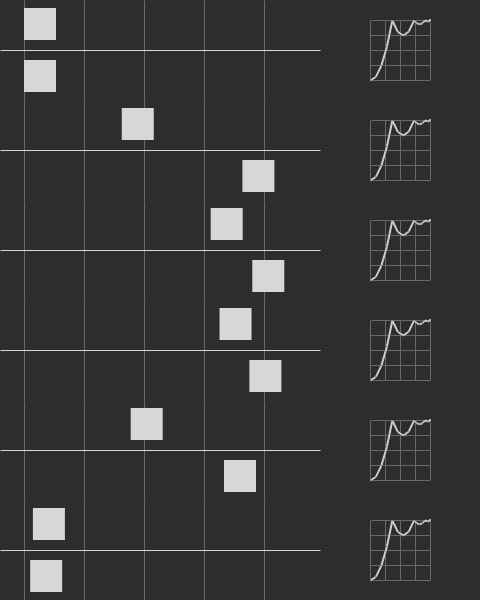
Supported easings:
- Keywords —
linear,ease,ease-in,ease-out,ease-in-out,step-start,step-end cubic-bezier(), including curves that overshootsteps()with every jumpterm —start,end,jump-start,jump-end,jump-both,jump-nonelinear(), with explicit, implicit and doubled stop positions
Requirements
Sublime Text 4. The package uses the 3.8 plugin host, declared in .python-version.
Installation
Package Control
Open the command palette, run Package Control: Install Package, and pick VisuBezier.
Manually
Clone into your Packages directory:
cd "$(python3 -c 'import sublime; print(sublime.packages_path())' 2>/dev/null || echo ~/Library/Application\ Support/Sublime\ Text/Packages)"
git clone https://github.com/mrcgrtz/visubezier.git VisuBezier
The directory must be named VisuBezier — note the capitalisation. The menu and command palette entries reference ${packages}/VisuBezier/, so a clone named visubezier loads and previews fine but has no Settings entry under Preferences → Package Settings.
Changes to files under core/ are picked up on the next reload of visubezier.py; if a pull ever seems to have no effect, restarting Sublime Text is the reliable reset.
Settings
Open them from Preferences → Package Settings → VisuBezier → Settings.
| Setting | Default | Description |
|---|---|---|
reference_easing_function |
"linear" |
Easing animated alongside yours for comparison. Any easing VisuBezier can parse. |
duration |
"1s" |
Duration of one pass of the animation, as a CSS time. |
background |
"#2d2d30" |
Background colour of the preview image. |
foreground |
"#d7d7d7" |
Colour of the curve, grid and animated squares. |
animate |
true |
When false, render a static strobe of the motion instead of playing it. |
show_track |
true |
When false, drop the animation track and preview the curve alone. |
underline |
true |
Underline easing functions in the buffer. |
underline_scope |
"region.bluish" |
Colour scheme scope used for that underline. |
selectors |
see below | Scopes in which previews are active. |
max_file_size |
1048576 |
Skip scanning buffers larger than this many bytes. |
selectors defaults to:
["source.css", "source.scss", "source.sass", "source.less", "source.stylus", "source.postcss", "text.xml"]
Matching is by scope prefix, so source.css also covers CSS embedded in HTML and text.xml covers SVG.
Post-install sample
Paste this into a CSS file and hover the values:
button {
    transition-timing-function: ease;
    transition-timing-function: ease-in;
    transition-timing-function: ease-out;
    transition-timing-function: ease-in-out;
    transition-timing-function: cubic-bezier(0.4, -0.2, 0.42, 1.2);
    transition-timing-function: steps(7);
    transition-timing-function: steps(5, jump-none);
    transition-timing-function: steps(8, jump-both);
    transition-timing-function: steps(4, jump-start);
    transition-timing-function: steps(2, jump-end);
    transition-timing-function: step-start;
    transition-timing-function: step-end;
    transition-timing-function: linear(0, 0.25 25% 75%, 1);
    transition-timing-function: linear(0, 0.063, 0.25, 0.563, 1 36.4%, 0.812, 0.75, 0.813, 1 72.7%, 0.953, 0.938, 0.953, 1 90.9%, 0.984, 1 100% 100%);
    transition-timing-function: ease, steps(3), cubic-bezier(1, 0, 0, 1), linear(0 0%, -0.25, 1.25, 1 100%);
}
How it works
Sublime Text's popup renderer, minihtml, supports neither SVG nor CSS animation, which is how the VS Code extension drew its preview. So VisuBezier rasterises the preview itself:
core/easing.pyparses and evaluates each easing — a Newton-Raphson solver forcubic-bezier(), jumpterm arithmetic forsteps(), piecewise interpolation forlinear().core/raster.pydraws into an indexed-colour canvas whose palette is a single foreground-over-background ramp, giving anti-aliasing for free.core/png.pyencodes that canvas.
minihtml also paints only the first frame of an animated GIF, so animation cannot be delegated to the image format either. An animated preview is instead a sequence of stills that the plugin cycles through with update_popup while the popup is open. core/gif.py survives for one job — generating the animated preview.gif above, via tools/make_preview.py.
All of it is pure Python with no third-party dependencies.
Differences from the VS Code extension
- **
linear()animates.** VS Code's renderer had nolinear()support, so the extension could draw the graph but fell back toeasefor the animation. Evaluating the easing directly removes that limitation. - Overshoot stays in frame. Squares are clamped to the animation track rather than escaping the preview area.
- Adjacent easings are both found. The upstream pattern consumed the delimiter after a match, so the second of
ease,easewas missed. - **
linear()stop positions follow the spec.** They are forced to be non-decreasing, and a final stop keeps its own value rather than being snapped to1. - Settings use Sublime naming and scope selectors instead of VS Code language identifiers. See the changelog for the mapping.
- No inline icon. minihtml cannot place an image inside a line of text, so matches are marked with an underline only.
Known issues
- Easing functions containing anything other than numbers are ignored, including
calc()andvar(). - Rendering an animated preview takes roughly 60 ms the first time; results are cached per easing and settings combination. Set
"animate": falsefor instant static previews, or"show_track": falseto skip the animation altogether. - Animation runs on a timer driven by the plugin, because minihtml supports neither CSS animation nor animated GIFs. It stops as soon as the popup closes.
Tests
python3 tests/run.py
The suite runs outside Sublime Text against a stubbed API. Encoded images are verified against ImageMagick when it is installed, and those tests skip when it is not.
Credits
Original VS Code extension by Chris Kirk-Nielsen. Sublime Text port by Marc Görtz.