
HexViewer
Hex viewer and editor for SublimeText
Details
Installs
- Total 215K
- Win 129K
- Mac 55K
- Linux 30K
| Oct 27 | Oct 26 | Oct 25 | Oct 24 | Oct 23 | Oct 22 | Oct 21 | Oct 20 | Oct 19 | Oct 18 | Oct 17 | Oct 16 | Oct 15 | Oct 14 | Oct 13 | Oct 12 | Oct 11 | Oct 10 | Oct 9 | Oct 8 | Oct 7 | Oct 6 | Oct 5 | Oct 4 | Oct 3 | Oct 2 | Oct 1 | Sep 30 | Sep 29 | Sep 28 | Sep 27 | Sep 26 | Sep 25 | Sep 24 | Sep 23 | Sep 22 | Sep 21 | Sep 20 | Sep 19 | Sep 18 | Sep 17 | Sep 16 | Sep 15 | Sep 14 | Sep 13 | Sep 12 | |
|---|---|---|---|---|---|---|---|---|---|---|---|---|---|---|---|---|---|---|---|---|---|---|---|---|---|---|---|---|---|---|---|---|---|---|---|---|---|---|---|---|---|---|---|---|---|---|
| Windows | 5 | 8 | 3 | 7 | 11 | 16 | 11 | 11 | 8 | 14 | 4 | 9 | 9 | 8 | 20 | 17 | 6 | 8 | 19 | 16 | 9 | 10 | 10 | 6 | 5 | 5 | 9 | 4 | 12 | 8 | 10 | 8 | 7 | 17 | 20 | 28 | 13 | 9 | 7 | 6 | 7 | 13 | 6 | 12 | 6 | 6 |
| Mac | 5 | 6 | 4 | 1 | 4 | 6 | 7 | 4 | 1 | 1 | 3 | 4 | 3 | 3 | 3 | 5 | 0 | 5 | 3 | 6 | 4 | 0 | 5 | 1 | 4 | 3 | 5 | 1 | 4 | 5 | 0 | 7 | 5 | 4 | 6 | 5 | 8 | 3 | 0 | 2 | 7 | 3 | 1 | 4 | 3 | 1 |
| Linux | 1 | 5 | 0 | 1 | 2 | 2 | 1 | 5 | 4 | 1 | 2 | 1 | 5 | 1 | 2 | 5 | 6 | 1 | 5 | 2 | 2 | 3 | 4 | 3 | 2 | 1 | 3 | 3 | 1 | 2 | 1 | 3 | 2 | 2 | 3 | 2 | 0 | 0 | 1 | 1 | 3 | 0 | 2 | 6 | 5 | 1 |
Readme
- Source
- raw.githubusercontent.com


HexViewer
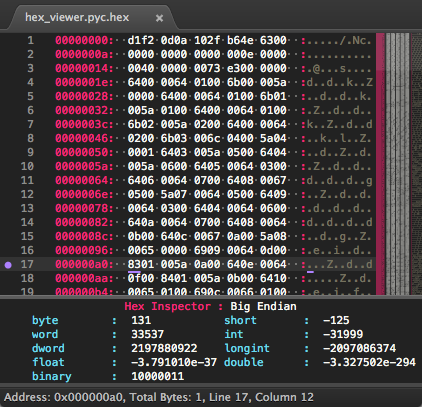
HexViewer is a plugin for Sublime Text that allows the toggling of a file into a hex viewing mode. HexViewer also supports limited hex editing.
Features
- View any file (that exist on disk) in a hex format showing both byte and ASCII representation.
- Command to jump to a specific address.
- In place editing of bytes or ASCII chars.
- Highlight selected byte and ASCII code.
- Inspection panel showing different integer representation at the cursor position.
- Configurable display of byte grouping, bytes per line, endianness.
- Export hex view to a binary file.
- Get the checksum of a given file (various checksums are available).
- Generate checksum/hash from input via panel or text selection.
- Optionally auto convert binary to hex view.
Documentation
https://facelessuser.github.io/HexViewer/
License
Hex Viewer is released under the MIT license.