
Theme - Darkroom
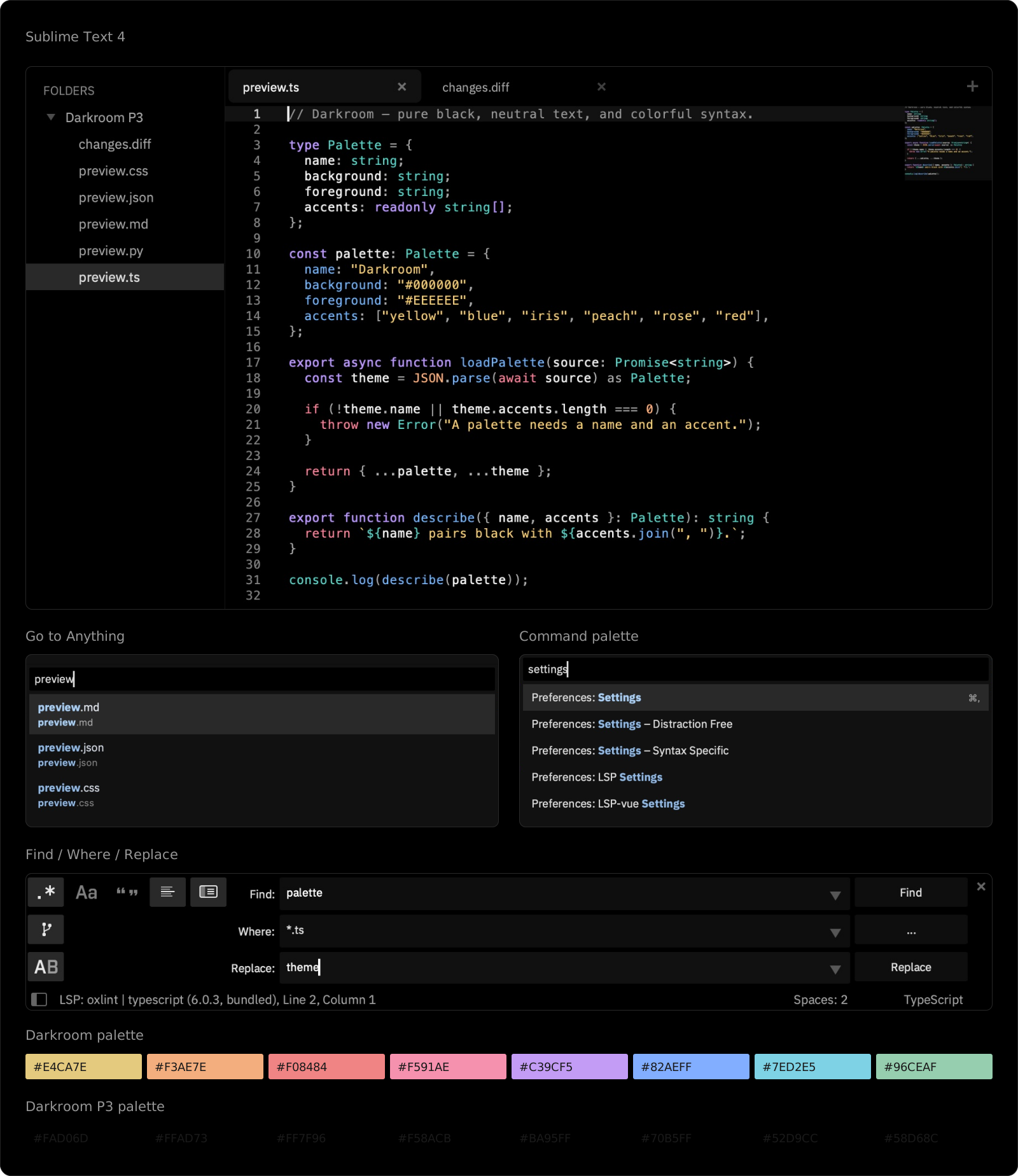
A pure black Sublime Text 4 theme with neutral text and colorful syntax.
Details
Installs
- Total 1
- Win 0
- Mac 1
- Linux 0
| Nov 2 | Nov 1 | Oct 31 | Oct 30 | Oct 29 | Oct 28 | Oct 27 | Oct 26 | Oct 25 | Oct 24 | Oct 23 | Oct 22 | Oct 21 | Oct 20 | Oct 19 | Oct 18 | Oct 17 | Oct 16 | Oct 15 | Oct 14 | Oct 13 | Oct 12 | Oct 11 | Oct 10 | Oct 9 | Oct 8 | Oct 7 | Oct 6 | Oct 5 | Oct 4 | Oct 3 | Oct 2 | Oct 1 | Sep 30 | Sep 29 | Sep 28 | Sep 27 | Sep 26 | Sep 25 | Sep 24 | Sep 23 | Sep 22 | Sep 21 | Sep 20 | Sep 19 | |
|---|---|---|---|---|---|---|---|---|---|---|---|---|---|---|---|---|---|---|---|---|---|---|---|---|---|---|---|---|---|---|---|---|---|---|---|---|---|---|---|---|---|---|---|---|---|
| Windows | 0 | 0 | 0 | 0 | 0 | 0 | 0 | 0 | 0 | 0 | 0 | 0 | 0 | 0 | 0 | 0 | 0 | 0 | 0 | 0 | 0 | 0 | 0 | 0 | 0 | 0 | 0 | 0 | 0 | 0 | 0 | 0 | 0 | 0 | 0 | 0 | 0 | 0 | 0 | 0 | 0 | 0 | 0 | 0 | 0 |
| Mac | 0 | 1 | 0 | 0 | 0 | 0 | 0 | 0 | 0 | 0 | 0 | 0 | 0 | 0 | 0 | 0 | 0 | 0 | 0 | 0 | 0 | 0 | 0 | 0 | 0 | 0 | 0 | 0 | 0 | 0 | 0 | 0 | 0 | 0 | 0 | 0 | 0 | 0 | 0 | 0 | 0 | 0 | 0 | 0 | 0 |
| Linux | 0 | 0 | 0 | 0 | 0 | 0 | 0 | 0 | 0 | 0 | 0 | 0 | 0 | 0 | 0 | 0 | 0 | 0 | 0 | 0 | 0 | 0 | 0 | 0 | 0 | 0 | 0 | 0 | 0 | 0 | 0 | 0 | 0 | 0 | 0 | 0 | 0 | 0 | 0 | 0 | 0 | 0 | 0 | 0 | 0 |
Readme
- Source
- raw.githubusercontent.com
Darkroom
Install
Requires Sublime Text 4 4197+ on macOS. Install IBM Plex Sans for the interface font.
Package Control submission is pending. Install from a checkout:
git clone https://github.com/pioug/sublime-darkroom.git
cd sublime-darkroom
bash scripts/install.sh
In the Command Palette (⌘⇧P), select Darkroom under both
UI: Select Theme and UI: Select Color Scheme.
For eight wide-gamut accents on Display P3 Macs, choose Darkroom P3 under UI: Select Color Scheme. It keeps the pure black background and neutral text.
For a standalone archive and release steps, see RELEASING.md.
License
MIT · Gilles Piou