
niceDarkTheme
Dark UI theme, color scheme and file icons for Sublime Text 4: graphite and teal, with an optional side bar | files | terminal layout
Details
Installs
- Total 34
- Win 22
- Mac 4
- Linux 8
| Oct 29 | Oct 28 | Oct 27 | Oct 26 | Oct 25 | Oct 24 | Oct 23 | Oct 22 | Oct 21 | Oct 20 | Oct 19 | Oct 18 | Oct 17 | Oct 16 | Oct 15 | Oct 14 | Oct 13 | Oct 12 | Oct 11 | Oct 10 | Oct 9 | Oct 8 | Oct 7 | Oct 6 | Oct 5 | Oct 4 | Oct 3 | Oct 2 | Oct 1 | Sep 30 | Sep 29 | Sep 28 | Sep 27 | Sep 26 | Sep 25 | Sep 24 | Sep 23 | Sep 22 | Sep 21 | Sep 20 | Sep 19 | Sep 18 | Sep 17 | Sep 16 | Sep 15 | |
|---|---|---|---|---|---|---|---|---|---|---|---|---|---|---|---|---|---|---|---|---|---|---|---|---|---|---|---|---|---|---|---|---|---|---|---|---|---|---|---|---|---|---|---|---|---|
| Windows | 0 | 0 | 0 | 0 | 1 | 0 | 2 | 1 | 1 | 0 | 1 | 1 | 0 | 1 | 0 | 1 | 0 | 3 | 1 | 1 | 2 | 5 | 4 | 0 | 0 | 0 | 0 | 0 | 0 | 0 | 0 | 0 | 0 | 0 | 0 | 0 | 0 | 0 | 0 | 0 | 0 | 0 | 0 | 0 | 0 |
| Mac | 0 | 0 | 0 | 1 | 0 | 0 | 0 | 0 | 0 | 0 | 0 | 0 | 1 | 0 | 0 | 0 | 0 | 0 | 0 | 1 | 0 | 1 | 0 | 0 | 0 | 0 | 0 | 0 | 0 | 0 | 0 | 0 | 0 | 0 | 0 | 0 | 0 | 0 | 0 | 0 | 0 | 0 | 0 | 0 | 0 |
| Linux | 0 | 0 | 0 | 0 | 0 | 1 | 0 | 0 | 0 | 0 | 1 | 0 | 0 | 1 | 0 | 1 | 0 | 0 | 1 | 1 | 2 | 0 | 0 | 0 | 0 | 0 | 0 | 0 | 0 | 0 | 0 | 0 | 0 | 0 | 0 | 0 | 0 | 0 | 0 | 0 | 0 | 0 | 0 | 0 | 0 |
Readme
- Source
- raw.githubusercontent.com
niceDarkTheme
A dark UI theme and color scheme for Sublime Text 4: neutral graphite surfaces (the editor darker than the side bar and tab bar), a teal accent, a colorful but even syntax palette, and matching file icons. It also sets up a three-pane default layout:
┌──────────┬──────────────────────────────┬──────────────┐
│ side bar │ files (70%)                  │ terminal     │
│ folders  │                              │ (Terminus,   │
│ & open   │                              │  30%)        │
│ files    │                              │              │
└──────────┴──────────────────────────────┴──────────────┘
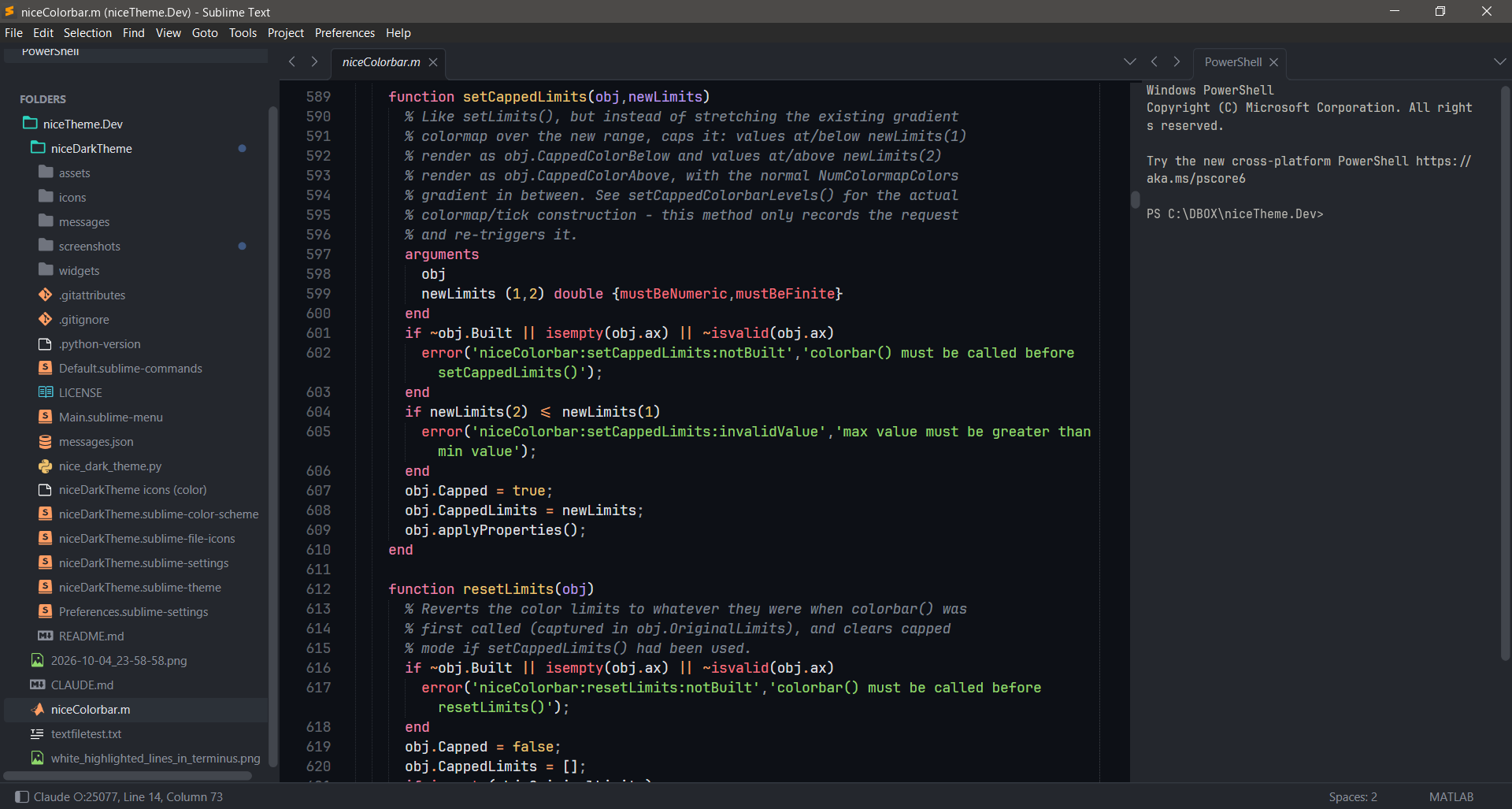
The menu stays a horizontal bar at the top of the window on Windows and Linux. It is not collapsed into a hamburger button.
Alternative layouts
You can change the layout at any time, either from the menu under Preferences › Package Settings › niceDarkTheme, or from the Command Palette (Ctrl/Cmd+Shift+P) by typing niceDarkTheme and choosing Terminal on the Right, Terminal at the Bottom or Without Terminal.
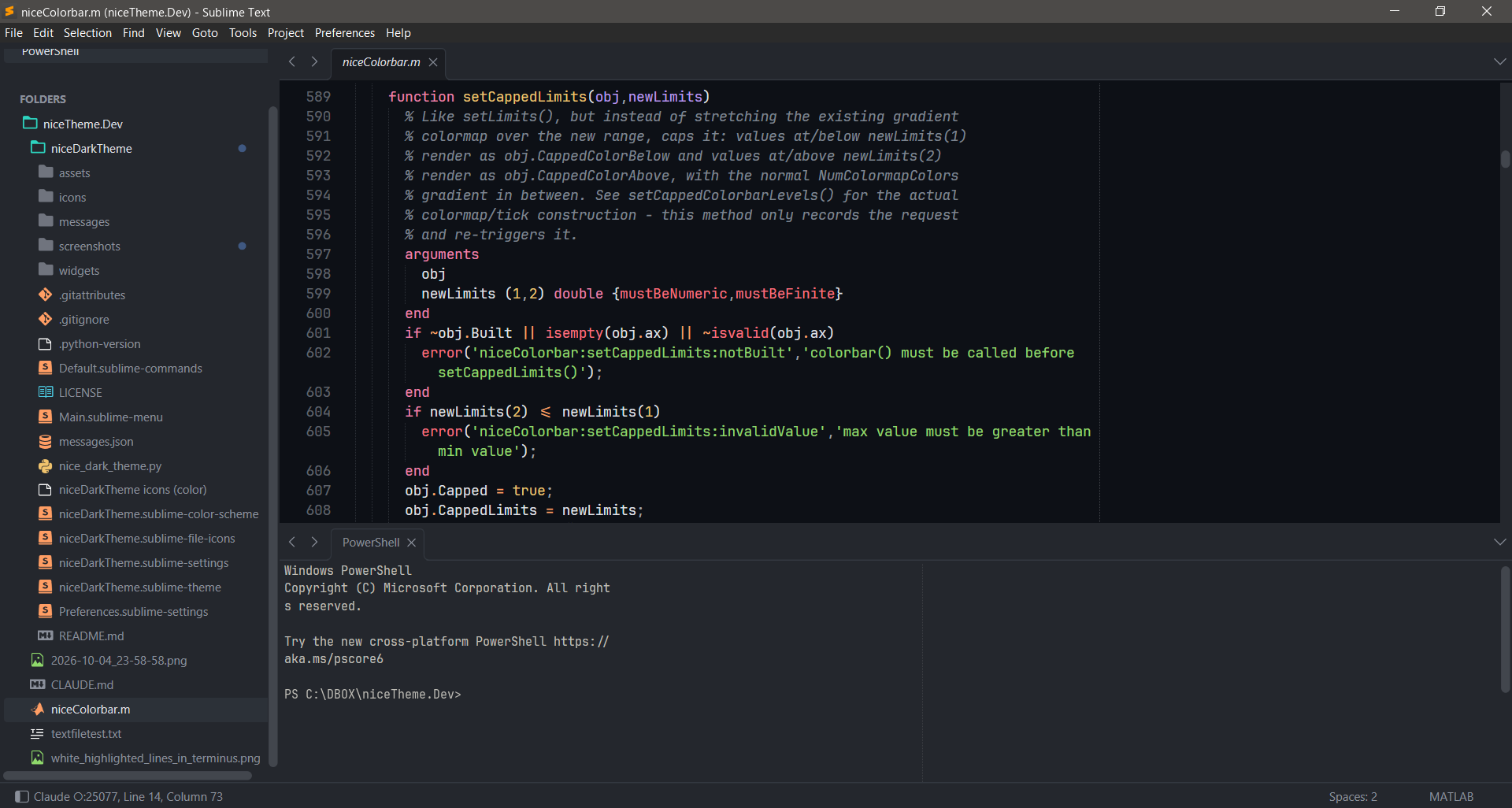
Terminal at the bottom. The terminal sits under the files, as wide as the editor area. The side bar is unaffected. Switch with Terminal at the Bottom (and back with Terminal on the Right).
┌──────────┬─────────────────────────────────────────────┐
│ side bar │ files (65%)                                 │
│          ├─────────────────────────────────────────────┤
│          │ terminal (Terminus, 35%)                    │
└──────────┴─────────────────────────────────────────────┘
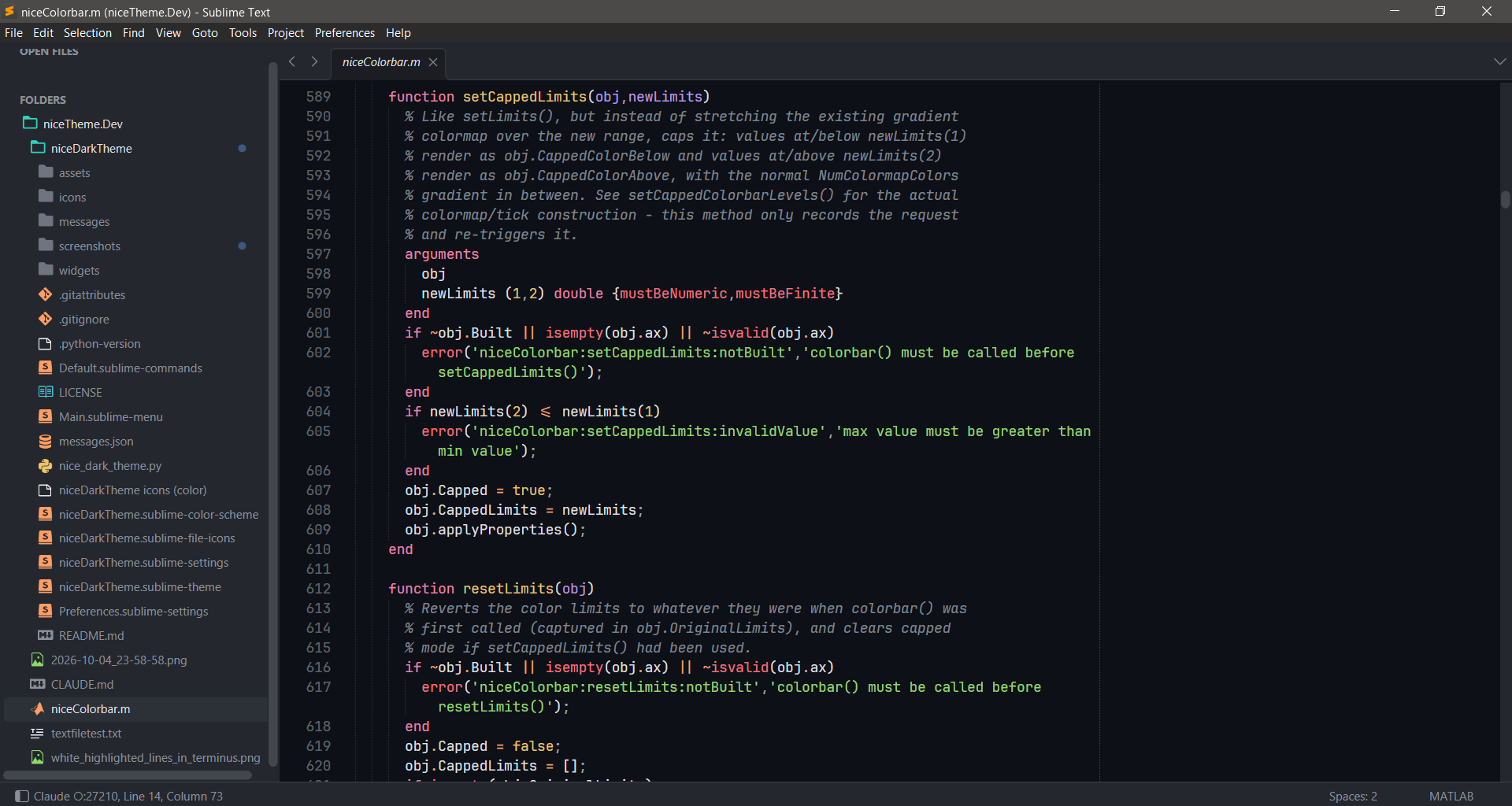
No terminal. Just the side bar and your files in a single view. Switch with Without Terminal. If a terminal is open, it asks before closing it, because that ends whatever is running in it. New windows then open without a terminal until you pick Terminal on the Right or at the Bottom again.
┌──────────┬────────────────────────────────────────────┐
│ side bar │ files                                      │
│          │                                            │
│          │                                            │
└──────────┴────────────────────────────────────────────┘
Install
What you need
| What | Needed for | Without it | How to get it |
|---|---|---|---|
| Sublime Text 4 | the theme itself | build 4206 or later, for the file icons (Sublime Text 3 is untested) | |
| Terminus | the terminal pane (right or bottom) | windows open with the side bar and files only | niceDarkTheme: Activate offers it, or Package Control: Install Package › Terminus |
| JetBrains Mono font | only Apply Recommended Settings, which sets it as the editor font | Sublime falls back to its default font | install the font on your system; it isn't bundled |
Terminus is a separate package, and Package Control can't install it as a dependency of a theme. That is why it is offered as a prompt. The file icons need nothing extra: they ship with the theme.
Package Control
- Open the Command Palette (Ctrl/Cmd+Shift+P) and run Package Control: Install Package.
- Choose niceDarkTheme.
- Run niceDarkTheme: Activate from the Command Palette. If Terminus is missing, it offers to install it.
- Optional: run niceDarkTheme: Apply Recommended Settings (see Commands).
Manual
Clone this repository into your Packages folder (Preferences › Browse Packages…) as niceDarkTheme:
git clone https://github.com/aaortizb/niceDarkTheme.git niceDarkTheme
Or activate it by hand in Preferences.sublime-settings:
"theme": "niceDarkTheme.sublime-theme",
"color_scheme": "niceDarkTheme.sublime-color-scheme",
File icons
The theme ships its own file icons (MATLAB, Markdown, images, config files such as package.json, …), colored to match its palette, through Sublime's file icon theme feature. Sublime loads niceDarkTheme.sublime-file-icons automatically while niceDarkTheme is the active theme; no setting is needed. This needs Sublime Text build 4206 or later; on older builds files show a generic icon. To use another icon set, set file_icon_theme in your own Preferences to the full file name of that set, for example "file_icon_theme": ["FileIcons (color).sublime-file-icons"]. To refer to this theme's set explicitly, the file name is niceDarkTheme.sublime-file-icons. The icons are based on FileIcons by Koen Lageveen (MIT), recolored.
Layout
When niceDarkTheme is the active theme, every window gets the layout at startup and whenever a new window opens. A window that already has a terminal, such as one restored from the last session, is left alone.
Switch the terminal's position under Preferences › Package Settings › niceDarkTheme: Terminal on the Right, Terminal at the Bottom or Without Terminal. The same three are in the Command Palette as niceDarkTheme: Terminal on the Right and so on. The choice is remembered, and an open terminal moves with it. Changing terminal_column_width or terminal_row_height in the settings, or terminal_position to "right" or "bottom", applies to open windows as soon as you save. "none" takes effect in new windows; use Without Terminal to close the terminal in a window you already have.
The terminal needs Terminus. Without Terminus, windows open with the side bar and files only.
Change these options under Preferences › Package Settings › niceDarkTheme › Settings:
| Setting | Default | Description |
|---|---|---|
layout_on_startup |
true |
Apply the layout at startup and in new windows |
terminal_position |
"right" |
"right" (column), "bottom" (row) or "none" (no terminal) |
terminal_column_width |
0.3 |
Width fraction of the terminal on the right |
terminal_row_height |
0.35 |
Height fraction of the terminal at the bottom |
open_terminal |
true |
Open a Terminus terminal. false also gives the single view |
terminal_args |
{} |
Arguments for terminus_open, e.g. {"config_name": "PowerShell"} |
keep_files_out_of_terminal |
true |
Files opened while the terminal has focus open in the files pane, not next to the terminal |
focus_files_after_terminal |
true |
Return focus to the files column |
show_side_bar / show_minimap |
true / false |
Side bar and minimap visibility |
Commands
| Command Palette | Command |
|---|---|
| niceDarkTheme: Activate | nice_activate |
| niceDarkTheme: Apply Recommended Settings | nice_apply_recommended_settings |
| niceDarkTheme: Apply Default Layout | nice_apply_layout |
| niceDarkTheme: Open Terminal | nice_open_terminal |
| niceDarkTheme: Terminal on the Right | nice_set_terminal_position {"position": "right"} |
| niceDarkTheme: Terminal at the Bottom | nice_set_terminal_position {"position": "bottom"} |
| niceDarkTheme: Without Terminal | nice_set_terminal_position {"position": "none"} |
niceDarkTheme indents with 2 spaces by default ("tab_size": 2, "translate_tabs_to_spaces": true). This default applies while the package is installed, even if you switch to another theme. Your own Preferences and syntax-specific settings override it.
Apply Recommended Settings asks for confirmation, then writes these editor settings to your user preferences: JetBrains Mono at 10.5, phase caret, a highlighted current line, line padding of 1, a ruler and word wrap at column 90, 2-space soft tabs, trimming trailing whitespace on save, and saving on focus lost. If Terminus is installed, it also sets the Terminus font size to 9 and the history to 3,000 lines. On Windows, it makes PowerShell the default Terminus shell, because under cmd.exe full-screen programs such as Claude Code can lag and misdraw typed characters. The dialog lists every change before anything is written.
Theme options
Set these in Preferences.sublime-settings:
| Setting | Default | Description |
|---|---|---|
nice_separator |
true |
Separators between the side bar, editor and panels |
nice_wide_scrollbars |
false |
Wider scroll bars |
nice_custom_titlebar |
false |
Theme-colored title bar. On Windows, this collapses the menu into a hamburger button |
File icons can be changed with the file_icon_theme setting (see File icons).
Credits
niceDarkTheme started from the dark variant of ayu by Ike Ku (MIT); the palette has since been redesigned. The file icons are based on FileIcons by Koen Lageveen (MIT), recolored. See LICENSE.