
Mercurial Color Scheme
Mercurial - A dark color scheme for Sublime Text based on Warp Terminal
Details
Installs
- Total 83
- Win 28
- Mac 33
- Linux 22
| Oct 10 | Oct 9 | Oct 8 | Oct 7 | Oct 6 | Oct 5 | Oct 4 | Oct 3 | Oct 2 | Oct 1 | Sep 30 | Sep 29 | Sep 28 | Sep 27 | Sep 26 | Sep 25 | Sep 24 | Sep 23 | Sep 22 | Sep 21 | Sep 20 | Sep 19 | Sep 18 | Sep 17 | Sep 16 | Sep 15 | Sep 14 | Sep 13 | Sep 12 | Sep 11 | Sep 10 | Sep 9 | Sep 8 | Sep 7 | Sep 6 | Sep 5 | Sep 4 | Sep 3 | Sep 2 | Sep 1 | Aug 31 | Aug 30 | Aug 29 | Aug 28 | Aug 27 | |
|---|---|---|---|---|---|---|---|---|---|---|---|---|---|---|---|---|---|---|---|---|---|---|---|---|---|---|---|---|---|---|---|---|---|---|---|---|---|---|---|---|---|---|---|---|---|
| Windows | 0 | 0 | 0 | 0 | 0 | 0 | 0 | 0 | 0 | 0 | 0 | 0 | 0 | 0 | 0 | 0 | 0 | 0 | 0 | 0 | 0 | 0 | 0 | 0 | 0 | 0 | 0 | 0 | 0 | 0 | 0 | 0 | 0 | 0 | 1 | 1 | 0 | 0 | 0 | 0 | 0 | 0 | 0 | 0 | 0 |
| Mac | 0 | 0 | 0 | 0 | 0 | 0 | 0 | 0 | 0 | 0 | 0 | 0 | 0 | 0 | 0 | 1 | 1 | 0 | 0 | 0 | 0 | 0 | 0 | 0 | 0 | 0 | 0 | 0 | 0 | 0 | 0 | 0 | 0 | 0 | 0 | 0 | 0 | 0 | 0 | 0 | 0 | 1 | 0 | 0 | 0 |
| Linux | 0 | 0 | 0 | 0 | 0 | 0 | 0 | 0 | 0 | 0 | 0 | 1 | 0 | 0 | 0 | 0 | 0 | 0 | 0 | 0 | 0 | 0 | 0 | 0 | 0 | 0 | 0 | 0 | 0 | 0 | 0 | 0 | 0 | 0 | 0 | 0 | 0 | 1 | 0 | 0 | 0 | 0 | 0 | 0 | 0 |
Readme
- Source
- raw.githubusercontent.com
Mercurial Color Scheme


A dark and light color scheme for Sublime Text based on Warp Terminal's default palette. Clean, balanced, and easy on the eyes for long coding sessions.
Variants
| Variant | Background | Best For |
|---|---|---|
| Mercurial (dark) |  #181818 |
Low-light / night coding |
| Mercurial Light |  #fafafa |
Bright environments / daylight |
Preview
Mercurial (Dark)
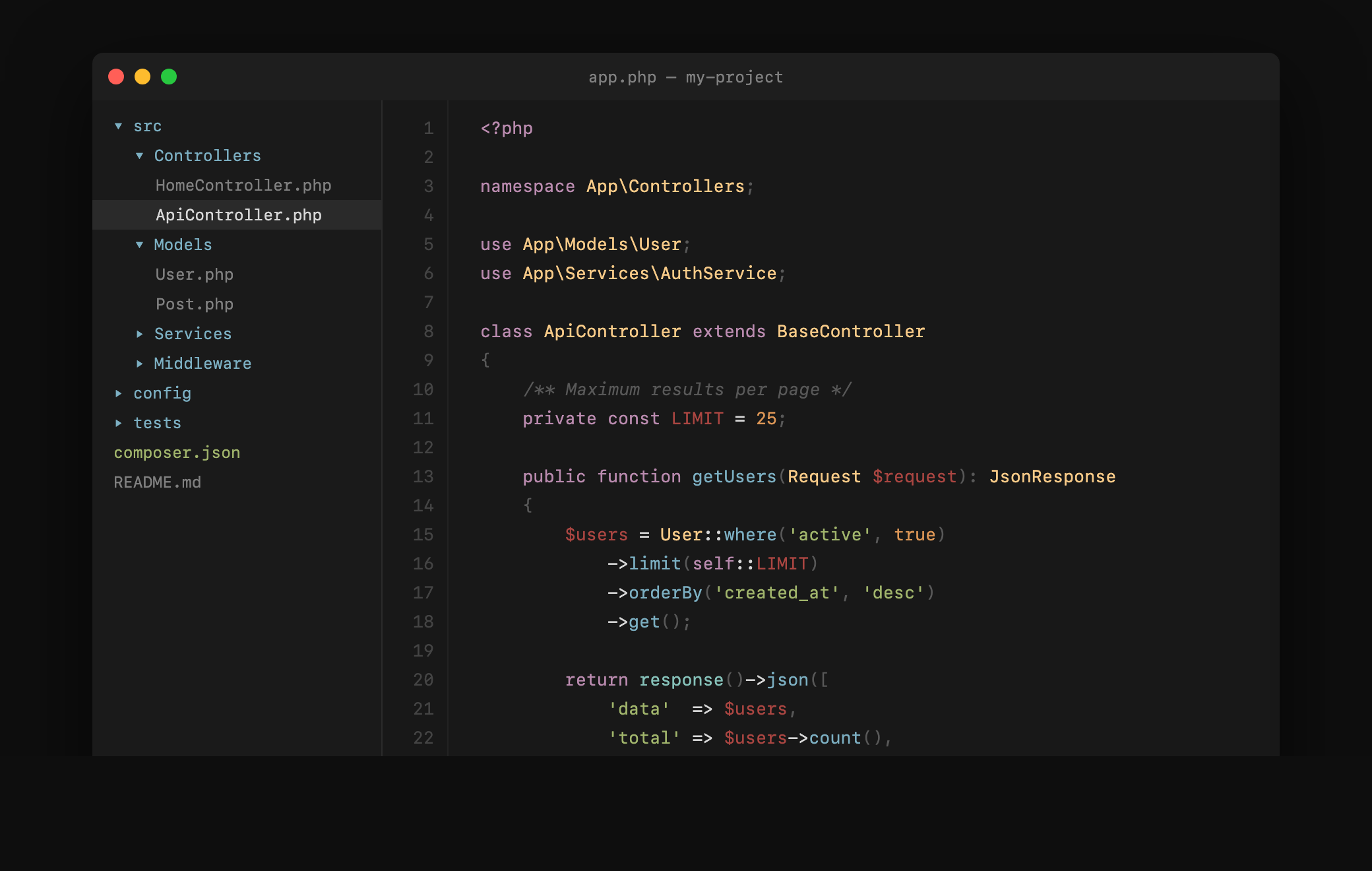
PHP
JavaScript
CSS
HTML
Installation
Package Control (Recommended)
- Open Command Palette (
Cmd+Shift+P/Ctrl+Shift+P) - Select Package Control: Install Package
- Search for Mercurial Color Scheme
- Activate:
- Dark: Preferences > Color Scheme > Mercurial
- Light: Preferences > Color Scheme > Mercurial Light
Manual Installation
- Download the desired scheme files
- Place in
Packages/User/(Preferences > Browse Packages) - Activate via Preferences > Color Scheme
Sublime Text < Build 3149
Use the .tmTheme files. Add to your settings:
"color_scheme": "Packages/Mercurial Color Scheme/Mercurial.tmTheme"
Colors (Dark)
| Role | Color | Hex |
|---|---|---|
| Background | |
#181818 |
| Foreground |  |
#d8d8d8 |
| Comments |  |
#585858 |
| Strings |  |
#a1b56c |
| Keywords |  |
#ba8baf |
| Functions |  |
#7cafc2 |
| Tags/Variables |  |
#ab4642 |
| Classes/Types |  |
#f7ca88 |
| Numbers |  |
#dc9656 |
| Library/Support |  |
#86c1b9 |
Colors (Light)
| Role | Color | Hex |
|---|---|---|
| Background | |
#fafafa |
| Foreground |  |
#383838 |
| Comments |  |
#909090 |
| Strings |  |
#4d6820 |
| Keywords |  |
#8b4d80 |
| Functions |  |
#2a6f8e |
| Tags/Variables |  |
#a03530 |
| Classes/Types |  |
#8a6d20 |
| Numbers |  |
#b06020 |
| Library/Support |  |
#247067 |
Plugin Compatibility
Mercurial includes dedicated scopes for these popular Sublime Text plugins:
- GitGutter — colored gutter marks for insertions, deletions, and changes
- BracketHighlighter — per-bracket-type coloring (curly, round, square, angle, tag, quote)
- SublimeLinter — error, warning, and info mark colors (SublimeLinter 4+)
Supported Languages
Full syntax coverage for PHP, JavaScript, TypeScript, HTML, CSS, LESS, Sass/SCSS, JSON, YAML, Markdown, SQL, Python, Shell/Bash, CoffeeScript, Makefile, Twig, Handlebars, and all languages using standard TextMate scopes.
Credits
- Palette: Based on Warp Terminal default dark theme
- Author: Renzo Johnson
- License: MIT