
BoxLang
The Official BoxLang Support Package for Sublime Text
Details
Installs
- Total 11
- Win 8
- Mac 1
- Linux 2
| Nov 3 | Nov 2 | Nov 1 | Oct 31 | Oct 30 | Oct 29 | Oct 28 | Oct 27 | Oct 26 | Oct 25 | Oct 24 | Oct 23 | Oct 22 | Oct 21 | Oct 20 | Oct 19 | Oct 18 | Oct 17 | Oct 16 | Oct 15 | Oct 14 | Oct 13 | Oct 12 | Oct 11 | Oct 10 | Oct 9 | Oct 8 | Oct 7 | Oct 6 | Oct 5 | Oct 4 | Oct 3 | Oct 2 | Oct 1 | Sep 30 | Sep 29 | Sep 28 | Sep 27 | Sep 26 | Sep 25 | Sep 24 | Sep 23 | Sep 22 | Sep 21 | Sep 20 | |
|---|---|---|---|---|---|---|---|---|---|---|---|---|---|---|---|---|---|---|---|---|---|---|---|---|---|---|---|---|---|---|---|---|---|---|---|---|---|---|---|---|---|---|---|---|---|
| Windows | 0 | 0 | 0 | 0 | 0 | 0 | 0 | 0 | 0 | 0 | 0 | 0 | 0 | 0 | 0 | 0 | 0 | 0 | 0 | 0 | 0 | 0 | 1 | 0 | 0 | 1 | 3 | 0 | 0 | 0 | 0 | 0 | 0 | 0 | 0 | 0 | 0 | 0 | 0 | 0 | 1 | 0 | 0 | 0 | 0 |
| Mac | 0 | 0 | 0 | 0 | 0 | 0 | 0 | 0 | 0 | 0 | 0 | 0 | 0 | 0 | 0 | 0 | 0 | 0 | 0 | 0 | 0 | 0 | 0 | 0 | 0 | 0 | 0 | 0 | 0 | 0 | 0 | 0 | 0 | 0 | 0 | 0 | 0 | 0 | 0 | 0 | 1 | 0 | 0 | 0 | 0 |
| Linux | 0 | 0 | 0 | 0 | 0 | 0 | 0 | 0 | 0 | 0 | 0 | 0 | 0 | 0 | 0 | 0 | 0 | 0 | 0 | 0 | 0 | 0 | 0 | 0 | 0 | 0 | 0 | 0 | 0 | 0 | 0 | 0 | 0 | 0 | 0 | 0 | 1 | 0 | 0 | 0 | 0 | 0 | 0 | 0 | 0 |
Readme
- Source
- raw.githubusercontent.com
BoxLang Language Support for Sublime Text


Comprehensive BoxLang language support for Sublime Text 4. Provides syntax highlighting, intelligent completions, inline documentation, code formatting, type inference, and build tools for the BoxLang programming language.
Features
Syntax Highlighting
.bx— Script classes with full syntax support.bxs— Script-only files.bxm— Module templates with embedded script blocks
Intelligent Completions
- 940+ Built-in Functions (639 core + 303 module) with parameter hints and snippet insertion
- 86 BoxLang Tags (
bx:components) (49 core + 37 module) with attribute completions - 370+ Member Functions for native types (string, array, struct, query, numeric, date, datetime, list, xml)
- Dot-Path Completions for
import,new, andcreateObject()statements - Type-Aware Completions based on inferred variable types
- Component Indexing with inheritance resolution for project-wide completions
Inline Documentation
- F1 Popup — Full documentation with parameter references
- Hover Docs — Quick info on mouse hover
- Completion Docs — Parameter hints during auto-complete
- Go to Docs — Navigate to boxlang.ortusbooks.com
Developer Tools
- Code Formatting via
boxlang formatCLI - Build System — Run, compile, debug, and audit BoxLang files
- Go to Definition — Command Palette navigation to classes and functions
- Go to Spec / Property — Quick panels for TestBox
describe()/it()names andpropertydeclarations - Syntax Check —
boxlang checkon save (and optionally while typing) with squiggles, gutter icons, inline error annotations, an error panel, and F4/Shift+F4 navigation - TestBox Runner — Run the current bundle, the spec at the cursor, or all tests with the BoxLang runner (or a project web runner) and see failures inline
- Error Panel — Parse error display with F4/Shift+F4 navigation
- Version Info —
BoxLang: Show Version Infoshows the BoxLang version, executable, install type (BVM, Homebrew, quick installer, …) and project details - Status Bar — Version, indexing progress, and error counts
- Code Snippets — 19 built-in snippets for common patterns, including sets, ranges, inner classes, query transformers and scheduled tasks
Screenshots
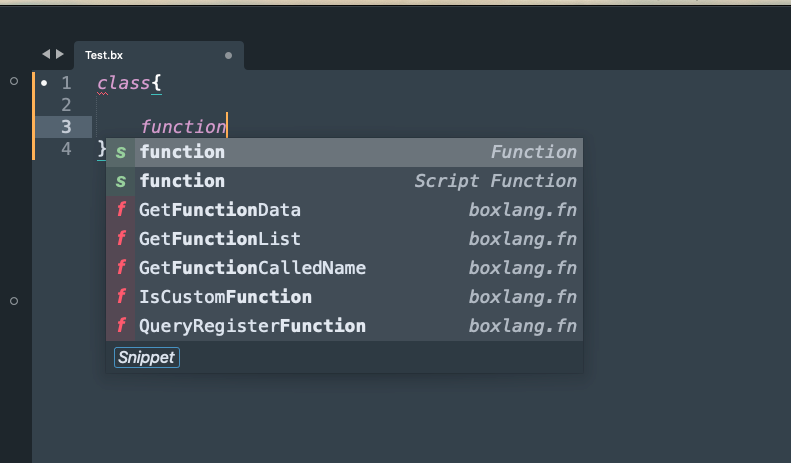 Context-aware completions |
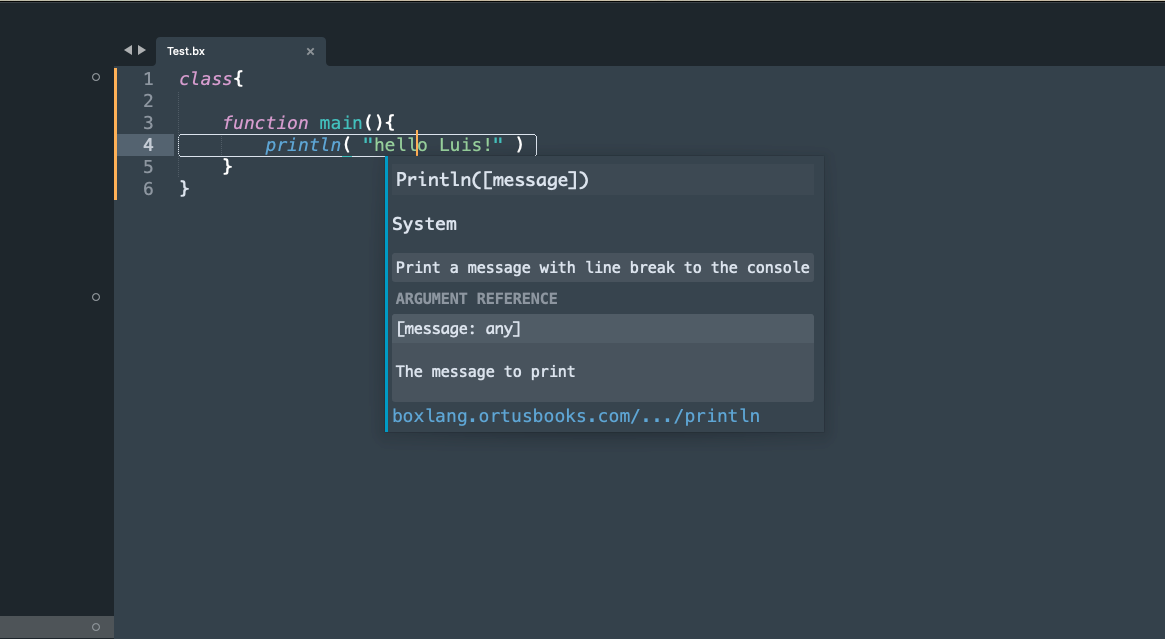 Inline documentation |
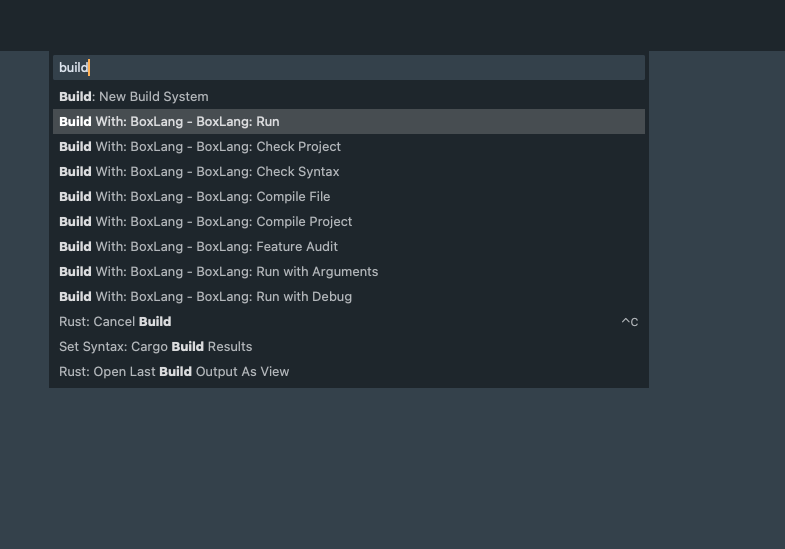 Build variants |
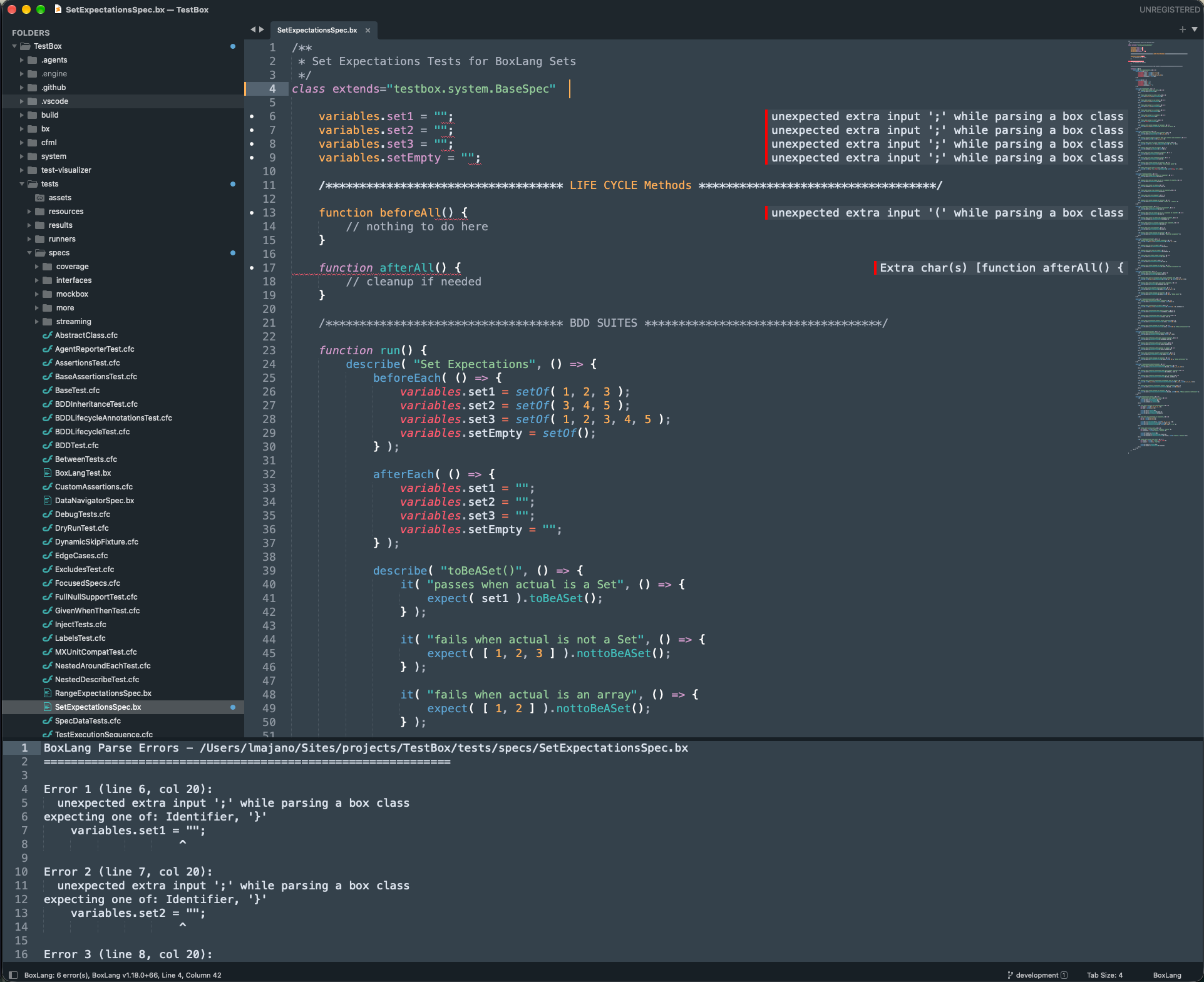 Syntax diagnostics |
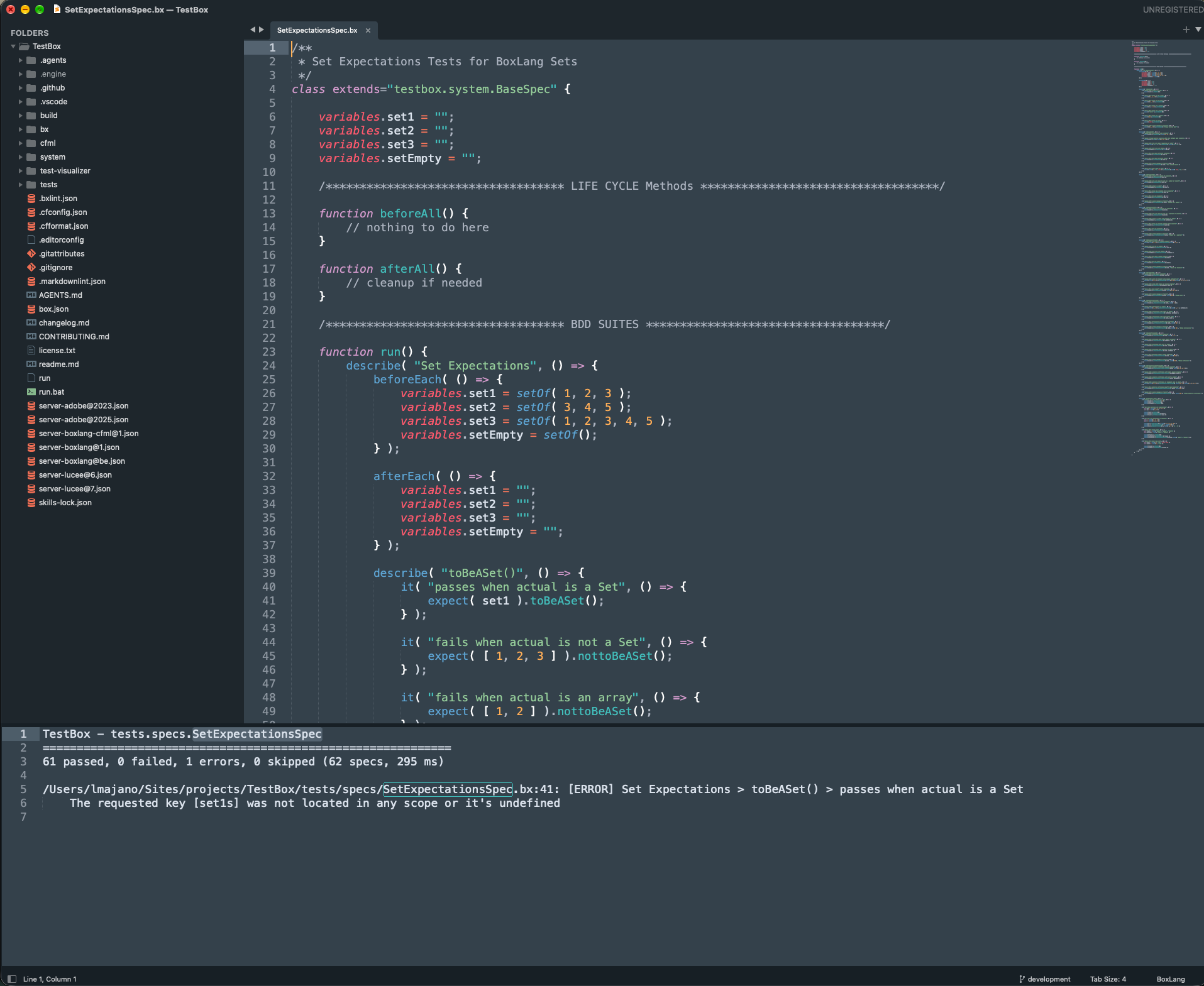 TestBox results |
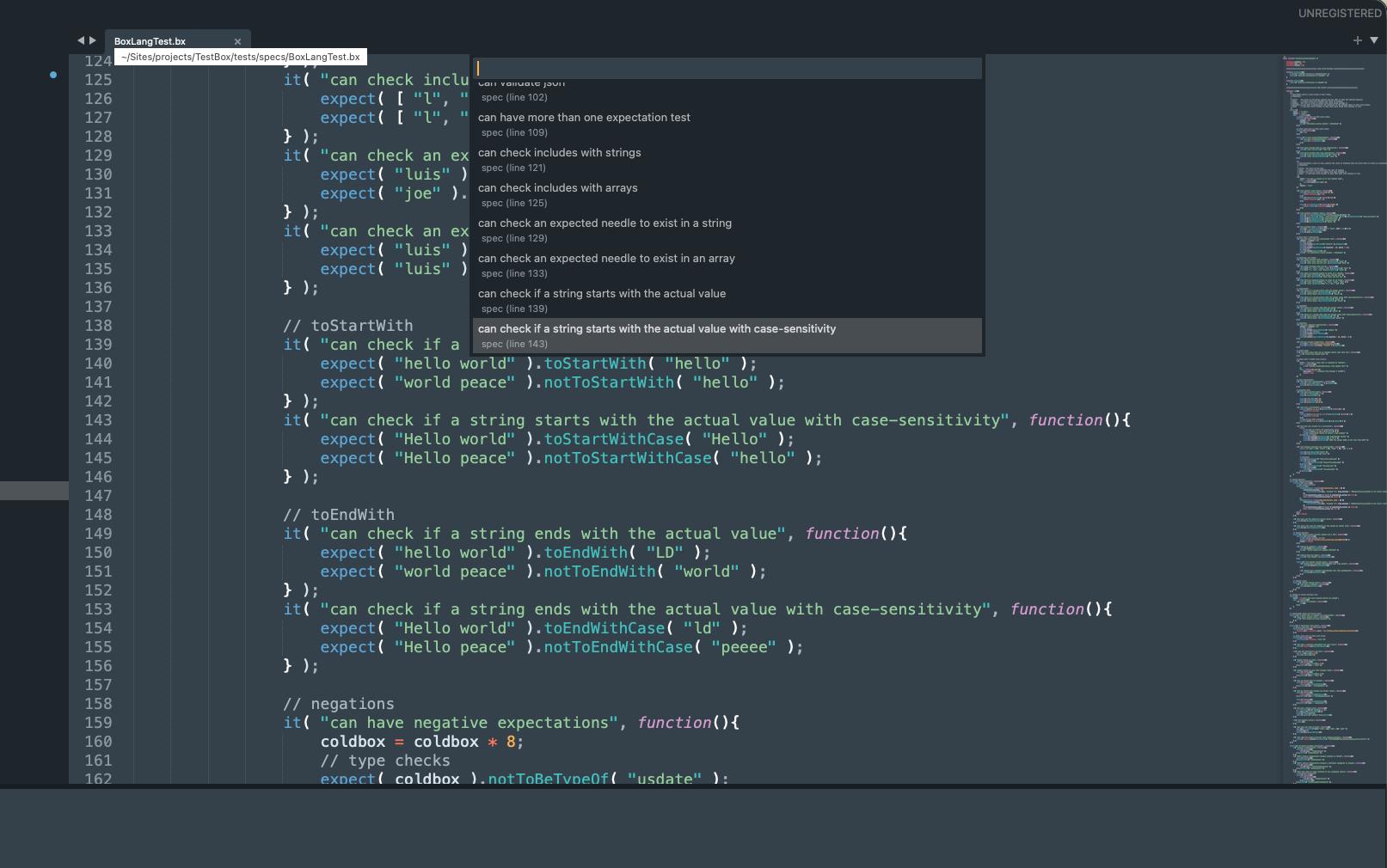 TestBox spec navigation |
Requirements
| Dependency | Version | Purpose |
|---|---|---|
| Sublime Text | 4 (Build 4180+) | Editor platform |
| BoxLang | 1.17.0+ | CLI for parsing, syntax checking, formatting, compilation |
| Python | 3.11+ | Plugin runtime (bundled with Sublime Text) |
Note: Syntax highlighting works without BoxLang installed. Full feature set requires the BoxLang CLI available in your PATH.
Installation
Via Package Control (Recommended)
- Open Command Palette (
Cmd+Shift+P/Ctrl+Shift+P) - Select
Package Control: Install Package - Search for
BoxLangand press Enter
Manual Installation
git clone https://github.com/ortus-boxlang/sublimetext-boxlang.git \
  ~/Library/Application\ Support/Sublime\ Text/Packages/BoxLang
Then restart Sublime Text.
First Run
On first launch, the setup wizard will:
- Detect BoxLang — Check if
boxlangis available in your PATH - Configure CFML Support — Optionally enable
.cfc/.cfm/.cfshandling (disabled by default if CFML package is installed) - Show Quick Tips — Display essential keyboard shortcuts
Re-run the wizard anytime: BoxLang: Run Setup Wizard (Command Palette)
Troubleshooting
Which BoxLang is Sublime Text using?
Run BoxLang: Show Version Info from the Command Palette. It re-detects BoxLang each time and shows:
BoxLang Version Info
============================================================
Version      : 1.18.0+1
Executable   : /Users/you/.local/bin/boxlang
Source       : Quick installer (user)
Features     : syntax check available
BOXLANG_HOME : /Users/you/.boxlang (default, variable not set)

Project      : /Users/you/work/app
  .boxlang.json : not found

Upgrade      : install-boxlang --check-update
It works for every way of installing BoxLang, and the Source line says which one was found:
| Source | Typical path |
|---|---|
| BVM | ~/.bvm/current/bin/boxlang |
| Homebrew | /opt/homebrew/bin/boxlang |
| Quick installer (user) | ~/.local/bin/boxlang |
| Quick installer (system) | /usr/local/bin/boxlang |
| Windows installer | C:\BoxLang\bin\boxlang.bat |
boxlang_executable_path setting |
whatever you set |
PATH |
anything else Sublime can find |
If you use BVM, the report also shows bvm current, the project's .bvmrc, and the installed versions, and warns when the .bvmrc version is not the one that is active. The status bar adds (.bvmrc 1.17.6) after the version in that case. Without BVM none of this appears.
Sublime Text checks, in order: the boxlang_executable_path setting, the standard locations in the table above, then your PATH. On macOS an app launched from the Dock or Spotlight does not read your shell profile, so its PATH and JAVA_HOME can differ from your Terminal's. If detection picks the wrong BoxLang or says it is not found, pin the exact one in Preferences: BoxLang Settings:
{ "boxlang_executable_path": "/Users/you/.local/bin/boxlang" }
To see which Java a BoxLang runs on, from a Terminal:
which boxlang
head -40 "$(which boxlang)"      # the launcher script shows how it picks a JVM
echo "$JAVA_HOME"
java -version
/usr/libexec/java_home -V         # macOS: every installed JDK
The status bar shows [warning][cds] The shared archive file version ...
That is a JVM warning, not a package error: the Java running BoxLang does not match the class data sharing archive it was built with, and the JVM prints a line before BoxLang's own output. Since 1.2.1 the package skips JVM warning lines when reading the BoxLang version and JSON output. To remove the warning itself, make BoxLang start on the JDK it expects: reinstall it (bvm install latest --force), or point JAVA_HOME at the matching JDK, then run boxlang --version in a Terminal and confirm the warning is gone.
Key Bindings
| Action | macOS | Linux | Windows |
|---|---|---|---|
| Show inline documentation | F1 |
F1 |
F1 |
| Toggle controller/view | Ctrl+F1 |
Ctrl+F1 |
Ctrl+F1 |
| Format code | Shift+Option+F |
Shift+Alt+F |
Shift+Alt+F |
| Inject DI property | Shift+Option+D |
Shift+Alt+D |
Shift+Alt+D |
Insert writeDump() |
Ctrl+Option+D |
Ctrl+Alt+D |
Ctrl+Alt+D |
Insert writeOutput() |
Ctrl+Shift+O |
Ctrl+Shift+O |
Ctrl+Shift+O |
Insert abort; |
Ctrl+Option+A |
Ctrl+Alt+A |
Ctrl+Alt+A |
Wrap selection in ## |
# |
# |
# |
| Go to definition | Cmd+Click (also Ctrl+Click) |
Ctrl+Click |
Ctrl+Click |
| Next parse error | F4 |
F4 |
F4 |
| Previous parse error | Shift+F4 |
Shift+F4 |
Shift+F4 |
| Build & run (Sublime default) | Cmd+B |
Ctrl+B |
Ctrl+B |
Note: On some macOS keyboards, use
Fnwith function keys (F1,F4, etc.) if media keys are enabled.
Build System
| Variant | Command | Use Case |
|---|---|---|
| Run | boxlang "$file" |
Execute current file |
| Run with Arguments | boxlang "$file" ${args} |
Execute with CLI args |
| Run with Debug | boxlang --bx-debug "$file" |
Run with Debug output |
| Compile File | boxlang compile --source "$file" --target "./bin" |
Compile single file |
| Compile Project | boxlang compile --source "$file_path" --target "./bin" |
Compile entire project |
| Check Syntax | boxlang check "$file" |
Validate syntax without running the file (BoxLang 1.17+) |
| Check Project | boxlang check --source "$project" |
Validate every file in the project (BoxLang 1.17+) |
| Feature Audit | boxlang featureaudit --source "$file_path" |
Audit CFML→BoxLang compatibility |
Navigating Symbols
| Where | What you get |
|---|---|
Goto Symbol (Cmd/Ctrl+R) |
Classes (including inner and local classes) and functions, in script and bx:function tag form |
Goto Anything > @ |
Same list, filtered as you type |
BoxLang: Go to Property |
Every property declaration in the file. Handles property string name;, property name="x" inject="y"; and <bx:property name="x"> |
BoxLang: Go to TestBox Spec or Suite |
Every describe() / it() style call and xUnit test function in the file |
Properties and spec names are listed through commands rather than Goto Symbol, because the grammar scopes cannot tell a property name from its attributes (inject, type) or a spec name from any other string.
Syntax Checking
The package runs boxlang check (BoxLang 1.17+) to find syntax errors without executing your code.
- On save (default): errors are underlined, listed in the error panel, and counted in the status bar. Use
F4/Shift+F4to jump between them. - While typing (opt-in): set
boxlang_check_on_typetotrue. The unsaved buffer is checked after a pause ofboxlang_check_on_type_delay_ms(default 1000 ms), without opening the panel. - On demand: run
BoxLang: Check Syntaxfrom the Command Palette, or pick theBoxLang: Check Syntaxbuild variant for clickable errors in the build output.BoxLang: Check Project(command and build variant) checks every file in the project. - Where errors show: a squiggle, a gutter icon, the first line of the message inline at the end of the line, a hover popup on the gutter icon, and the full text in the error panel. Turn the icon or inline text off with
boxlang_error_gutter_iconsandboxlang_error_inline_annotations. - Works for
.bx,.bxs,.bxm, and the CFML extensions (.cfc,.cfm,.cfs) when CFML fallback is enabled.
If your BoxLang is older than 1.17 the check is skipped and the status bar tells you why.
TestBox
Run tests from the Command Palette (BoxLang: TestBox ...):
| Command | Runs |
|---|---|
TestBox Run Bundle (Current File) |
The bundle for the current file |
TestBox Run Spec at Cursor |
The it() / test() / function testXxx() above the cursor (or the enclosing describe() suite) |
TestBox Run All Tests |
Everything in directory (default tests.specs) |
TestBox Run Last |
Repeats the previous run |
By default tests run through TestBox's BoxLang runner (testbox/system/runners/BoxLangRunner.bx, TestBox 7+). It is auto-detected from your project; set runner_path if yours lives elsewhere. Results appear in an output panel with clickable file:line failures, and failing lines in open files get a squiggle, gutter icon and inline message.
Jump to specs and suites
BoxLang: Go to TestBox Spec or Suite lists every describe(), feature(), story(), it(), test(), then() and xUnit function testXxx() in the current file. The list previews as you move through it and jumps on Enter (Escape restores your cursor).
Using a web runner (per project)
A web runner is opt-in per project. Put the runner URL in your .sublime-project:
{
  "settings": {
    "boxlang_testbox": {
      "http_runner_url": "http://localhost:8080/tests/runner.bxm"
    }
  }
}
Tests then run over HTTP with reporter=json (plus bundles, directory, testSpecs or testSuites as needed) and the results are shown the same way.
boxlang_testbox key |
Default | Description |
|---|---|---|
runner_path |
"" |
Path to BoxLangRunner.bx, relative to the project root. Empty = auto-detect |
http_runner_url |
"" |
Web runner URL. Empty = use the BoxLang runner |
directory |
"tests.specs" |
Dot-path directory used by Run All Tests |
extra_args |
[] |
Extra BoxLang runner arguments, e.g. ["--labels=unit"] |
timeout |
300 |
Seconds to wait for a run |
Settings
Open settings: Preferences: BoxLang Settings (Command Palette)
Note: The table below shows frequently used settings. For the complete list (30 settings), see
Preferences: BoxLang Settingsin Sublime Text or BoxLang.sublime-settings.
Key Settings
| Setting | Default | Description |
|---|---|---|
boxlang_executable_path |
null |
Custom BoxLang CLI path |
boxlang_enable_cfml_fallback |
false |
Enable .cfc/.cfm/.cfs support |
boxlang_bif_completions |
"required" |
BIF style: basic, required, full |
boxlang_class_completions |
"required" |
Component style: basic, required, full |
boxlang_class_completion_names |
"basic" |
Include return type: basic, full |
boxlang_instantiated_component_completions |
true |
Variable-to-component mapping completions |
boxlang_auto_insert_closing_tag |
false |
Auto-insert closing bx: tag on > |
boxlang_check_on_save |
true |
Run boxlang check when a file is saved |
boxlang_check_show_panel |
true |
Open the error panel when a check finds errors |
boxlang_check_on_type |
false |
Also check while typing (debounced, checks the unsaved buffer) |
boxlang_check_on_type_delay_ms |
1000 |
Delay after the last keystroke before checking (min 100) |
boxlang_error_gutter_icons |
true |
Gutter icon on lines with syntax errors |
boxlang_error_inline_annotations |
true |
Show the first line of each error at the end of the line |
boxlang_format_on_save |
false |
Auto-format on save |
boxlang_auto_compile_on_save |
false |
Auto-compile to ./bin on save |
boxlang_compile_target |
"./bin" |
Compilation target directory |
boxlang_hover_docs |
true |
Enable hover documentation |
boxlang_completion_docs |
true |
Enable completion docs popup |
boxlang_status_bar_enabled |
true |
Show status bar info |
boxlang_class_folders |
[ { "path": ".", ... } ] |
Class folders for indexing and variable mapping (defaults to project root) |
boxlang_controller_folders |
["controllers","handlers"] |
Controller folder names for toggle |
boxlang_view_folders |
["views"] |
View folder names for toggle |
boxlang_testbox_enabled |
true |
Enable TestBox integration |
Project Configuration
Add to your .sublime-project file:
{
  "settings": {
    "boxlang_class_folders": [
      {
        "path": ".",
        "variable_names": ["{class}", "{class_folder_singularized}"],
        "accessors": true
      }
    ]
  },
  "mappings": [
    { "path": "/absolute/path/to/project", "mapping": "/" }
  ]
}
Code Snippets
| Trigger | Description |
|---|---|
bxclass |
Class declaration with extends |
bxinterface |
Interface declaration |
bxcomponent |
Component declaration |
bxfunc |
Function declaration |
bxtest |
Test block (describe/it) |
bxtry |
Try/catch block |
bxfor |
For loop |
bxforeach |
For-in loop |
bxif |
If statement |
bxscript |
<bx:script> block |
bxlocalclass |
Local or inner class (1.14+) |
bxabstract |
Abstract class (1.14+) |
bxset |
Set literal (1.14+) |
bxrange |
Range (1.14+) |
bxclassmap |
Class reference as constructor, map( User ) (1.14+) |
bxtransformer |
queryExecute with a query transformer (1.14+) |
bxscheduler |
schedulerNew() with a server-fixed task (1.18+) |
bxtask |
Scheduled task with .onOneServer() (1.18+) |
bxclassintercept |
Class instantiation interception point (1.18+) |
Trying the Package Locally
scripts/local_smoke_test.py checks the package against a real BoxLang (and optionally TestBox) install before you open Sublime Text:
# Everything it can find on PATH
python3 scripts/local_smoke_test.py

# Explicit paths, a web runner, and linking the package into Sublime Text
python3 scripts/local_smoke_test.py \
  --boxlang ~/.bvm/current/bin/boxlang \
  --testbox /path/to/testbox \
  --http-url http://localhost:8080/tests/runner.bxm \
  --install
| Step | What it verifies |
|---|---|
| 1 | Python compiles, JSON, XML and settings files parse, the unit tests pass |
| 2 | BoxLang is installed and 1.17+ |
| 3 | boxlang check --format json output is parsed for a valid and an invalid file |
| 4 | The build variant file_regex matches real boxlang check text output, for a file and a project |
| 5 | The TestBox BoxLang runner writes a JSON report the package can read, failures carry a file and line, and --filter-specs runs a single spec (needs TestBox 7+) |
| 6 | A web runner returns reporter=json output the package can read (only with --http-url) |
Steps that need something you do not have (TestBox, a web runner) are skipped. The script exits 1 if anything fails, and finishes by printing a checklist of manual checks to run inside Sublime Text. --install symlinks the package into your Sublime Text Packages folder as BoxLang.
Running Tests
The package includes a comprehensive test suite using pytest and TestBox-style expectations (363 tests across 20 files).
Quick Start
# Run all tests
python -m pytest tests/

# Run with verbose output
python -m pytest tests/ -v

# Run with coverage report
python -m pytest tests/ --cov=src --cov-report=html
Using the Test Runner
# All tests
python tests/run_tests.py

# Unit tests only
python tests/run_tests.py --unit

# Integration tests only
python tests/run_tests.py --integration

# With coverage
python tests/run_tests.py --coverage

# Generate HTML coverage report
python tests/run_tests.py --report

# Watch mode (re-runs on file changes)
python tests/run_tests.py --watch

# Run specific test file
python tests/run_tests.py --file tests/unit/test_ast_parser.py

# Run tests with specific marker
python tests/run_tests.py --marker fast
Using Make
make test              # Run all tests
make test-unit         # Unit tests only
make test-integration  # Integration tests only
make test-coverage     # Run with coverage
make test-report       # Generate HTML coverage report
make test-watch        # Watch mode
make test-file FILE=tests/unit/test_ast_parser.py
make test-marker MARKER=fast
make test-list         # List all available tests
make clean             # Clean test artifacts
Test Structure
tests/
├── conftest.py              # Pytest fixtures and Sublime Text mocks
├── expectations.py          # TestBox-style fluent assertions
├── run_tests.py             # Custom test runner CLI
├── pytest.ini               # Pytest configuration
├── requirements.txt         # Test dependencies
├── unit/                    # Unit tests (12 files, 191 tests)
│   ├── test_ast_parser.py
│   ├── test_tag_parser.py
│   ├── test_type_resolver.py
│   ├── test_cli.py
│   ├── test_events.py
│   ├── test_utils.py
│   ├── test_error_panel.py
│   ├── test_status_bar.py
│   ├── test_documentation_helpers.py
│   ├── test_parser_router.py
│   ├── test_wizard.py
│   └── test_bug_fixes.py    # Regression tests for all reviewed bugs
├── integration/             # Integration tests (3 files, 45 tests)
│   ├── test_completions.py
│   ├── test_indexing.py
│   └── test_plugins.py
└── fixtures/                # Sample BoxLang files
    ├── sample_class.bx
    ├── sample_script.bxs
    └── sample_module.bxm
TestBox-Style Expectations
The test suite uses a fluent assertion API inspired by TestBox:
from tests.expectations import expect

# Equality
expect(actual).to_be(expected)
expect(actual).not_to_be(expected)

# Type checks
expect(value).to_be_instance_of(SomeClass)
expect(value).to_be_true()
expect(value).to_be_false()
expect(value).to_be_none()
expect(value).not_to_be_none()

# Collections
expect(collection).to_contain(item)
expect(collection).to_have_length(5)
expect(collection).to_be_empty()
expect(dict_obj).to_have_key("key")

# Strings
expect(string).to_start_with("prefix")
expect(string).to_end_with("suffix")
expect(string).to_contain_string("substring")
expect(string).to_match(r"regex.*pattern")

# Negation
expect(value).not_to_contain(item)
expect(value).not_to_start_with("prefix")
expect(value).not_to_end_with("suffix")
expect(value).not_to_contain_string("substring")

# Numeric
expect(value).to_be_gt(other)
expect(value).to_be_gte(other)
expect(value).to_be_lt(other)
expect(value).to_be_lte(other)
expect(value).to_be_close_to(other, delta=0.001)
Installing Test Dependencies
# Using pip
pip install pytest pytest-mock pytest-cov

# Or use the provided requirements file
pip install -r tests/requirements.txt
CI/CD
Tests run automatically on push and pull requests via GitHub Actions (Python 3.11, 3.12, 3.13). Coverage reports are uploaded to Codecov.
Architecture
Parsing Strategy
| File Type | Parser | Method |
|---|---|---|
.bx / .bxs |
AST Parser | boxlang --bx-printast (100% accuracy) |
.bxm |
Tag Parser | Flexible tokenizer (not strict XML) |
Plugin System
Completions and documentation are provided by pluggable modules:
| Plugin | Purpose |
|---|---|
basecompletions |
BIFs, tags, member functions from JSON data |
boxdocs |
URL-based inline documentation |
classes |
Variable-to-component completions |
dotpaths |
Import/new/createObject dot-path completions |
typecompletions |
Type-aware member method completions |
applicationbx |
Application.bx lifecycle method completions |
in_file_completions |
Current-file function, variable, and property completions |
Type Inference
Medium-depth type resolution from:
- Literal values (
"string",123,[],{},true/false) newexpressions (new UserService()→component:UserService)createObject()calls- BIF return types (60+ known functions)
- Variable assignment tracing
- Dot chain resolution
- Component metadata lookup
Updating Completion Data
Completion data (BIFs, tags, member functions, and inline doc parameters) is generated from the boxlang-docs repository using scripts/generate_completions.py.
What gets generated
| File | Contents |
|---|---|
boxlang_functions.json |
940+ BIF names → description + snippet pairs |
boxlang_tags.json |
86 tag names → required/optional attribute lists |
boxlang_member_functions.json |
Member methods per type (string, array, struct, …) |
boxlang_function_params.json |
Full parameter data used by F1/hover doc popups |
Coverage includes core BoxLang plus all modules: compat-cfml, CSRF, ESAPI, image-manipulation, password-encryption, RSS, WDDX, web-support, ui-compatibility, bx-couchbase, bx-csv, bx-jwt, bx-ldap, bx-meilisearch, bx-plus, bx-plus-pdf, bx-redis, bx-spreadsheet.
SOP — Running the generator
First time (clone the docs repo)
python3 scripts/generate_completions.py --clone
This clones boxlang-docs to ../boxlang-docs (sibling of this repo) and generates all JSON files.
After a BoxLang release or docs update
# Pull latest docs and regenerate
python3 scripts/generate_completions.py --update

# Or if the docs repo is in a custom location
python3 scripts/generate_completions.py --update --docs-path /path/to/boxlang-docs
Reviewing the output
The script prints a summary of what was found:
Parsing BIF files...
  compat-cfml: +40 BIFs
  image-manipulation: +55 BIFs
  ...
Found 942 BIFs total (639 core + 303 module)
Check [warn] lines in stderr — they indicate markdown files the parser could not extract a
function name from (usually placeholder README.md files; a count of zero warnings is ideal).
Committing the updated JSON
The generated JSON files are checked into the repository under
src/plugins_/basecompletions/json/. After running the script, commit all four files together:
git add src/plugins_/basecompletions/json/
git commit -m "chore: update completion data from boxlang-docs"
Prerequisites
- Python 3.11+
boxlang-docsrepo cloned (or use--clone/--docs-path)- No other dependencies — uses stdlib only
Contributing
- Fork the repository
- Create a feature branch (
git checkout -b feature/amazing-feature) - Write tests for new functionality
- Run the test suite (
make test) - Commit your changes (
git commit -m 'Add amazing feature') - Push to the branch (
git push origin feature/amazing-feature) - Open a Pull Request
Guidelines
- AST-only parsing for
.bx/.bxs— no regex fallback - Self-closing tags must be derived from BoxLang source
@BoxComponentannotations - Plugin system — extend
BoxlangPluginbase class for new features - Type inference — keep at medium depth; no full static analysis
- Zero dead code — no non-BoxLang features from CFML patterns
- CLI required — all parsing/formatting/compilation delegates to
boxlangCLI
License
Apache License 2.0 — see license.txt for details.
Credits
Built by Ortus Solutions for the BoxLang community.
Architecture inspired by the sublimetext-cfml package, reimagined and rebuilt from the ground up for BoxLang.